Your First Workflow
The Difference Between Using AI and Working With AI
For months, I used AI the way most people do—sporadically. Some days I’d fire up ChatGPT to draft a response or summarize a long thread. Other days I’d forget it existed entirely. There was no consistency, no pattern. Just random conversations when I remembered.
Then I built my first real workflow for handling incoming social media messages. Trigger: new batch of messages hits the queue. Input: message text, sender history, product context. AI processing: classify by intent, draft responses for routine inquiries. Human review: verify classifications, edit responses for accuracy and tone. Action: send approved responses, escalate flagged items.
Within a week, the workflow felt automatic. I wasn’t deciding whether to use AI anymore—it was just how I processed messages. The random AI conversations became a system I ran every time.
That’s the difference between using AI and working with AI. Using depends on memory and motivation. Working is systematic—built into how you operate. The workflow ran the same way whether I was energized or tired, whether I remembered AI existed or not. Consistency came from the system, not from willpower.
You have a task in mind—the one you identified as your best starting point. Now turn that choice into a workflow.
The Five-Component Structure
Every AI workflow has five components, whether you’ve named them or not. Making them explicit turns accidental success into repeatable process.
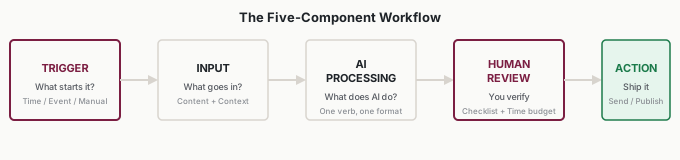
Component 1: Trigger
What starts the workflow?
Triggers come in three types:
Time-based: Every morning. Every Monday. End of each day. At the start of each quarter. Time-based triggers are reliable because calendars are reliable.
Event-based: New email arrives. Support ticket created. Meeting ends. Customer signs contract. Event-based triggers tie the workflow to actual work events.
Manual: You decide to run it when needed. Manual triggers are the weakest—they depend on memory and motivation.
The best triggers are automatic or near-automatic. If you have to remember to start the workflow, you’ll eventually forget. If the trigger happens automatically (calendar reminder, notification, system alert), the workflow runs consistently.
When defining your trigger, be specific: not “when I need to write status updates” but “every Friday at 3 PM” or “when my project management tool marks a milestone complete.”
A common mistake is choosing triggers that depend on your state of mind. “When I feel overwhelmed by emails” isn’t a trigger—it’s a hope. “When my inbox hits 50 unread” is a trigger. Make triggers observable and unambiguous.
Component 2: Input
What information does AI receive?
Input determines output quality more than any other factor. Bad input doesn’t just produce bad output—it produces confident-sounding bad output that takes longer to fix than writing from scratch.
Your input should include:
The core content: The actual material to process. Meeting transcript. Email thread. Customer feedback. Data to analyze.
Context: Information that shapes how AI should approach the task. Who’s the audience? What’s the history? What’s the goal?
Constraints: Boundaries on the output. Maximum length. Required elements. Things to avoid. Format requirements.
Examples: What does good output look like? Examples are powerful—they show AI the standard you’re expecting rather than hoping it infers correctly.
Write your input requirements down. They become your prompt template. When you’ve defined exactly what goes in, you can reproduce the workflow reliably and hand it off to others.
The most common workflow failure is inadequate input. I learned this the hard way: my first message-triage workflow produced unusable classifications because I forgot to include the sender’s account history. The AI was guessing whether someone was an existing customer or a cold lead. Once I added that context, accuracy jumped from roughly 60% to over 90%. If you’re disappointed with output quality, the first place to look is input quality. What information did you forget to provide?
Component 3: AI Processing
What does AI actually do?
“Help with this” is not a processing step. Be specific. Choose a verb:
- Draft: Generate first-pass content for review
- Summarize: Condense longer content into shorter form
- Categorize: Sort items into defined buckets
- Extract: Pull specific information from larger content
- Analyze: Identify patterns, trends, or insights
- Compare: Evaluate options against criteria
- Translate: Convert content from one form to another
Clear processing steps are testable. You can verify whether AI is doing what you asked. Vague processing produces vague results that are hard to evaluate.
Also specify the output format: “3-bullet summary,” “draft email with subject line,” “categorized list with confidence scores,” “analysis with three recommendations.” Format clarity reduces editing time.
Processing should be single-purpose. If you’re asking AI to “summarize and analyze and categorize and draft a response,” you’re probably asking for too much in one step. Break complex processing into sequential steps, reviewing after each one. Simpler processing steps produce more reliable output.
Component 4: Human Review
How do you evaluate the output?
This is the critical component most people minimize or skip. It’s where the intern model actually lives—AI drafts, you verify.
Define your review criteria explicitly:
- What are you checking for? (Accuracy, tone, completeness, appropriateness)
- What’s the threshold for approval versus rejection?
- How much editing is acceptable before you’d rather regenerate?
Set a time budget. “I’ll spend 3-5 minutes reviewing each output” creates sustainability. Without a budget, review either expands to consume all saved time (defeating the purpose) or shrinks to nothing (creating risk).
Review criteria should be specific enough that someone else could apply them. Not “make sure it’s good” but “verify all customer names are spelled correctly, tone matches our brand guide, and no commitments are made that weren’t in the original request.”
Over time, your review criteria become more refined. You’ll discover specific errors that AI makes repeatedly—and add checks for those. You’ll learn which aspects are consistently good—and stop checking those as closely. The review process evolves as you learn the workflow’s patterns.
Component 5: Action
What happens after approval?
Output must connect to a real business outcome. Possible actions include: publish, send, save, escalate, archive, assign, schedule, submit.
If there’s no action, there’s no workflow—just an interesting conversation with AI. The action is what makes the workflow matter. It’s the connection between AI output and actual work getting done.
Be specific: not “send the email” but “send via CRM, log the interaction, and set follow-up reminder for 3 days.”
A clear action also makes success measurable. Did the workflow produce output that got used? If output sits in a folder unused, either the workflow doesn’t connect to real work or the action step isn’t specific enough.
Building Your First Workflow
You have a task in mind. Let’s structure it.
Step 1: Name Your Trigger
What event tells you it’s time to do this task?
If you can’t identify the trigger, you can’t make the workflow automatic. Examples: “New support ticket assigned to me” (event). “Monday morning when I plan the week” (time). “Client requests a proposal” (event, manual response).
Write it down: “My workflow starts when ________________.”
Step 2: List Your Inputs
What information does AI need to do this well?
Be comprehensive. For each item ask: if this were missing, how would output quality suffer?
Write it down as a checklist. Before running the workflow, you’ll gather everything on the list.
Step 3: Define Your Processing
What exactly should AI produce?
Specify the output format clearly. “A summary” is vague. “A 3-bullet summary with action items bolded” is specific.
Write it down: “AI will produce ________________ in the following format: ________________.”
Step 4: Set Your Review Criteria
What will you check before accepting output?
Create a short checklist. Keep it focused—3-5 items maximum for most workflows. Set your time budget.
Write it down: “Before I accept output, I will verify: ________________. Review time: ________________ minutes.”
Step 5: Connect Your Action
What happens with approved output?
Be specific about where output goes and what you do with it.
Write it down: “After approval, I will ________________.”
That’s a complete workflow definition. It might seem like a lot of documentation for one task. But this documentation is what makes the workflow repeatable, improvable, and shareable. Without it, you’re just hoping to remember how you did it last time.
A Complete Example: The Customer Onboarding Workflow
Priya manages customer success for a SaaS company. Her team onboards 15-20 new customers monthly. Each requires personalized welcome documentation—taking 45-60 minutes per customer.
She built this workflow:
Trigger: New customer contract signed in CRM (automatic notification)
Input: - Customer company name and industry - Contract tier (Basic/Professional/Enterprise) - Primary contact name and role - Use case from sales notes - Implementation timeline - Specific requirements from contract
Processing: - Personalized welcome email (350-400 words) - Custom training agenda based on tier - Setup checklist with customer-specific items - Week 1 check-in talking points
Review: - Company name spelled correctly - Contract tier matches documentation - Use case reflected accurately - No generic language that should be specific - Appropriate tone for customer type - Review time: 5-7 minutes
Action: - Send welcome email via CRM - Attach training agenda - Add checklist to customer folder - Schedule Week 1 call with talking points
Results: Documentation time dropped from 45-60 minutes to 15-20 minutes per customer. The team saved 10-15 hours monthly—time that went into actual customer conversations.
What made Priya’s workflow successful? Every component was specific. The trigger was automatic—no one had to remember. The input checklist ensured nothing was forgotten. The review criteria were concrete enough that any team member could apply them. The action was definite—not “send the email eventually” but “send via CRM immediately.”
Priya’s first iteration wasn’t perfect. The initial prompts produced outputs that were too generic. She refined the input requirements, adding more specific use case information. By week three, the workflow was stable. By week six, it was the team standard.
Common Workflow Patterns
Most first workflows fall into one of four patterns:
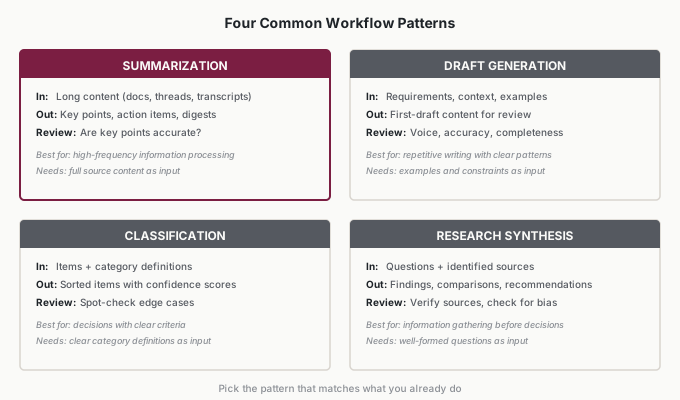
Summarization workflows: Long content goes in, key points come out. Meeting summaries, document digests, email thread recaps. Best for high-frequency information processing where you need the essence without the volume.
Draft generation workflows: Requirements and context go in, first-draft content comes out. Status updates, response templates, documentation sections. Best for repetitive writing tasks with clear patterns.
Classification workflows: Items and categories go in, sorted items come out. Ticket triage, lead qualification, content categorization. Best for decisions that follow clear criteria.
Research synthesis workflows: Questions and sources go in, findings come out. Competitive research, market analysis, background briefings. Best for information gathering before decisions.
Each pattern has characteristic inputs, processing steps, and review criteria. Summarization needs the full source content. Draft generation needs examples and constraints. Classification needs clear category definitions. Research synthesis needs well-formed questions and identified sources.
Identify which pattern matches your task. That will guide how you structure each component.
Your first workflow doesn’t have to be creative or complex. In fact, simpler is better. Pick a pattern that matches what you already do—you’re not inventing new work, you’re structuring existing work. Once you’ve built one workflow successfully, building the next one is easier. The framework becomes natural.
Applications
Priya (Customer Success Manager)
Priya’s onboarding workflow above shows the department leader path. She started with a clear event trigger (new contract signed), defined specific inputs her team could gather consistently, and set review criteria concrete enough that any team member could apply them. Her first iteration wasn’t perfect—initial outputs were too generic until she added use case details from sales notes. By week three, the workflow was stable. By week six, it was the team standard. Documentation time dropped from 45-60 minutes to 15-20 minutes per customer. The lesson for department leaders: define every component specifically enough that someone else on your team could run it without asking you questions.
Derek (Business Analyst)
Derek built a summarization workflow for weekly stakeholder reports. Trigger: every Friday at 2 PM. Input: project tracker exports, Slack thread highlights he’d bookmarked during the week, and a three-bullet priorities list from his manager. AI processing: draft a one-page status summary with risk flags highlighted. Human review: verify risk flags against actual project data (3 minutes). Action: paste into the shared team doc and tag his manager. The first week took 25 minutes end-to-end, versus his usual 90 minutes of writing from scratch. By week three, it took 15 minutes. The key insight for individual contributors: start with a workflow you already dread doing manually. The motivation to stick with it is built in.
Luisa (Founder/CEO, 30-Employee E-Commerce Brand)
Luisa needed a workflow she could run herself—no IT team, no integrations budget. She chose draft generation for product descriptions. Trigger: new product added to inventory spreadsheet. Input: product photos (described manually), competitor listings, target customer profile, brand voice examples. AI processing: draft product description in brand voice with SEO keywords. Human review: check brand consistency and factual accuracy (4 minutes). Action: paste into Shopify listing. Her biggest surprise was how much the examples mattered—the first descriptions without brand voice examples sounded generic. Once she added three examples of descriptions she’d written herself, output quality jumped dramatically. For small CEOs: your own past work is your best input. Feed AI examples of what “good” looks like in your business.
Victor (VP of Operations, Logistics Company)
Victor didn’t build a personal workflow first—he designed one for his dispatch team. Classification workflow: incoming shipment requests sorted by urgency, route complexity, and available capacity. Trigger: new request enters the system (event-based, automatic). Input: request details, current fleet status, weather alerts, customer SLA tier. AI processing: classify into three priority buckets with recommended driver assignment. Human review: dispatcher verifies classification and assignment (2 minutes per request, versus 8 minutes of manual triage). Action: confirm assignment in dispatch system. Victor’s insight for senior leaders: don’t pilot the workflow yourself if your team will be the ones running it. Have a team member build it, run it, and refine it. You set the success criteria and evaluation timeline. The team owns the execution. His dispatch team processed 40% more requests per shift within the first month.
Common Objections
“This seems like overkill for a simple task.”
Simple tasks become complex when you try to scale them or hand them off. The structure that feels excessive now prevents problems later. Five minutes defining components saves hours of confusion when you try to explain the workflow to someone else.
“My workflow doesn’t fit these five steps.”
Every workflow has a trigger, input, AI processing, human review, and action—even if you haven’t named them. You already decide when to start, what information to use, what to ask AI for, whether output is acceptable, and what to do with results. Making these explicit improves reliability.
“I don’t want to add more process.”
A good workflow actually removes process by making decisions automatic. You’re not adding steps—you’re clarifying steps that already exist implicitly. The structure front-loads thinking so you don’t reinvent the workflow each time.
“What if I can’t identify a clear trigger?”
Start with a time-based trigger. “Every morning at 9 AM, I process yesterday’s incoming requests.” Time-based triggers are more reliable than hoping you’ll remember at the right moment.
“How detailed should my input checklist be?”
Detailed enough that if you handed it to a colleague, they could gather everything needed. If you find yourself adding information mid-workflow because output is missing something, that missing information should be on the checklist.
“What if review takes too long?”
Either your review criteria are too expansive, or your AI output quality needs improvement. If you’re spending 20 minutes reviewing a 5-minute AI task, something’s wrong. Either tighten the criteria (focus on what actually matters) or improve the input (better input = better output = less editing).
“The workflow works for simple cases but fails on complex ones.”
That’s normal. Start with simple cases. Document the edge cases where it fails. Some will become exceptions you handle manually. Others will become improvements to your input or processing steps. Complexity tolerance grows over time.
Your Monday Morning Action Item
Build your first workflow now using this template:
Task: [your chosen opportunity]
- Trigger: What starts it? ________________
- Input: What does AI receive? ________________
- AI processing: What does AI produce? ________________
- Human review: What do you check? ________________
- Action: What happens next? ________________
Run the workflow three times this week. After each run, note: What worked? What needed adjustment? How long did each step take?
The first run will feel rough. That’s normal—you’re learning what your specific workflow needs. By the third run, you’ll have the beginnings of a reliable process. Don’t overthink the initial structure. The first version doesn’t need to be perfect—it needs to be specific enough to try. Three runs will teach you more than three hours of planning.