Your Master Prompt
The Paragraph I Kept Retyping
Somewhere around my hundredth AI session, I noticed I was typing the same paragraph again. Who I am, what I build, who the client is, how I like drafts formatted. I’d typed some version of it so many times my fingers had it memorized—and when I skipped it to save a minute, the outputs drifted: too formal, too hedged, calibrated for somebody generic who wasn’t me.
So I wrote the paragraph down once, properly. My first version was four sentences, and looking back at it now, it was wrong in three of them—too vague about my role, silent about my formatting preferences, nothing at all about constraints. But even that crude version changed the texture of every session that started with it. The current version is about 250 words, refined over two years, and I can tell you what almost every line is doing there and which mistake put it in.
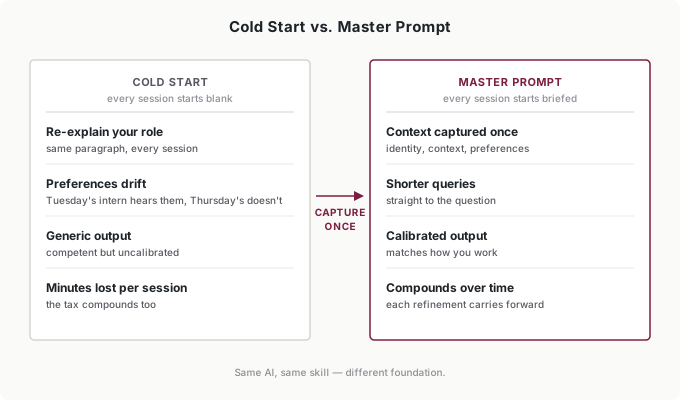
That document is a master prompt, and here’s the frame that makes it obvious why you need one: every new session is a new intern. Same capability, zero memory. The amnesia we talked about at the start of this book never went away—you’ve just been compensating for it by re-explaining yourself, session after session, like onboarding a new hire every morning by monologue.
The master prompt is the onboarding document instead. Write it once, and every new intern starts the day already knowing you.
Everything in this book so far has been about getting today’s task right. This last stretch is about making next year’s tasks cheaper—practices that compound. The master prompt is the first thing in this book you build purely for yourself, and unlike a workflow, it appreciates: every refinement carries forward into thousands of future sessions.
Every Morning, a New Intern
Every AI conversation begins blank. No memory of your role, your industry, your preferences, or the correction you made yesterday. Without context, outputs are competent but generic—the AI doesn’t know whether you want bullets or prose, doesn’t know your compliance constraints, doesn’t know that “make it punchy” means something specific to you.
Most people compensate by re-explaining, dozens of times a week. It works, roughly, but it has two costs. The visible one is time—minutes per session, forever. The invisible one is inconsistency: no two hand-typed context paragraphs are identical, so the calibration wobbles. Tuesday’s intern hears about your formatting preferences; Thursday’s doesn’t. The outputs drift in ways you attribute to the AI having a bad day, when actually the onboarding varied.
You already know the better tool: every SCOPE brief you’ve written this whole book has a “prior context” element, and you’ve been re-supplying it by hand every time. SCOPE describes the task; the master prompt describes you. It’s the prior context you never retype—and once it’s standing, your per-task briefs get shorter, because the C and P of SCOPE are pre-loaded before you type a word.
The Five Components
An effective master prompt has five sections. Four are stable; one lives.
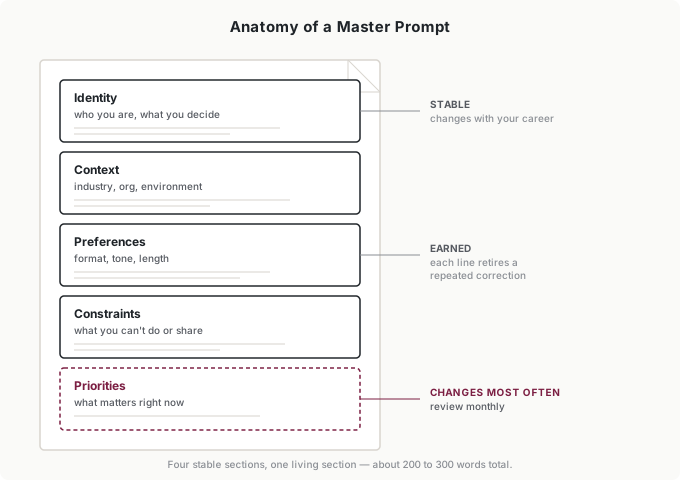
Identity. Who you are professionally, what you’re responsible for, what decisions you own. Not your résumé—a working description that tells the intern whose desk it’s sitting at. Mine says what I build, who I build it for, and that I’m the final reviewer on everything that ships. Write yours the way you’d introduce yourself to a new colleague who needs to be useful by lunch.
Context. Your industry, organization, and environment—the stable facts that shape your work. A healthcare context carries compliance weight that retail doesn’t; a 15-person firm has different constraints than an enterprise. Mine names the client’s industry and the four messaging channels, because a draft that’s perfect for email is wrong for SMS, and the intern should know that before I say a word.
Preferences. How you want information delivered. Format, length, tone, structure. Mine includes “lead with the recommendation,” “no corporate buzzwords,” and “short paragraphs”—each one added after I caught myself making the same edit for the third time. Yours should come from the same place: think about the outputs you’ve rewritten most, and write down what you changed.
Constraints. What can’t be done, shared, or assumed. This is where my hardest-won line lives: never reference a policy that isn’t in the provided policy document—the constraint the fabricated hardship pause taught me. Include approval limits, confidentiality boundaries, compliance requirements. Only the ones that actually recur; this is a working document, not a legal one.
Priorities. What matters right now. This is the living section—the one that changes monthly while the other four barely move. Mine currently names the quarter’s focus and the one project the intern should assume questions relate to unless told otherwise. When your priorities shift and your prompt doesn’t, the AI optimizes for last quarter.
Together they run about 200 to 300 words. Here’s my current version, lightly redacted:
Identity: I’m an independent consultant who designs and runs AI-powered messaging workflows for clients. I build the systems, write the prompts, and review what ships. I’m the final quality gate—nothing customer-facing goes out on my word alone being wrong.
Context: My main client is a direct-to-consumer health brand. Their customers message through SMS, email, Facebook Messenger, and Instagram, and each channel has its own length and tone norms. Health context means compliance-adjacent caution: no medical claims, ever.
Preferences: Lead with the recommendation, then the reasoning. Short paragraphs. Direct language—no corporate buzzwords, no hedging that doesn’t carry information. When drafting customer messages, match the samples I provide, not a generic support voice.
Constraints: Never reference a policy, discount, or program that isn’t in the provided policy document—if a customer asks about something not covered, flag it instead. No customer names or personal details in any prompt. Nothing that sounds like medical advice.
Priorities: This quarter: reducing response-time variance across channels. Assume questions relate to the messaging system unless I say otherwise.
Every line in that document retired a correction I used to make by hand.
Using It
The mechanics are unglamorous and they matter. Some AI tools persist custom instructions automatically—set your master prompt there once and every session inherits it. For tools that don’t, keep the document one keystroke away: a pinned note, a text file, a text-expander shortcut. The moment retrieving it costs more than 10 seconds, you’ll start skipping it, and the drift comes back.
Not every exchange needs it. A quick fact check or a definition doesn’t care who you are. My rule: if the output’s fit—its tone, format, assumptions—matters, the prompt goes in. If only the output’s facts matter, skip it. Complex analyses, drafts anyone else will read, anything strategic: those always get the full context, because those are exactly the tasks where “competent but generic” quietly costs the most.
One warning from experience: when an AI tool’s built-in memory feature and your pasted master prompt disagree, the results get strange. If you use persistent memory, make the master prompt the single source of truth and clear contradicting memories—two onboarding documents are worse than one.
Your Task Library and Evolution Protocol
The five components are the foundation. Two practices turn the foundation into the compounding asset this part of the book is about.
The task library. For work you do repeatedly, build variants: your base prompt plus a standing fragment for the task type. My writing variant adds voice-matching instructions. My analysis variant adds “show your reasoning before conclusions, flag assumptions explicitly, state confidence.” My communication variant splits by audience—friendly-professional for external, blunter for internal. A variant is just a master prompt plus a permanent SCOPE fragment—the parts of the brief that never change for that kind of work, written once. When you notice yourself assembling the same task setup for the third time, that’s a variant asking to exist.
The evolution protocol. The master prompt improves through the same feedback loop you run on everything else—this time pointed at your own instructions. The signal is repeated corrections: every time you catch yourself telling the AI the same thing twice—“shorter,” “we can’t do that,” “remember the compliance thing”—that’s a line item. The master prompt is where line items go to retire.
The other signal runs the opposite direction: surprisingly good outputs. When the AI gets something exactly right, look at what you did differently in that session—there’s often a piece of context worth making permanent. My “match the samples I provide, not a generic support voice” line came from noticing that sessions where I pasted example messages produced drafts I barely edited, and sessions where I didn’t produced drafts I rewrote. The difference was one sentence of standing context away from being automatic.
It’s worth seeing what’s actually happening here, because it reframes the whole activity. Every correction you make is a sample of your judgment—“that headline’s wrong,” “that’s not how I’d handle this client,” “that offer is off, and here’s why.” Say it to a person and it vanishes the second it leaves your mouth; you’ve been leaking your discernment one correction at a time your whole career and keeping none of it. Write the same correction into the master prompt and it stays. The system stops making that mistake—and moves one step closer to your taste. You’re not maintaining a document. You’re teaching the intern to think like you, one “no” at a time.
My cadence: a glance at the priorities section monthly, a real pass quarterly, and an immediate edit whenever a correction repeats. When I change something meaningful, I keep the old version and run a few typical queries against both—the same version discipline as any other tool I maintain. My month-one prompt was four sentences; the current one is 250 words and two years of retired corrections. Don’t try to build the year-two version in your first week. Let it earn its length.
Putting It Into Practice
Elena writes one for herself and one for the team
Elena’s personal prompt looks like mine with different nouns: content director, B2B software, twelve writers, prefers structure-first feedback. What’s distinct is the second document—a shared team-context block her whole team pastes alongside their personal prompts: the brand voice rules, the current campaign, the banned claims list. Personal calibration stays personal; shared facts get written once and versioned like any team document. When the campaign changes, one person updates one block, and twelve writers’ interns get the memo. Before the block existed, campaign-context drift was her team’s most common AI error; now it’s a category her error log barely sees.
Jordan’s variant does the arguing
Jordan’s base prompt is short—analyst, private equity, numerals-and-sources preferences. The work lives in his analysis variant: “show reasoning before conclusions, state confidence levels, flag every assumption, and challenge my thesis before confirming it.” That last clause is his favorite line in the whole document. It came from noticing the AI agreed with him too readily on a deal thesis that later fell apart—now every analysis session starts with a standing instruction to push back.
Tomás keeps the identity, churns the priorities
A founder’s problem is that everything is his approval authority, so constraints filter almost nothing—priorities have to do that work. Tomás’s identity and context sections haven’t changed in a year. His priorities section changes monthly, and he treats updating it as part of month-end close: whatever the firm’s focus is, the intern hears it first. The one constraint that never moves: client financial data gets referenced by category, never by name.
Ingrid writes the never-list
Ingrid’s contribution is the policy line for her department: master prompts are encouraged, the shared org-context block is maintained and approved centrally, and three things never go in any prompt—client names, contract values, and credentials. One sentence in the AI policy, reviewed with the same annual pass as the tool inventory. Her teams calibrate freely inside those lines, and the compliance review that used to happen after a leak now happens before one. The subtle win is cultural: because the policy says encouraged, writing a master prompt became the normal first step of AI onboarding in her department—new hires draft one in their first week, which means Ingrid’s teams skip the six months of generic-output frustration that turns most people into AI skeptics.
Common Objections
“This seems like a lot of upfront work.”
Mine took about 40 minutes to write badly and two years to refine—and the 40-minute version paid for itself within the week, just in retyped context. It’s front-loading effort for ongoing returns, and the returns run for every session you’ll ever start.
“My needs change too often for a standard prompt.”
Four of the five sections are stable by design. The one that changes—priorities—is separated precisely so you can update it in 30 seconds without touching the rest. If your identity section is churning, that’s a career event, not a prompt problem.
“I use different AI tools—this won’t transfer.”
The document is about you, not the tool. Some tools persist it automatically as custom instructions; for others you paste it. The content is universal even when the plumbing isn’t.
“How do I handle confidential information?”
The same way my constraints section does: by category, never by instance. “I can’t share customer names or contract values” tells the intern the boundary exists without crossing it. If you’re writing actual client names or real revenue figures into a master prompt, you’ve built a leak, not a handbook—Ingrid’s never-list exists for exactly this reason.
“Isn’t this just training the AI to tell me what I want to hear?”
Context isn’t manipulation—it’s calibration. But the concern is real, and I’ve triggered it myself: for a while my prompt said “be concise and decisive,” and I slowly noticed the pushback had disappeared. Drafts got confident and worse. I changed the line to “be direct about your uncertainty—flag weak points before I find them,” and the intern started arguing with me again. Audit your prompt the way you’d audit any instruction you give a subordinate: if the AI has stopped pushing back when it should, you wrote the wrong handbook.
Your Monday Morning Action Item
Write your first master prompt this week—one pass, five short sections:
Identity: two or three sentences—title, responsibilities, decisions you own. Context: one or two sentences on your industry and organization. Preferences: the three edits you make most often to AI output, written as standing instructions. Constraints: the two boundaries that come up repeatedly. Priorities: your current focus, one sentence.
Then test it: run your next real AI conversation with the prompt pasted at the top, and the same conversation without it. Read both outputs side by side. That comparison will teach you more about what the document does than anything I can tell you—and it usually recruits people on the spot.
Your first version will be four sentences and wrong in three of them. Mine was. Write it anyway—every correction you retire into it compounds across every session you’ll ever start.
You’re not writing a prompt. You’re writing the handbook every future intern reads on day one.