Organizational Considerations
The Day Nobody Could Answer the CEO’s Question
Six months into an AI rollout at one of my client companies, things were going great—on paper. The customer response team I worked with had their workflow humming. Marketing had built their own content pipeline. Operations had a reporting system that saved them hours every week. Even the sales team had started using AI for proposal drafts.
Then their CEO walked into a leadership meeting and asked a simple question: “How many AI workflows do we actually have running across the company?”
Dead silence.
I looked at marketing. Marketing looked at operations. Nobody knew. I knew about the workflows I’d built with the response team. I had a vague sense of what marketing was doing. I had no idea operations had built anything until that moment.
The next three questions were worse: “What data are they accessing?” Unclear. “Are they meeting the same quality standards?” They weren’t. “What happens when marketing’s content workflow contradicts sales’ proposal workflow?” Nobody had thought about it.
We’d succeeded at the team level and stumbled at the organizational level. Every team had followed the intern model—clear tasks, review before shipping, incremental trust, feedback loops. But nobody was applying those same principles across teams. We had five different AI interns, each reporting to a different manager, with no coordination between them.
That meeting was the moment I realized: scaling AI isn’t just about getting more teams to adopt it. It’s about making sure the whole organization doesn’t trip over its own success.
The Tipping Point
There’s a predictable moment when AI adoption shifts from “a few teams doing cool things” to “organizational challenge requiring coordination.” I missed it the first time. Here’s how to spot it before your CEO does.
Multiple teams building independently. When three or more teams have their own AI workflows, they’re almost certainly duplicating effort. We had two teams that had each built nearly identical summarization workflows—same prompts, same review process—without knowing the other existed.
Workflows crossing team boundaries. Marketing’s AI-generated content was flowing to sales. Operations’ AI reports were informing finance decisions. But nobody owned the handoff points. When marketing changed their content workflow, sales didn’t find out until a client got confused by inconsistent messaging.
Security questions with no clear owner. The company’s IT director started asking which AI tools had access to customer data. I could answer for my workflows. Nobody could answer for the organization. That gap kept him up at night—and it should have.
Quality varying wildly. The team I worked with reviewed every AI output before it went to customers. I learned later that another team was sending AI drafts directly to clients with minimal review. Same company, same brand, wildly different standards.
And all of that describes only the workflows you can see. By 2024 the invisible version had a name: Microsoft and LinkedIn’s Work Trend Index—a survey of 31,000 people across 31 countries—found that 75% of knowledge workers were using generative AI at work, and 78% of those users were bringing their own tools rather than anything their employer provided. The report called it BYOAI. Worse for anyone responsible for governance, 52% of the people using AI at work were reluctant to admit using it for their most important tasks—meaning much of the usage touching your organization’s data is usage nobody can audit, because nobody will own up to it.
If any of these sound familiar—or if you suspect the invisible version is already happening—you’ve crossed the tipping point. The question isn’t whether to add coordination—it’s how to do it without killing the innovation that got you here.
Governance That Doesn’t Kill Innovation
Governance has a terrible reputation, and it’s mostly deserved. Most organizations either ignore it entirely (chaos) or overdo it (bureaucracy that drives AI usage underground). After that CEO meeting, I had to find a middle path.
Three Questions, Not Three Hundred
I started with three questions. Every organization needs clear answers to these, and you don’t need a committee to figure them out:
Who can build and deploy workflows? In our case, anyone could build. But anything touching customer data or producing customer-facing output needed a review conversation—not an approval process, a conversation—with the workflow owner and someone from the relevant team.
What standards must workflows meet? We adopted the documentation approach from two chapters back: every workflow needed a one-page summary covering purpose, data involved, review process, and owner. If you couldn’t fill out one page, you didn’t understand your own workflow well enough to run it.
Where do concerns go? Security questions went to IT. Compliance questions went to legal. Cross-team conflicts went to the relevant directors. We wrote this on a single slide and shared it with every team. Done.
That was it. Three questions, clear answers, one slide. It took a Monday afternoon to set up. It wasn’t perfect, but it was infinitely better than what we had before, which was nothing.
The Workflow Registry
The single most useful thing we did was create a registry—a shared spreadsheet listing every AI workflow in the company. For each one: what it does, who owns it, what data it touches, and who uses the output.
Building it was revealing. We discovered 17 workflows across five teams. Three were near-duplicates. Two were accessing data they probably shouldn’t have been. One had been abandoned but was still running, pulling data and generating reports nobody read.
The registry didn’t create rules. It created visibility. And visibility turned out to be 90% of what we needed. Teams started finding each other’s workflows and building on them instead of starting from scratch. The duplicates got consolidated. The abandoned workflow got shut down. The data access issues got fixed—not because I mandated it, but because the owners saw the problem once it was visible.
The Centralization Trap
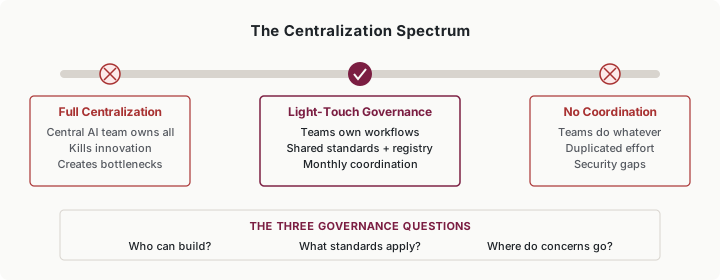
One temptation I want to warn you about: don’t centralize.
After the CEO meeting, someone suggested creating a dedicated AI team that would own all workflows. It sounded logical—central expertise, consistent standards, unified strategy. In practice, it would have been a disaster.
The people closest to the work understand their domain. The customer response team knew what good customer communication looked like. Marketing knew their content needs. A central AI team would have become a bottleneck—every request going through a queue, every change requiring a ticket, every team waiting on someone who didn’t understand their context.
Instead, we kept ownership distributed and added lightweight coordination. Each team owned their workflows. A monthly 30-minute standup connected the workflow owners. A shared Slack channel let people ask “has anyone solved X?” before building from scratch.
The intern model scales here too: give teams clear tasks (own your workflows, follow the standards), review before shipping (the registry provides visibility), build trust incrementally (start with voluntary coordination, add requirements only when needed), and maintain feedback loops (the monthly standup surfaces what’s working and what isn’t).
Security and Compliance Without the Iron Curtain
The fastest way to kill AI adoption is to let security become a wall. The second-fastest way is to ignore security until something breaks. I’ve seen both, and neither ends well.
Partner Early, Not Late
When the IT director started asking questions, my first instinct was to get everything locked down before involving him. That was backwards. I should have brought him in when we started building, not after we had 17 workflows running.
Here’s what worked once we got the relationship right: I invited IT and legal into a design conversation. Not “here’s what we built, please approve it”—that puts them in the position of saying no. Instead: “Here’s what we’re trying to accomplish. What do we need to be careful about? What would make you comfortable?”
The difference was night and day. The IT director didn’t want to block AI usage. He wanted to know that customer data wasn’t being sent to tools without encryption, that we had audit trails, and that someone was thinking about the compliance implications. Reasonable asks, all of them.
The Safe-to-Experiment Zone
The best thing that came out of our security conversation was a pre-approved list. IT reviewed the major AI tools and classified them: these three are approved for general use with internal data, these two are approved for public data only, anything else needs a conversation.
That list eliminated 80% of the security friction. Teams didn’t have to ask permission every time they wanted to try something. They checked the list. If the tool was approved and the data was appropriate (using the four-level data classification), they could move forward.
We also defined “safe use cases”—categories that didn’t need review. Drafting internal meeting notes? Go ahead. Summarizing public research? No review needed. Anything touching customer PII or generating customer-facing content? That’s where the guardrails kicked in.
Clear boundaries didn’t slow innovation. They accelerated it, because people stopped hesitating.
Putting It Into Practice
Carmen manages a twelve-person marketing team
Carmen’s team built a content generation workflow that produces draft blog posts, social media copy, and email campaigns. It works well—until the sales team starts using AI-generated content that contradicts what marketing published.
Carmen proposes a simple fix: a shared content brief that both teams’ AI workflows reference. She adds her workflow to the company registry, discovers sales has three workflows she didn’t know about, and sets up a biweekly sync to keep messaging aligned. No governance committee required—just visibility and a conversation.
Javier is a financial analyst
Javier has been using AI to draft quarterly analysis reports, but he’s nervous. His company has no official AI policy, and he’s unsure whether running financial data through an external AI tool violates compliance requirements.
He raises the question with his manager, who escalates to legal. Instead of a shutdown, legal works with IT to identify which AI tools are approved for internal financial data (not the free consumer tools Javier had been using, but the company’s enterprise subscription with appropriate data handling). Javier switches tools, documents his workflow, and keeps producing reports—now with confidence instead of anxiety.
Noor is CEO of a 40-person consulting firm
Noor notices that three of her four practice areas have independently developed AI research workflows. They’re using different tools, different prompts, and getting inconsistent quality. Two teams are paying for separate AI subscriptions.
She spends a Friday afternoon building a workflow registry—a shared spreadsheet with every AI workflow in the company. The exercise reveals the duplicated subscriptions (saving her firm $400 a month), two workflows that could be combined, and one team’s excellent prompt template that the others immediately adopt. Total governance investment: four hours and a spreadsheet.
Wesley is VP of Operations at a regional hospital system
Wesley’s challenge is harder: healthcare AI carries HIPAA obligations. Three departments want to use AI for different purposes—scheduling optimization, clinical note drafting, and patient communication. Each carries different compliance requirements.
Wesley brings in compliance and IT for a design session—not an approval gate, a design session. Together they define three tiers: green (no patient data—scheduling, staffing), yellow (de-identified data—aggregate analytics), red (PHI—requires full HIPAA controls). Each department maps their proposed workflow to a tier, and the compliance team provides guardrails specific to each level. The departments that mapped to green start immediately. The red-tier project gets additional controls designed in, adding two weeks but avoiding a potential violation that could have cost millions. If you’re not in healthcare, don’t skip past Wesley—swap HIPAA for whatever your regulated core is (payment data, student records, client confidentiality clauses) and the three-tier move is identical: most of your AI opportunities don’t touch the regulated core at all, and tiering proves it.
Building Capability Without a Bureaucracy
At some point someone will suggest creating a formal AI Center of Excellence. Before you commit budget and headcount, consider what you actually need.
A CoE sounds impressive—dedicated resources, concentrated expertise, strategic coordination. In practice, it often becomes the bottleneck it was designed to prevent. Every AI request goes through one team that doesn’t understand the functional context. The people closest to the work lose ownership. Innovation slows to the pace of a ticketing queue.
For most organizations, lighter alternatives work better:
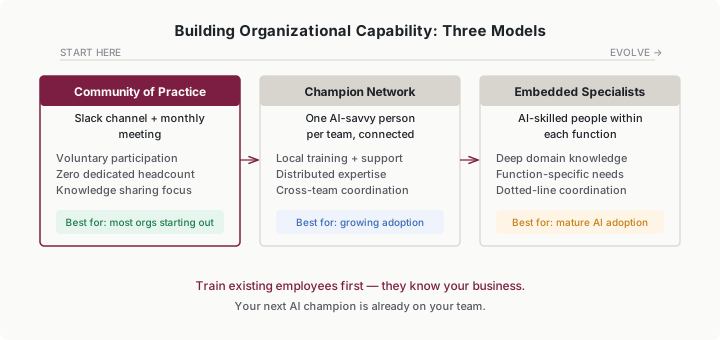
Community of practice. A Slack channel and a monthly meeting where AI practitioners across the organization share what they’re learning. Voluntary, zero dedicated headcount, surprisingly effective. This is where we started, and it solved our knowledge-siloing problem almost immediately. One team’s discovery about prompt structure for financial analysis saved another team two weeks of experimentation.
Champion network. One AI-savvy person per team, connected to their counterparts in other teams. They handle local training, troubleshoot problems, and carry learnings back and forth. This gives you distributed expertise with coordination—the best of both centralized and decentralized models.
Embedded specialists. AI-skilled people placed within each function rather than centralized. They understand the domain deeply and bring AI capability to it. This works best in organizations with mature AI adoption where functions have significantly different needs.
Most organizations should start with a community of practice. It costs nothing, surfaces knowledge that’s already there, and shows you what coordination you actually need before you invest in structure you might not. If you find that certain teams need more hands-on support, evolve toward a champion network. Save formal CoEs for when you have fifty-plus workflows and genuine strategic coordination needs.
One principle I’d emphasize: build AI capability by training existing employees, not just hiring specialists. The people who understand your business can learn AI tools far faster than AI experts can learn your business. Your next AI champion is probably already on your team—they’re the person who’s been quietly experimenting and getting results. Recognize them, give them a platform, and watch the capability spread.
Common Objections
“Governance will kill our innovation.”
Only if you build the wrong kind. A workflow registry, three answered questions, and a monthly standup isn’t bureaucracy—it’s communication. The teams that were innovating before will keep innovating. They’ll just stop duplicating each other’s work.
“We’re too small to need organizational governance.”
If you have more than one team using AI, you need to know who’s doing what. That’s not governance—it’s awareness. A shared spreadsheet and a 30-minute monthly conversation. Scale the structure to your size.
“Security and compliance always say no.”
They say no when you show up after the fact asking for forgiveness. They say “yes, if” when you bring them in during design and ask what would make them comfortable. I watched the same IT director go from blocking a project to championing it once we changed our approach.
“We don’t have resources for a center of excellence.”
Good—you probably don’t need one. A community of practice (Slack channel plus monthly meeting) or a champion network (one AI-savvy person per team who connects with peers) provides structure without dedicated headcount. Start with what you have.
Your Monday Morning Action Item
Pick one of these based on where you are:
If you have no visibility: Build a workflow registry this week. Shared spreadsheet, one row per workflow: what it does, who owns it, what data it touches. Send it to every team lead and ask them to add theirs. You’ll learn something surprising.
If you have visibility but no standards: Answer the three governance questions. Who can build? What standards apply? Where do concerns go? Write the answers on one page and share it.
If you have standards but no coordination: Start a monthly workflow owners standup. Thirty minutes, every workflow owner in the room. What’s working, what’s not, what could we share? Set a calendar invite today.
Set a quarterly review to adjust whatever you start. What works at five workflows won’t work at fifty. Build governance that can evolve.