Risk Assessment
When I Almost Gave AI the Keys
The first time I proposed giving AI access to my client’s customer communication system, their operations lead pushed back hard. She wanted a full security review, legal sign-off, and a 3-month pilot. For a tool that would draft internal account summaries. Three months of process for a summary drafter—while the actual customer-facing work that needed help sat untouched.
The opposite failure mode makes headlines. Air Canada’s chatbot invented a refund policy and a tribunal made the airline honor it. Amazon spent three years on a recruiting tool before discovering it had learned to penalize women’s résumés. A Manhattan law firm filed an AI-fabricated brief and collected sanctions instead of a verdict. Different companies, same root cause: broad access, no assessment, just enthusiasm.
Go too slow and the work that needs help never gets it. Go too fast and you’re the case study.
The answer isn’t “go fast” or “go slow.” It’s knowing which situations deserve scrutiny and which ones you’re overthinking.
The Permission Framework
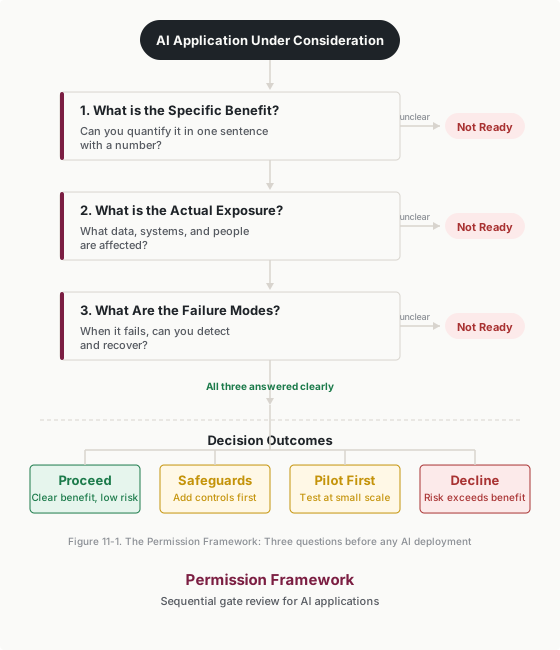
Three questions. That’s it. Answer them honestly and you’ll know whether to move forward, slow down, or stop.
Question 1: What’s the Specific Benefit?
Can you articulate a concrete, measurable improvement? Not “efficiency” or “productivity”—those are vague. How much time saved? How many errors prevented? What capacity unlocked?
“This will help us work better” isn’t a benefit statement—it’s a hope.
Question 2: What’s the Actual Exposure?
What data does AI access? What systems does it touch? Who is affected if something goes wrong?
People routinely underestimate exposure. “It only sees summaries” might be true—but what’s in those summaries? Customer names, deal values, internal assessments? When I audited what the support workflow I’d built for a client actually touched, I found it was pulling internal team notes about clients—comments like “difficult customer, escalate to Sarah”—and weaving that tone into responses. “It doesn’t access anything sensitive” is rarely accurate when you look closely.
Question 3: What Are the Failure Modes?
When (not if) this fails, what happens? Can you detect failures? Can you recover? The question isn’t whether failures will occur—it’s whether you’ve planned for them.
Why Three Questions Instead of Thirty Pages
Enterprise risk frameworks run to dozens of pages. Nobody outside compliance reads them. In my experience, these three questions surface the same issues the 30-page framework would—and you can answer them in about 30 minutes.
They force concrete thinking. Vague answers reveal gaps: - “It will save time” → How much time? For whom? - “The risk is minimal” → What data is accessed? What if it fails? - “It usually works fine” → What happens when it doesn’t?
When you can’t answer clearly, you’re not ready to proceed. Low-risk applications sail through in minutes. High-risk applications get the scrutiny they deserve.
Applying Question 1: Specific Benefit
Every AI application needs a number. Without one, you’re guessing whether it’s worth the risk.
How to Quantify Benefit
When I proposed my client’s customer response workflow, I didn’t say “it’ll make us more productive.” I put a number on the queue: 72,000 messages a month that the existing team couldn’t personally answer, and a triage-plus-draft system that would let the same people handle all of them with human review on every send. A strong benefit statement follows that shape: “We process 50 support tickets daily. AI triage and drafts would enable 80 with the same team—60% more capacity without a single hire.”
The same principle applies to any benefit category:
Time saved: “The weekly customer summary takes 3 hours manually. With AI, it takes 45 minutes. That’s 2.25 hours saved weekly—117 hours per year.”
Error reduction: “Manual data entry has a 3% error rate. AI-assisted verification reduces errors to under 0.5%.”
Quality improvement: “Customer satisfaction on responses averages 4.1/5. AI-assisted responses with consistent templates could target 4.4/5.”
The Benefit Bar
Not all benefits justify all risks. The relationship between benefit and acceptable exposure isn’t linear:
Low-risk applications: Even modest benefits justify proceeding. Internal meeting summaries that save 20 minutes daily are worth the minimal exposure of internal calendar and transcript data.
Medium-risk applications: Benefits need to be substantial. Customer communication assistance that saves 5 hours weekly needs strong safeguards given the exposure to customer data and external communication.
High-risk applications: Benefits must be compelling. AI-assisted hiring decisions that touch candidate PII and have discrimination potential require transformative benefits to justify the exposure.
If you can’t quantify a benefit that seems proportional to the exposure, pause. Either the application isn’t worth pursuing, or you haven’t thought clearly enough about what you’re trying to achieve.
The Clarity Test
Here’s a simple test: could you explain the benefit to your boss in one sentence with a number in it?
- “This saves our team 10 hours weekly on report preparation.” ✓
- “This improves efficiency.” ✗
- “This reduces error rates from 3% to 0.5% on customer communications.” ✓
- “This makes us more productive.” ✗
If your benefit statement doesn’t pass this test, keep refining until it does. The clarity will help you make better decisions about whether the application is worth pursuing.
Applying Question 2: Actual Exposure
Be honest about what your AI actually touches. Most people underestimate it.
Data Access Inventory
What information does this AI application touch?
Direct access: What data goes into the prompt or system? - Customer information (names, contact details, account data) - Financial data (pricing, revenue, costs) - Internal communications (emails, messages, documents) - Employee information (performance data, compensation, HR records) - Proprietary data (strategies, roadmaps, competitive intelligence)
When I finally mapped everything my client’s workflow actually touched, the list was roughly twice as long as what I would have written from memory.
Indirect access: What context or metadata is exposed? - Who’s involved in conversations - What topics are discussed - Timing and patterns of activity - Relationships between people and projects
System Touchpoints
Where does AI output go?
Internal only: Output stays within your organization. Lower exposure.
External communication: Output goes to customers, partners, or public. Higher exposure.
Systems of record: Output gets stored in CRM, HR systems, or financial systems. Creates persistent exposure.
Impact Assessment
Who is affected if something goes wrong?
Customers: Privacy violations, inappropriate communications, incorrect information
Employees: Unfair treatment, privacy violations, performance assessment issues
Partners: Confidentiality breaches, relationship damage
Regulators: Compliance violations, audit findings, enforcement actions
The organization: Reputation damage, legal exposure, competitive harm
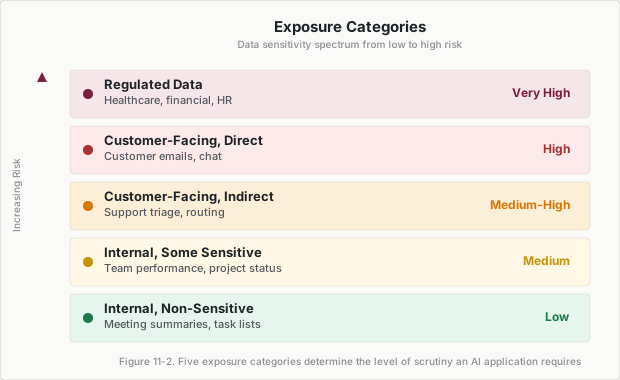
Exposure Categories
| Category | Examples | Typical Risk |
|---|---|---|
| Internal, non-sensitive | Meeting summaries, task lists | Low |
| Internal, some sensitive | Team performance, project status | Medium |
| Customer-facing, indirect | Support ticket triage, routing | Medium-High |
| Customer-facing, direct | Customer emails, chat responses | High |
| Regulated data | Healthcare records, financial data, HR decisions | Very High |
Be honest about which category your application falls into. The temptation is to classify everything as “low risk” to avoid scrutiny. Resist it.
The Honest Assessment Test
Ask someone outside your immediate team to review your exposure assessment. People consistently downplay risk for tools they’re excited about.
Common rationalizations to watch for: - “It’s just internal”—but internal data can still be sensitive - “We already share this information”—but sharing it differently changes risk - “The AI doesn’t store anything”—but it processes everything you give it - “Our vendor is trustworthy”—but trust doesn’t eliminate exposure
If you find yourself making these arguments, slow down. They’re often signs of wishful thinking rather than rigorous assessment.
Applying Question 3: Failure Modes
The failure mode I know personally is fabrication—my own system once drafted a hardship-based payment pause the company didn’t offer, warm and on-brand and entirely invented. A human read the draft before it shipped; that layer, not luck, is what caught it.
Consider these public failures before planning your own detection strategy.
In Mata v. Avianca (2023), attorneys submitted a brief citing cases that ChatGPT had fabricated. Cost: a $5,000 sanction against both lawyers and their firm, court-ordered notifications to the judges falsely named as authors of the fake opinions, and career-defining reputation damage. That’s an accuracy failure—and nobody caught it before filing.
Air Canada’s customer service chatbot provided incorrect refund policy information. A customer relied on it, and the Civil Resolution Tribunal ordered Air Canada to pay C$812.02 in damages, interest, and fees. A small-claims loss, but the headlines were far more expensive than the award.
Amazon built an AI recruiting tool that penalized resumes containing the word “women’s” and downgraded graduates of all-women’s colleges. The tool was scrapped before deployment, but the development cost and reputational damage were significant—even tools caught before deployment cause harm.
Categories of Failure
These cases illustrate four failure types you need to plan for:
Accuracy failures: Wrong information stated with confidence—fabricated citations, incorrect account balances, missed decisions in meeting summaries.
Inappropriate output: Content that creates legal exposure, offends recipients, or violates brand guidelines.
Data exposure: Confidential information shared with the wrong audience—pricing leaked to prospects, private data referenced in external communications.
Bias and discrimination: Inconsistent treatment across demographic groups—screening tools that disadvantage candidates, customer prioritization based on inappropriate factors.
Building Detection Mechanisms
For each failure mode, ask: How would we know?
Immediate detection: Human review catches problem before impact
Rapid detection: Monitoring or audit catches problem quickly
Delayed detection: Problem discovered through complaints, audits, or incidents
Undetected: Problem persists until major consequence surfaces
Aim for immediate or rapid detection. Every outbound draft in my client’s system went through human review for months—immediate detection as a standing workflow step, not a spot-check. If your only detection mechanism is “customer complains” or “lawsuit filed,” your safeguards are inadequate.
Planning Recovery
For each failure mode, ask: What do we do when it happens?
Correction: Can the error be fixed?
Notification: Who needs to know, and how quickly?
Remediation: What makes the affected party whole?
Process change: How do we prevent recurrence?
Worst-Case Analysis
For each failure type, ask: what’s the maximum plausible damage?
Not the average outcome—the worst realistic scenario. A customer service error might typically mean an apology and correction. The worst case might be a viral social media incident and significant reputation damage.
The common thread across the cases above: failures that seemed unlikely in advance became significant incidents. Plan for the worst case, not the average case. If the worst case is unacceptable, either add safeguards or don’t proceed.
Making the Decision
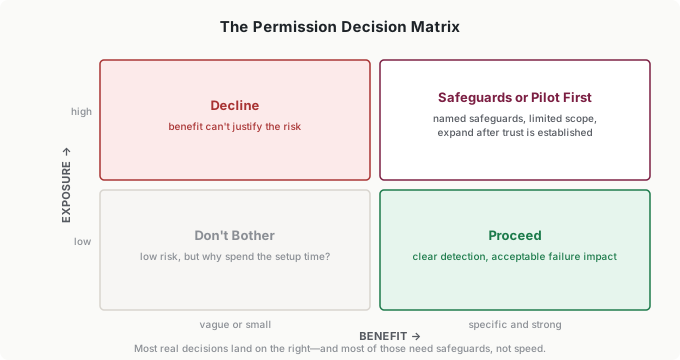
With answers to all three questions, you have four options:
Proceed: Low exposure, clear detection, acceptable failure impact, strong benefit.
Proceed with safeguards: Medium exposure requires additional human review, monitoring, or constraints. Be specific—what percentage of outputs get reviewed? What gets logged? What triggers escalation? “Proceed with safeguards” without named safeguards isn’t a decision—it’s a deferral.
Pilot first: High exposure warrants testing with limited scope before broader rollout.
Decline: Exposure too high, failure modes unacceptable, or benefit insufficient to justify risk.
Most decisions land in the middle two categories. That’s fine. Start conservative—you can always expand permissions after trust is established. Two years of running a 72,000-message-a-month system taught me that clawing back access after an incident is far harder than granting it after a clean pilot.
For significant applications, document your reasoning: the benefit statement, the exposure map, the failure modes with detection plans, and the decision rationale. I know—nobody wants more paperwork. But when something goes wrong, the difference between “we thought about this” and “we just winged it” is the difference between a learning moment and a career problem.
Build the next review date into the decision. Risk profiles change—what was low-risk in January might not be by June.
Putting It Into Practice
Tara, CS Director (12-person team), wanted AI to draft customer renewal emails. She ran the Permission Framework in 20 minutes. Benefit: her team spent 6 hours weekly writing renewal outreach—AI drafts could cut that to 90 minutes. Exposure: customer-facing direct communication with account details, pricing, and contract terms. Failure modes: wrong pricing (detectable by human review), wrong tone (detectable by spot-check), data leak of one client’s terms to another (catastrophic but preventable with per-account inputs). Decision: proceed with safeguards—100% human review for the first month, then spot-check the 20% involving enterprise accounts. The first month’s review caught exactly what the assessment predicted it would: two drafts with stale pricing pulled from an outdated field, both fixed before sending, both turned into input fixes. The framework gave her a defensible answer when her VP asked, “How do we know this is safe?”—and the review log gave her the evidence.
Andre, solutions engineer, used AI to generate technical proposals. He almost skipped the assessment—“it’s just internal drafts.” The exposure audit revealed the drafts included client infrastructure details, pricing assumptions, and competitive positioning. If a draft leaked or an AI hallucination made it into a final proposal, the damage would be real. He added constraints: no client names in AI inputs (replaced with anonymized labels), mandatory review of every technical claim, and a template that separated public product specs from confidential pricing. The constraints earned their keep within a month, when a draft confidently described infrastructure the client didn’t have—caught at the mandatory-review step, traced to a template gap, fixed the same day. Assessment time: 15 minutes. Problems prevented: potentially career-ending.
Tomás, founder of a 15-person bookkeeping firm, considered AI-assisted bookkeeping with client financial data. The Permission Framework stopped him from rushing in. Benefit was clear: 10 hours weekly of data entry automation. But exposure was regulated data—client financials, tax information, bank account details. Failure modes included incorrect categorization (fixable), data exposure between clients (catastrophic), and regulatory violations (firm-ending). Decision: pilot first with one low-risk client using anonymized historical data, no live financial feeds until the pilot proved reliable for 3 months. That cautious pilot is the seed of the month-end anomaly-check workflow his firm would eventually run as standard practice—the discipline came first, the capability grew inside it.
Paulo, VP of Marketing (4 regional teams), needed to set an AI policy for his department without paralyzing his teams. He used the Permission Framework to create three tiers. Green-light applications (internal summaries, brainstorming, first drafts of internal documents) could proceed without assessment—benefit was obvious, exposure was internal-only. Yellow-light applications (customer-facing content, competitive analysis, campaign copy) required a quick three-question assessment documented in a shared template. Red-light applications (anything touching customer PII, pricing data, or legal content) required his sign-off. The tiers got their first real test when a regional team wanted AI-drafted campaign copy for a client launch: yellow-light, one shared-template assessment, one named safeguard (brand review before anything shipped), approved the same day. The framework scaled from individual decisions to department policy in an afternoon.
Common Objections
“This slows us down too much.”
I hear this constantly, usually from teams that haven’t done the math. A thorough assessment takes 30-60 minutes. An incident response takes weeks. You’re not spending hours on meeting summary tools—you’re investing appropriate time on customer communication systems.
“Our AI vendor already did risk assessment.”
They assessed their product, not your use case. A vendor assessment covers whether their AI is generally safe. It doesn’t cover your specific data, your organizational context, or your acceptable risk tolerance. A chatbot vendor’s security certification says nothing about whether your team is about to feed it contract terms it should never see.
“We ran the framework, proceeded, and something still went wrong.”
The framework doesn’t buy immunity—it buys detection and a recovery plan. The difference between an assessed failure and an unassessed one is that you catch the assessed one at the review step instead of in a customer complaint, and you already know who to notify and how to fix it. That’s the entire value: failures become incidents you handle instead of crises that handle you.
“We don’t have time to document everything.”
Scale documentation to risk. A meeting summary tool needs a sentence. A customer communication system needs a page.
“This feels like we’re being overly cautious.”
For low-risk applications, you’ll breeze through the framework in minutes. It only feels burdensome when you’re trying to rush through high-risk applications without adequate thought—and those are exactly the ones that need it.
Your Monday Morning Action Item
Pick one AI application you’re using or considering. Run through the Permission Framework:
Specific benefit: What’s the quantified improvement? (Be concrete)
Actual exposure: What data is accessed? Who’s affected if it fails? (Be honest)
Failure modes: What can go wrong? How would you detect it? What’s the recovery plan? (Be thorough)
Make a decision: proceed, proceed with safeguards, pilot, or decline.
Write one paragraph documenting your reasoning.
If you can’t complete this exercise in 30 minutes, that’s diagnostic—the application is either too complex for quick assessment or you don’t yet understand it well enough to proceed. Either way, you’ve learned something useful before making a commitment you’d regret.