Workflow to Infrastructure
The First Time My Workflow Left My Hands
For 90 days, I personally ran the message workflows I’d built for my client—every morning review, every constraint update, every judgment call about which drafts needed a human rewrite. Then the client asked the reasonable question: “Can our team run this?”
I said yes. I wrote up the prompts, walked their ops team through the system in an hour-long call, and handed it off.
Within two weeks, it was dying. One team member used it exactly as designed. Two had quietly modified the prompts—and broken the constraint that kept the AI from inventing policies. One had stopped using it entirely after a draft embarrassed her with a customer, because nobody had told her which outputs needed a deep review and which needed a glance. The error rate I’d held under 2% was climbing, and the team’s conclusion was forming fast: the AI thing doesn’t really work.
The workflow hadn’t changed. The prompts were identical. What was missing was me—every small judgment I made without noticing I was making it. When to trust the draft. When to push back. Which customer messages the AI reliably misread. None of that was in the prompts, because none of it had needed to be. It lived in my head.
That’s the lesson of this chapter: the workflow isn’t the asset; the judgment around it is. A workflow that works for you isn’t automatically a workflow that works for your team. What operates intuitively in your hands has to become infrastructure that operates explicitly for others.
Everything you’ve built so far—the workflows, the review discipline, the pattern eye—has been personal practice. The question now changes from “does this work for me?” to “can this work without me?”
When to Scale
Most scaling attempts fail because they happen too early. Two weeks after I built my first workflow, a colleague asked me to demo it for his team. I almost did. I’m glad I didn’t—over the next month I discovered four failure modes I hadn’t known existed, and any team that adopted the two-week version would have hit all four undocumented.
Premature scaling doesn’t just kill the workflow at hand. People remember that the last AI initiative failed, and they’re skeptical of the next one. You get one credibility budget per team; don’t spend it on something unstable.
A workflow is ready to scale when it passes 4 readiness signals:
Stability. You’ve used it consistently for 4+ weeks without major changes. Minor tweaks are fine; major redesigns mean it’s not stable yet.
Documentation readiness. You could hand it to someone with a one-page guide and reasonable confidence they could use it. If explaining it requires an hour-long conversation and constant availability, it’s not ready. (An hour-long call was exactly how I handed off mine. You know how that went.)
Proven results. You have measurable evidence it works. Not “it seems helpful” but “it cut this task from 4 hours to 45 minutes” or “it caught three errors that would have reached clients.”
Pattern understanding. You know when it works and when it doesn’t. You can predict its failure modes rather than being surprised by them. If you’ve read the pattern-recognition chapter, this is your error log talking.
Then three more questions before you commit: Who will actually benefit—do you have real target users, or does sharing just feel like the generous thing to do? Who will own it—not just use it, but maintain and improve it? And how will it improve—where does user feedback go?
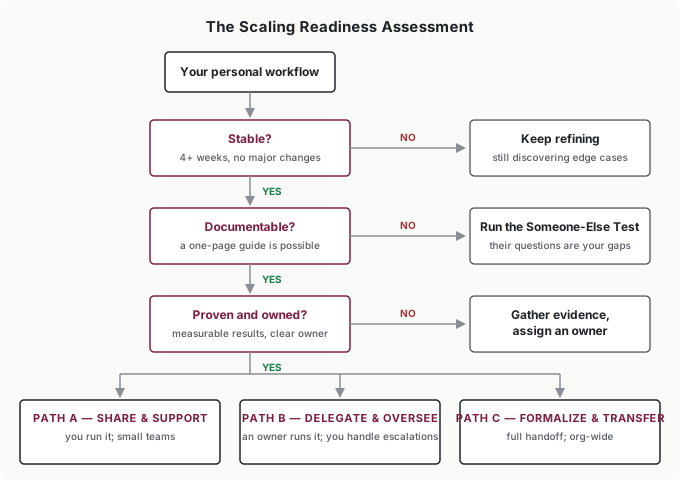
If any answer is weak, fix it before scaling. Scaling amplifies both benefits and problems—better to amplify after the problems are gone.
The Transformation
A personal workflow works because you understand it intuitively. Infrastructure works because it’s written down. The transformation between the two is the real work of scaling: converting tacit knowledge into explicit documentation.
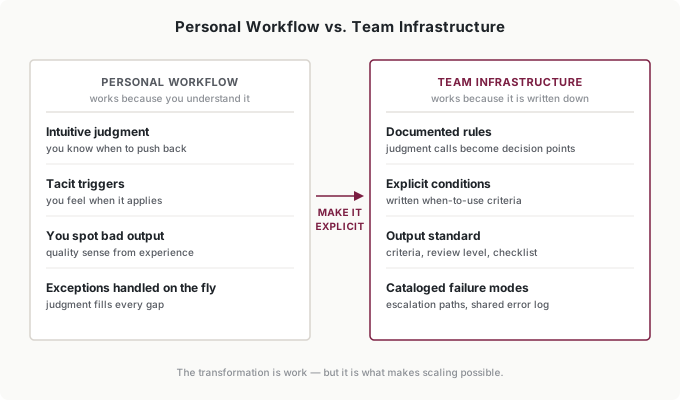
You already have the tools for this. The documentation a team needs is the SCOPE brief you learned in the intern-model chapter—written for someone who isn’t you. Specific outcome, constraints, output format, prior context, evaluation criteria. Then wrap it in the workflow structure: what triggers it, what inputs it needs, what the AI does, where human review happens, and what action follows.
“Written for someone who isn’t you” changes more than you’d expect. My personal notes said things like “watch the tone on angry customers.” The team version had to say: “If the customer’s message contains a complaint about a previous interaction, the draft must acknowledge it in the first sentence—see examples 4 and 5. If the complaint involves a refund over $200, don’t send; escalate.” Same knowledge. One version assumes my judgment; the other replaces it.
Two additions matter for team use:
State the review level. Your documentation should name the Review Spectrum level each output needs—scan, spot-check, deep review, or rewrite—and at what stakes. The team member who got burned in my handoff got burned precisely here: nobody told her customer-facing drafts needed a deep review.
Reset the trust rung. Here’s the counterintuitive part: even though the workflow is proven, new users don’t inherit your trust level. I ran my workflows at Rung 3—spot-checking one batch in five. The client’s team had to start at Rung 1, reviewing everything, exactly as if the workflow were new. Because to them, it was. Trust belongs to the person-workflow pair, not the workflow. Write the starting rung into the documentation, along with what earns a promotion.
The Expert’s Curse
The hardest part of documentation is that your expertise hides from you.
When I finally rewrote my handoff documentation, I sat next to one of the client’s team members—the one who’d modified the prompts—and watched her run the workflow cold, without helping. Inside ten minutes I had a page of notes. She didn’t know that messages mentioning a competitor got routed differently. She didn’t know the AI reliably fumbled multi-question messages, because I’d been silently splitting those by hand for months. She’d modified the prompts because the documentation never explained why the constraints were there—so they looked like clutter she could clean up.
None of that was her failure. All of it was knowledge I didn’t know I had until I watched someone work without it.
That’s the fix for the expert’s curse: observation. Watch someone new use your workflow. Don’t help. Note every hesitation, every wrong turn, every question. Ask them to think aloud. Their confusion is your documentation gap, mapped precisely.
Then run the test that actually matters—the Someone-Else Test: could a person with no context follow your documentation and get 80% of your results? Not 100%; some judgment will always stay tacit, and they’ll earn the last 20% through their own experience. But 80% means the essential knowledge made it onto the page.
If you can’t document it, you don’t fully understand it. The documentation process isn’t paperwork that follows understanding—it’s how you find out whether the understanding exists.
There’s one exception worth flagging, because it’s where the last part of this book goes. Everything above is about handing a workflow to another person, and people need the reasons written down. Transferring your judgment to the AI works differently. You may never be able to explain why a particular headline is wrong, or why one customer message needs a softer open—but you don’t have to. Feed the system enough examples of the call, and enough corrections when it misses, and it starts matching the pattern you could never have put into words. For a human teammate, tacit knowledge is a documentation problem. For your intern, it’s a matter of enough demonstrations—which is exactly what the master prompt in Part 8 is built to collect.
Building the Infrastructure
Documentation gets someone through their first week. Infrastructure keeps the workflow alive after month three. The difference is support systems.
Training beats documentation for the first hour. People don’t read guides before starting; they read them when stuck. What actually got my client’s team over the initial hump was a 20-minute recorded walkthrough of me running the workflow on three real messages—one routine, one tricky, one that needed escalation. The recording did what the live demo couldn’t: they could rewatch the tricky part.
Questions need a place to go. For my client’s team, that was a shared channel where I answered within a day for the first month, then their ops lead took over. Users who can’t get unstuck don’t file tickets—they just quietly stop using the workflow.
Edge cases need an owner. The documentation covers common cases; someone has to handle the weird ones and decide whether each is a one-off or a new constraint. This is the feedback loop from the intern model operating at team scale: errors become log entries, log entries become patterns, patterns become documentation updates.
Changes need versions. Nothing sophisticated—my convention is a date-stamped name in the doc header: “Refund Triage v4—2026-05-12,” with two lines on what changed. Version stamps make rollbacks possible, let you test a change with two users before rolling it to ten, and end the “wait, which prompt are you using?” archaeology.
Someone needs to own it. I’ve watched committee ownership kill more than one internal tool: when everyone owns it, no one owns it. My recommendation, from having sat in both seats: a single owner with a feedback channel. One person accountable for the infrastructure, actively collecting input from everyone using it, making the final call quickly.
Three Scaling Paths
How much of this you take on yourself depends on the path:
Path A: Share and Support. You share the workflow, you answer the questions, you maintain the documentation. Fine for a small team where the support burden stays small.
Path B: Delegate and Oversee. Someone else runs day-to-day operations; you handle escalations and guide improvements. Right for larger teams or when your attention is needed elsewhere.
Path C: Formalize and Transfer. Full handoff—complete documentation, a new owner, and you step away. Required for organizational adoption where you can’t stay involved.
I took Path C with my client, and the transfer only held on the second attempt—after the observation sessions rewrote the documentation and the ops lead formally owned the error log. The first attempt failed because I’d done Path C’s handoff with Path A’s documentation.
Putting It Into Practice
Elena scales her content workflow
Elena’s brief templates worked so well that she did what every workflow builder does: shared them at a team meeting and assumed adoption would follow. A month later, three of her twelve people were using them properly.
The readiness signals diagnosed it. Her workflow was stable and proven—but it failed documentation readiness. The brief template existed; the judgment around it didn’t. Her team didn’t know which content types the AI handled well, or that case studies needed real customer quotes provided up front. So she ran the observation fix: watched her newest hire build a brief cold, collected every stumble, and turned the notes into a one-page guide with the review level stated per content type. Adoption went from three people to ten in six weeks—and the two holdouts told her exactly which parts of the guide didn’t fit their content type, which became version 2.
Jordan decides what not to scale
When two analysts asked Jordan for his research summary template, he ran the readiness assessment instead of just forwarding the prompt—and got a split answer. The earnings-call workflow passed everything: stable for months, documented input specs, measurable results. The foreign-filings workflow failed pattern understanding; it had never been stable enough to leave Rung 1, and Jordan couldn’t predict its failure modes well enough to warn anyone.
So he shared the first and kept the second personal. That’s a legitimate outcome. The goal was never to scale everything—some workflows should stay personal tools, and the assessment exists to tell you which.
Tomás transfers his briefing before it becomes a bottleneck
Tomás runs a fifteen-person bookkeeping firm, and his month-end anomaly-check workflow—AI flags unusual client transactions for review—lived entirely in his head and his prompt library. When he realized he was the single point of failure for a process his whole firm depended on, he chose Path C: full transfer to his operations lead.
The transfer took a version-stamped playbook, two weeks of the ops lead running it at Rung 1 while Tomás spot-checked her review decisions, and a standing rule that new failure patterns go into a shared log rather than into anyone’s memory. Three months later, Tomás isn’t in the loop at all—which was the entire point.
Ingrid gates a portfolio of workflows
Ingrid, a VP of customer operations, inherited the opposite problem: too much scaling enthusiasm. After an all-hands demo, three team leads wanted to roll out nine different AI workflows across her department at once.
She used the readiness signals as gating criteria. Each workflow’s creator had to show 4+ weeks of stability, a one-page guide, and measured results before anything rolled out beyond its creator. Two of the nine passed. Those two got real infrastructure—named owners, stated review levels, a shared error log that any team could read. The other seven went back to their creators with a specific gap list instead of a no. Six months later, five more had passed the gates, and none had burned a team’s credibility budget on the way.
Common Objections
“My workflow is too personal or intuitive to document.”
If you can’t document it, you don’t fully understand it. What feels like intuition is usually pattern recognition that can be made explicit—that’s what my observation sessions proved to me. The documentation effort improves your own understanding even if nobody else ever reads it.
“Everyone has different styles—one workflow won’t fit all.”
Infrastructure is a foundation, not a straitjacket. Build in the places where people can adapt it to their own style without breaking the core—my client’s team members phrase drafts differently, but the constraints and review levels are non-negotiable. Standards on what matters, freedom on what doesn’t.
“I don’t have time to turn my workflow into infrastructure.”
Add up the time you spend being the human FAQ for people who could use this workflow, plus the time spent fixing errors that documentation would have prevented. That’s what you’re paying now. Often “no time” masks “no priority”—which is a different and more honest conversation.
“What if the workflow changes after I scale it?”
It will change—that’s health, not failure. Version stamps handle it: date the change, note what moved, test with two users before rolling to everyone. My refund-triage workflow is on version 4; the team barely noticed versions 2 and 3, which is exactly how updates should feel.
Your Monday Morning Action Item
Choose one AI workflow you use regularly and run the Scaling Readiness Assessment on it:
Check stability. Used consistently for 4+ weeks? No major changes recently?
Check documentation. Could you explain it in one page? Are inputs, review level, and starting trust rung defined?
Check proof. Do you have a measurable result—time saved, errors caught—you could show a skeptic?
Choose the path. Not ready: keep refining, and note which signal failed. Ready for small scale: write the one-page guide and test it on one person with the Someone-Else Test. Ready for more: pick Path A, B, or C based on how involved you can stay.
The goal isn’t to scale everything—it’s to scale the right things at the right time. Some workflows should stay personal tools. Others are ready to become team infrastructure. This assessment tells you the difference.