Your Personal AI System
The Folder
There’s a folder on my machine called ai-system. Let me show you what’s in it.
One master prompt—250 words, two years old, every line earned. A workflows directory: the messaging workflows, each documented as trigger, input, AI processing, human review, action. A task library of prompt variants—writing, analysis, communication. A references directory: the client’s policy document, the channel-tone notes, a one-page org sketch of who’s who on the client’s team. And a knowledge base, which is mostly the error log you’ve heard about all book—the fabricated hardship pause lives there, along with every pattern that ever became a constraint—plus a running file of decisions and why I made them.
Two years ago, this folder was one file, four sentences long, wrong in three of them.
Here’s the part that matters for you: you already own most of this. The master prompt—you wrote it last chapter. The workflows—you’ve been documenting them since you built your first one. The task library—you started it with your first variant. The error log—you’ve been keeping it since you learned to see AI’s failure patterns. You’ve been building this system the whole book. This chapter is just where you notice.
There’s a name for what the folder actually is, in the frame this book runs on: it’s the intern’s complete employment file. The onboarding document, the job descriptions, the work samples, the company wiki, the performance history. Every new session is a new intern—and a new intern with a complete employment file is productive before you’ve said a word.
From Consumer to Manager
Most people use AI the way you’d use a search engine: open the app, ask, close the app. Nothing accumulates. Every session starts from zero, and the value of an hour with AI stays flat forever.
The shift this chapter asks for isn’t technical—it’s managerial. A consumer uses AI to help with tasks. A manager employs it: gives it standing context, documented processes, work samples, and a performance history, then holds it to them. The difference between my month-one folder and my current one isn’t sophistication. It’s two years of managing instead of consuming.
You can hear the difference in how people talk about their AI use. The consumer says “I asked it to write a report and it did okay.” The manager says “my reporting workflow needed a new constraint after last week’s miss.” The first sentence describes an event; the second describes an employee with a file. Same tools, same monthly subscription—entirely different trajectory, because only one of them is accumulating anything.
That’s what “system” means here. Not software. Not a productivity method. Five documents and the connections between them.
The Five Components—You Own Four
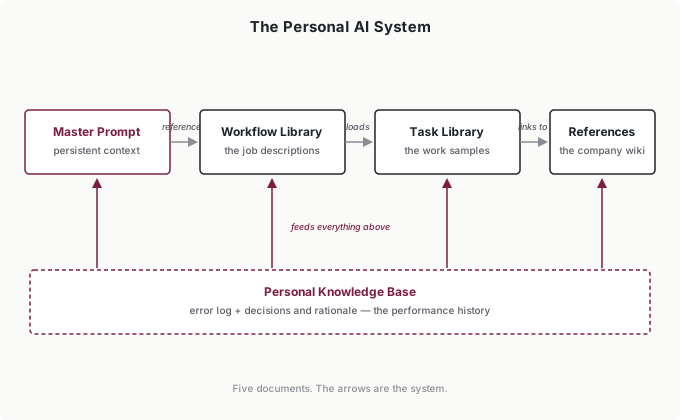
The master prompt is the onboarding document—identity, context, preferences, constraints, priorities. Built. If yours is where you left it last chapter, it’s already doing its job.
The workflow library holds the job descriptions: each recurring task documented as trigger, input, AI processing, human review, action. You’ve been writing these since your first workflow. Three to five well-refined ones beat twenty you never open—quality over inventory, always.
The task library holds the work samples—the prompt variants you started building alongside your master prompt. Analysis variants, writing variants, communication variants. When a prompt produces something excellent, it goes here; when you refine one through iteration, the improved version replaces the old. This is the same task library from last chapter, promoted from a practice to a shelf.
The knowledge base is the performance history, and you’ve been keeping it longer than anything else in the folder: your error log is its founding document. Expand it with decisions and rationale—when you make a significant call with AI assistance, save the reasoning. The genuinely new skill here is retrieval: when a similar situation comes back, feed the relevant entry into the session. “Here’s how I thought about this last time” turns accumulated history into standing advantage, and it’s the habit most people never build.
Here’s retrieval in practice. Last quarter a client asked me to expand the messaging workflows to a new channel. Before drafting anything, I pulled two entries into the session: the decision notes from the last channel expansion (what we underestimated: tone drift) and the error-log cluster from that rollout (the AI kept applying email length norms to chat). The AI’s first draft of the new plan flagged both risks unprompted—because I’d handed it my own history. That 60 seconds of retrieval did what six months of remembering couldn’t.
Reference documents are the one component you probably haven’t built yet—the company wiki. Standing facts about your environment: how your sales process works, what your product categories are, who the stakeholders are. Your master prompt is about you. Reference documents are about your environment.
The test for what deserves a reference doc is simple: anything you’ve explained to the AI three times. My policy-document reference exists because the alternative was pasting policy details into every customer-message session; my client-org sketch exists because “the ops lead” and “the head of sales” kept needing introductions. Each document took 10 minutes to write and ended a category of repetition permanently.
One discipline keeps them trustworthy: date them, and treat staleness as a real cost. An outdated reference is worse than none—the AI states last quarter’s pricing with total confidence, and you’ve built a misinformation pipeline with your own hands. When the underlying facts change, updating the reference is part of the change, not a cleanup task for later.
Five documents. The arrows between them are the system: the master prompt references the workflows, workflows load task-library variants, variants link to references, and the knowledge base feeds everything. Integration is what kills the cognitive overhead—you activate one component and it pulls in what it needs.
Putting It Under One Roof
The assembly is deliberately unimpressive. Make a folder. Here’s mine, as of this writing:
/ai-system
  master-prompt.md
  /workflows
    refund-triage.md
    weekly-report.md
    escalation-draft.md
  /task-library
    analysis.md
    writing.md
    customer-messages.md
  /references
    policy-document.md
    channel-norms.md
    client-org.md
  /knowledge-base
    error-log.md
    decisions.md
That’s it. No app, no tooling, no method with a trademark. The escalation-draft.md workflow hasn’t been touched in four months and probably deserves deletion—I’m showing you the real folder, not the brochure. Use whatever structure makes sense to you; the only rule is that everything has an address, because a component you can’t find in 5 seconds is a component you’ll stop using.
Then grow it the only sustainable way: document things when they work, not in dedicated system-building sessions. A prompt produces something excellent—thirty seconds to save it to the task library. A workflow stabilizes—write it down while it’s fresh. A correction repeats—it goes to the master prompt; an error pattern emerges—it goes to the log. The system assembles itself from work you were doing anyway. The moment it starts feeling like homework, you’re building documentation for its own sake, and you should stop.
Keeping It Alive
The maintenance rhythm extends the evolution protocol you already run on your master prompt to the whole folder. Immediately: when a correction repeats, it retires into the appropriate document that day. Weekly, call it 10 minutes: save anything useful from the week, delete anything that proved wrong. Quarterly, an honest hour: which components did I actually use? Are the references current? What earned its place, and what’s just sitting there?
That last question matters more than the additions. I deleted a meeting-summary template last quarter that I’d been maintaining for a year and used maybe twice—it felt like part of the system, and it was actually just weight. A lean system you actually use beats an elaborate system you avoid. When multiple templates serve similar purposes, merge them. When a workflow has steps you always skip, the workflow is wrong, not you. When something hasn’t been touched in months, it’s not infrastructure—it’s clutter with a filename.
The signs your system needs attention are the same three every time: you’re not using components (update them or delete them), things feel stale (the priorities section describes last quarter; a reference predates the reorg), or you’re working around the system—explaining context despite the master prompt, avoiding a template because it doesn’t fit. Working around the system is the loudest signal, because it means the folder has stopped being the path of least resistance, and the path of least resistance is the only place a system can live.
How do you know the system is working? Two questions, the same ones you’d ask about any employee’s trajectory: is the revision rate falling—do outputs need less correction than last quarter? And is the repetition rate falling—are you explaining the same context less often? If both are trending right, the system is compounding. If they’re flat, something in the folder is stale.
The Compound Effect
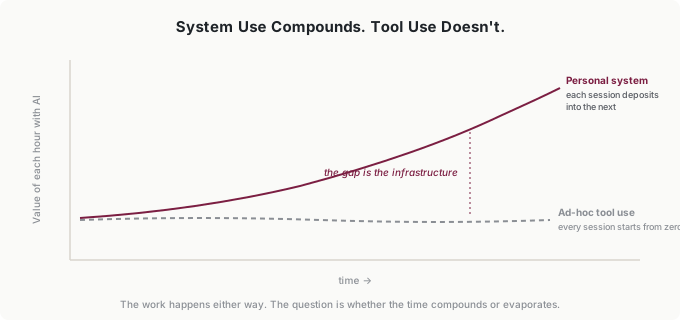
Here’s the argument of this whole final part of the book, in one contrast. An hour spent with AI as a consumer is worth roughly the same hour next year—every session starts from zero, so nothing carries. An hour spent inside a system deposits something: a retired correction, a saved variant, a logged pattern. The work was happening either way. The question is whether that time compounds or evaporates.
My folder is the receipt. The four-sentence master prompt became 250 earned words. The error log’s entries became constraints that stopped whole categories of failure. The workflows that started as personal notes became the infrastructure a client’s team runs on. None of that took a dedicated project—it took two years of 10-minute deposits.
And the compounding shows up where you’d least expect it: in the hard tasks, not the routine ones. Routine tasks got fast early. But when something genuinely novel lands on my desk now—a new channel, a new client, a workflow that’s never existed—I don’t start from zero, because the system holds two years of adjacent history to retrieve from. That’s the quiet difference between a tool and infrastructure: tools help with what you already know how to do. Infrastructure helps with what you’ve never done before.
Putting It Into Practice
Jordan’s knowledge base is a graveyard of theses
Jordan’s system is small and sharp: base prompt, the analysis variant that argues with him, and a knowledge base he calls his dead-thesis file—every investment thesis that didn’t survive, with the reasoning that killed it. Before any new analysis, he feeds the AI the two or three nearest corpses. The intern starts every valuation already knowing how the last similar idea died. That file cost him nothing to build—he was writing post-mortems anyway—and it’s become the most valuable document he owns.
Tomás’s folder is the firm’s AI infrastructure
At a 15-person firm, the founder’s system and the company’s system are the same folder. Tomás’s workflows are the anomaly checks his ops lead now runs; his references are the client-category sheet everyone uses; his never-list is firm policy. When his accountant asked how the firm “did AI,” the honest answer was: it’s a directory. The lesson for small-company CEOs is that you don’t need an AI strategy document—you need a folder that works, and the discipline to keep it current.
Ingrid splits the file
Ingrid’s governance move is deciding which components are personal and which are departmental. Master prompts and task libraries: personal, always. Reference documents and the error-log categories: centrally maintained, one owner each, on the tool inventory with annual review. Her rule of thumb travels well—calibration is personal; facts are shared. It’s one sentence of policy, and it prevents both failure modes: twelve drifting copies of the org chart, and a central committee editing anyone’s personal preferences.
Common Objections
“This seems like a lot of infrastructure to maintain.”
It would be, built as a project. Built as deposits—30 seconds when a prompt works, 10 minutes a week of cleanup—it’s less time than you currently spend re-explaining context. My folder took two years to get good and never took a weekend.
“My needs change too fast for a stable system.”
The volatile parts—priorities, current projects—live in the components designed to change. The stable parts are more stable than you think. My identity section has changed once in two years; my priorities section changes monthly and takes 30 seconds.
“What if I switch AI tools?”
The folder is plain documents you own. It moves with you. That’s not incidental—it’s the design. Your system should outlive any subscription.
“Should I share my system with my team?”
Split it the way Ingrid does: calibration is personal, facts are shared. Your master prompt and variants are yours; the reference documents and shared workflows are team infrastructure with an owner and versions. Sharing the personal parts helps nobody—your preferences aren’t your colleague’s.
“How long until I see benefits?”
The master prompt pays off in the next session. Workflows and variants pay off the first time you don’t rebuild a prompt from scratch. The knowledge base pays off the first time a logged pattern catches a repeat mistake—for me, that was week three. The compounding takes longer, which is the point: it’s the part a new user can’t shortcut.
Your Monday Morning Action Item
Assemble—don’t build. This week:
Make the folder. Move your master prompt into it. Document one workflow—the recurring task where you use AI most, as trigger, input, AI processing, human review, action. Save one task-library variant—a prompt that has worked well. Write one reference document—the context you’ve explained to AI most often, dated. And put your error log in the knowledge base, where it becomes the founding document of your performance history.
Then adopt the deposit habit: one item per week, captured when it works, deleted when it stops. That’s the whole method. Sophistication comes through use and refinement, not initial complexity.
A year from now the hours you spend with AI will have either compounded or evaporated. The folder is the difference—and you’ve been filling it all book. This chapter was just where you noticed.