First Projects
Two Different Starts
My second build was the failure.
After the pattern-detection tool worked, I got ambitious. The obvious next step, I decided, was a full client-reporting dashboard: pull from the messaging platform, join it with the client’s sales data, chart everything, refresh automatically. I spent a weekend asking the AI for code I couldn’t evaluate, pasting errors I didn’t understand, and watching the thing grow to hundreds of lines that never once ran end to end. By Sunday night I had nothing—and a genuinely bruised confidence, because hadn’t I just done this successfully a month earlier?
Around the same time, the client’s ops lead tried her first build. Her goal was almost embarrassingly small: every Friday she manually reshaped one spreadsheet export into the format another system wanted, which ate 90 minutes of her afternoon. She asked the AI for a tool that read her CSV and reformatted it. The first version worked within the hour. She spent 30 more minutes on edge cases. Done—a tool that did in seconds what had eaten most of her Friday.
Same AI. Same month. Comparable technical skill, which is to say none. Completely different outcomes, and the difference wasn’t aptitude or luck. It was project selection.
You already found your candidate and wrote the brief. This is the part where you open the assistant and start talking—and how you talk determines which of those two weekends you get.
Choosing Your First Project
Project selection is the single biggest determinant of first-project success. You ran the fit test in the last chapter—Frequent, Forgiving, Clear, Contained—and FFCC still governs. For a first project, tighten two of the dials and add one criterion.
Tighten Contained: hours, not weeks. You should be able to describe the complete functionality in a paragraph or two. If you need a requirements document, the scope is too large for a first build. My dashboard failed this test before I typed a word; I just didn’t check.
Tighten Clear: you should know exactly when it works, down to the output. “Reads my data file and produces output in this specific format” is testable. “Helps with data analysis” will feel incomplete forever.
And add: use data you understand. Your first project should work on data or processes you know deeply, because when something goes wrong—and something will—your domain knowledge is how you tell whether the problem is in the tool or in the test case. Unfamiliar data turns every bug into two mysteries.
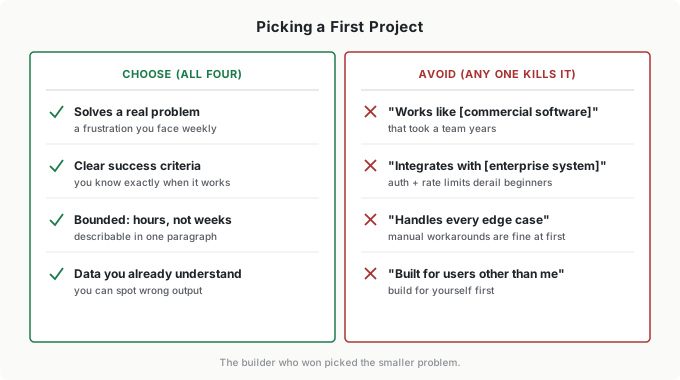
Certain project shapes consistently fail as first attempts, and every one of them was present in my dashboard:
- “It should work like [commercial software].” Commercial products represent years of professional development. Solve one specific problem; don’t replicate a product.
- “It needs to integrate with [enterprise system].” Authentication, rate limits, format drift—every integration point multiplies difficulty. Start with local files and manual exports.
- “It should handle [edge cases] automatically.” Every automatic edge case you demand up front is an hour your first version doesn’t ship. Manual workarounds are fine at first.
- “Users will be [people other than you].” Building for yourself means instant iteration and perfectly understood requirements. Multi-user tools come later—that’s the scaling problem you already know from Part 6.
The Conversation Pattern
Vibe coding happens through conversation, and the conversation is your SCOPE brief delivered a piece at a time instead of in one block. How you structure it decides most of your results.
Set context first. This is SCOPE’s prior context, spoken plainly:
“I’m not a programmer. I work in operations and spend time every week manually copying data between spreadsheets. I want to build a simple tool that automates part of this process.”
Without that framing, you’ll get answers written for engineers—jargon-heavy explanations and solutions that assume knowledge you don’t have.
Request one thing at a time. Start with the core capability:
“I have a CSV file with columns for date, customer name, and order amount. I want a tool that reads this file and creates a summary showing total orders by customer.”
Achievable, testable, done in one round. Compare the request that sank my dashboard weekend:
“Write a Python script that reads CSV files, processes them with error handling, validates data formats, generates summaries, and emails reports automatically.”
Everything at once. The AI generates code for all of it, and when something breaks—something always breaks—the problem could be in any component. You can’t debug what you can’t isolate.
Describe outcomes, not implementation. You may be tempted to use technical vocabulary you’ve picked up. Resist it.
Less effective: “Write a Python script using pandas to read the CSV with exception handling for file not found errors.”
More effective: “I want to read data from this CSV file and count how many orders each customer has. If the file doesn’t exist, tell me instead of crashing.”
The AI knows implementation. You know outcomes. Stay on your side of the division of labor—that’s where your leverage is.
Test immediately, report specifically. After every response, run what you got. When it fails:
Less effective: “It’s not working.”
More effective: “When I run the script with my test file, I get this error message: [paste error]. The file exists and has data in it.”
Specific reports get specific fixes. Vague reports get guesses. This is the feedback loop you’ve run all book, at conversation speed.
The full loop—describe, generate, run, report—is the same cycle from the last chapter, and here’s the expectation to calibrate against: most successful first projects take 3 to 5 full cycles of that loop. Not one. Expecting perfection on the first generation is how the first hour convinces people the whole thing is hype.
Building in Versions
The instinct is to build everything at once. My dashboard is what that instinct produces. Incremental building is faster, less frustrating, and it produces tools you actually understand.
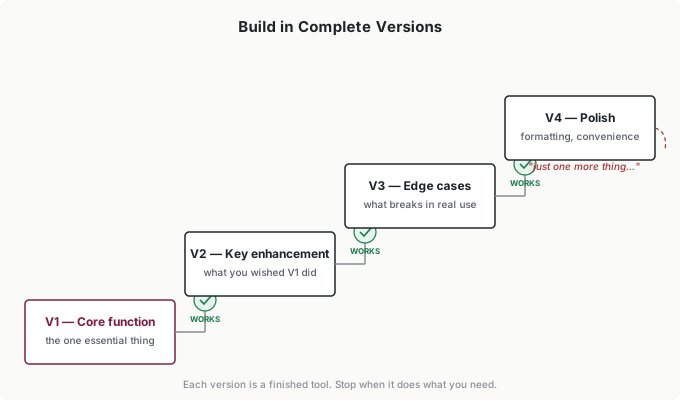
Version 1 is the core function, embarrassingly small. If the goal is a weekly report generator, V1 might read one file and print its contents. That’s fine. Working-but-trivial beats ambitious-but-broken, because you can build on working.
Version 2 adds the one enhancement you wished V1 had. Version 3 handles the edge cases that show up in real use. Version 4 is polish—formatting, convenience, output that’s pleasant instead of merely correct.
The rule that makes the staircase work: each version works completely before the next begins. You should be able to say, flatly, “V2 works,” and demonstrate it. This isn’t just complexity management—it’s motivation management. Working tools, however limited, feel like progress. Half-finished ambitious tools feel like failure, and feelings decide whether you come back after dinner.
Then comes the dangerous moment: the tool does what you originally wanted. Stop. I mean it—this is where I’ve watched more projects die than at any error message. You have a working tool and you think, “While I’m here, I could also add…” Each addition interacts with what exists, breeds new edge cases, and converts a simple tool into a fragile one. This thinking has destroyed more projects than technical difficulty.
Set the boundary before you start: “This project is complete when it does X.” When it does X, stop. Your second project can be more ambitious. Your first project should be finished.
Testing Without Reading Code
Last chapter’s rule—code that runs is not code that works—is easy to agree with and hard to practice. Here’s the practice, and none of it requires reading code.
Compare to known answers. The most reliable test there is: run the tool on data where you already know the correct result. If it calculates totals, feed it a file you’ve totaled by hand. This is exactly how I caught my conversation-counting bug—the code ran flawlessly and the answer was wrong. People skip this test because the output looks right. Looking right is what AI output does.
Here’s what the known-answer test looks like in practice. The ops lead’s reformatter had to preserve row counts—every row in, one row out. Her test file had 214 rows; the first working version produced 209. Five rows had a comma inside a quoted field, and the parser silently dropped them. No error message, no crash, plausible-looking output—and a bug that would have quietly eaten five orders a week forever. One known answer caught it in 30 seconds.
Sanity-check what you can’t verify exactly. Are the numbers in plausible ranges? Do the totals actually sum? Anything obviously missing or duplicated? Your domain expertise is the test harness here—you know what reasonable looks like in your field.
Poke the edges. Empty file. Missing fields. Weird characters. A huge file. You don’t need exhaustive testing; three or four edge cases catch most of what will otherwise surprise you in week two.
Run everything at Rung 1. A first tool has earned no trust. Check its output against manual work until it stops being wrong—that’s the same promotion rule every workflow in this book lives under. The ops lead ran her reformatter alongside the manual process for three Fridays before she let it fly solo, and that’s the right instinct: the cost of three parallel runs is an hour; the cost of a silent bug in an unwatched tool is unbounded.
And when something fails, remember what debugging actually is at this level: debugging isn’t a technical skill—it’s a reporting skill. Describe the symptom precisely, provide the input that caused it, and state expected versus actual: “I expected a summary with 3 rows; I got 2 rows and this error.” With that report, the AI usually finds the problem in one round. Without it, you’re both guessing, and the guessing loop is what “going in circles” feels like from the inside.
Putting It Into Practice
Jordan’s build, message by message
Jordan’s earnings-pull script from the last chapter took him four cycles of the loop. First message: context (“I’m an analyst, not a programmer”) plus one capability—pull the reported revenue figures from a saved transcript file. It worked. Second: add the segment breakdown. Third: it choked on a transcript with a different header format—he pasted the error and three lines of the offending file, and the fix came back in one round. Fourth: output to the exact CSV format his model expects. Total time, about two hours—less than one quarter’s worth of the manual pulling it replaced.
Elena coaches the first pick
When a second writer on Elena’s team wanted to build, his first pitch was a full editorial-calendar system—assignments, deadlines, Slack reminders, the works. Elena has seen the two weekends. She didn’t say no; she asked which single part hurt most this week. Answer: turning the content calendar’s export into the status format leadership wants. That’s the first project—bounded, testable, his own data. The calendar system can be project four, if it still seems worth it by then. He shipped the status formatter in an evening, used it that Friday, and—this is the part Elena cares about—came back two weeks later with a sharper pick for project two. Coaching the pick is a manager’s highest-leverage contribution to a team member’s first build.
Tomás’s dashboard, version by version
The anomaly dashboard that eventually ran Tomás’s Monday review did not start as a dashboard. V1 read one bank-export CSV and printed transactions over a threshold. V2 added the second account. V3 handled the export-format quirks that showed up in real months. V4 made the output readable enough to scan over coffee. Four versions, each one used in real Monday reviews before the next existed. If he’d asked for the dashboard on day one, he’d have gotten my weekend instead.
Ingrid’s first-project rule
Ingrid’s teams got one more line in her build policy after watching a few first projects stall: your first build must be droppable. If abandoning it costs nothing but the time spent, it’s a first project; if abandoning it would leave a gap in someone’s workflow, it’s not a first project—it’s a dependency, and dependencies don’t get built by beginners on weekends. The rule sounds restrictive and is actually liberating: inside it, nobody needs to fear failing.
Common Objections
“I tried and got error messages I don’t understand.”
You don’t need to understand them—you need to deliver them. Copy the error exactly, say what you were doing, and ask the AI to explain it in plain language. Translating errors is something AI does genuinely well.
“It generated code but I don’t know if it’s safe to run.”
For tools that read local files you own, inside the boundaries from the last chapter—no credentials, no customer data, no network access—the risk is bounded. If you’re unsure, ask: “Before I run this, explain in simple terms what it will do to my files.” For anything beyond those lines, the last chapter’s hard rules apply.
“It works on my test data but fails on real data.”
That’s progress wearing a disguise. Real data is messier than test data—my client’s exports had format quirks no test file anticipated. Find the specific rows that fail, hand them to the AI, iterate. This is the loop working, not the loop failing.
“I keep going in circles without making progress.”
That was my dashboard weekend, and the diagnosis is almost always the same: the project is too big for the loop to converge. Circles mean scope, not stupidity. Cut the project in half, then in half again, until a version can work completely—or step back and ask whether this was the right first pick at all.
Your Monday Morning Action Item
You wrote the brief last week. This week, you run it.
Pull out your SCOPE brief—or take 20 minutes now to pick a candidate and write one. FFCC-fit, hours-not-weeks, data you understand.
Open the assistant and set context. Who you are, what you do, what you want to build. Then request exactly one capability—the V1 core.
Run what you get. Test against an answer you know. Report failures specifically: symptom, input, expected versus actual.
Stop at working. V1 that works completely is this week’s win. The staircase can wait for next weekend.
The goal isn’t a finished tool by Friday—it’s one full trip around the loop, because everything in this chapter becomes concrete the first time you paste an error message and watch a fix come back. Your first conversation might take 30 minutes and end with something half-working. That teaches you more than any chapter can.
Start before you feel ready.