Pattern Recognition
The Errors I Stopped Reading For
In my first month reviewing AI-drafted customer responses, I read every single one. All 72,000 messages ran through my workflow, and I was checking each output word by word. By month six, I could scan a batch of 50 and pull the three with problems in under 2 minutes.
I didn’t get lazier. I got better at knowing where AI screws up.
The turning point was a hallucinated return policy. The AI told a customer they could return a product within 90 days—we’d changed that to 30 days six months earlier. I caught it, but only because I happened to remember the policy change. The next week, a different response cited a “customer satisfaction guarantee” we’d never offered. Same pattern: the AI invented a specific, plausible-sounding policy detail.
Once I saw that pattern, I started seeing it everywhere. Not just fabricated policies—fabricated statistics, fabricated competitor comparisons, fabricated product features. The errors weren’t random. They clustered. And once I knew where to look, I stopped wasting time on the 90% of output that was fine and zeroed in on the 10% that needed scrutiny.
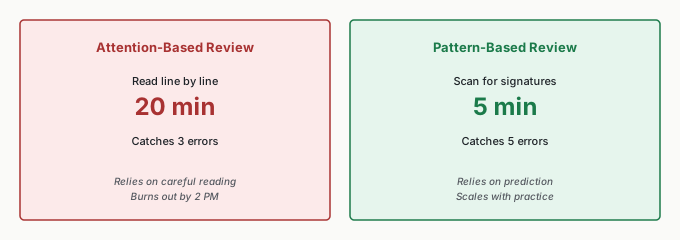
That shift—from reading everything carefully to scanning for known failure modes—is the difference between attention-based review and pattern-based review. Attention burns out. Patterns scale.
Five AI Error Patterns
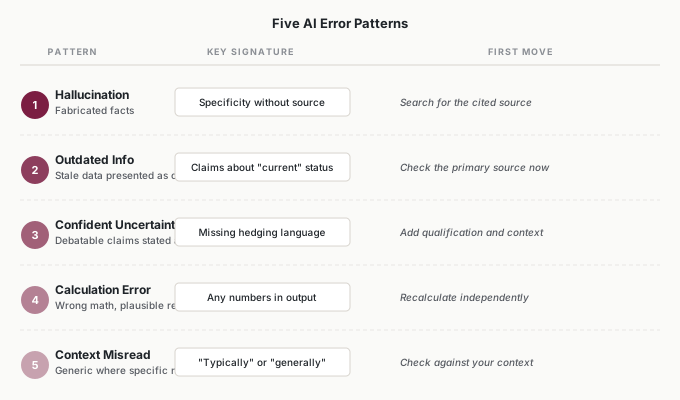
AI errors cluster around five predictable patterns. Each has recognizable signatures—warning signs you can learn to spot before they cost you.
Pattern 1: The Hallucination
I learned this one the hard way. An AI-generated competitive analysis included a statistic: “According to a 2023 industry report, 73% of enterprises have adopted AI-assisted customer service.” It sounded right. It had the specificity of a real citation. I almost included it in a client presentation. The report didn’t exist.
Signatures to watch for:
- Specificity without source—a precise percentage or quote with no verifiable origin
- Confident obscurity—detailed claims about niche topics
- Too-perfect examples—case studies that feel suspiciously relevant
- Your gut says “really?”—if something seems too convenient, verify it
What to do: Search for the specific claim. If you can’t find the source independently, treat it as fabricated.
Pattern 2: The Outdated Information
The return policy error that first caught my attention was this pattern. AI presents stale data with the same confidence as current data, because it has no way to know what changed after its training cutoff.
Signatures to watch for:
- Claims about “current” pricing, leadership, or capabilities
- Recent timeframes stated with false precision
- Market share, employee counts, product features—anything that changes
- Technology versions or compatibility claims
What to do: Verify against the actual current source—the company’s website, recent filings, authoritative databases. Never trust AI’s “current” claims without checking.
Pattern 3: The Confident Uncertainty
This one is subtle. AI presents debatable information as settled fact. Where an expert would say “it depends,” AI delivers a definitive answer. I noticed this most in strategic recommendations—the AI would state “the best approach is X” without acknowledging that X depends entirely on context, resources, and risk tolerance.
Signatures to watch for:
- False precision—exact numbers for inherently uncertain quantities
- Missing hedging—“the best approach” without “for whom?”
- Complex topics reduced to simple answers
- No acknowledgment of tradeoffs or alternatives
What to do: Add appropriate qualification. If the AI says something is “the best approach,” ask: best for whom, under what constraints, compared to what alternatives?
Pattern 4: The Calculation Error
AI processes language, not mathematics. I’ve seen it claim that a 15% increase from 200 is 260 (it’s 230), that three items at $47 each totals $151 (it’s $141), and that 8 out of 12 is “approximately 75%” (it’s 67%). The errors are often small enough to seem plausible.
Signatures to watch for:
- Any numbers in the output—all numeric claims deserve a second look
- Percentage calculations—the most common error area
- “Therefore” or “which means”—conclusions drawn from calculations
- Multi-step analysis—each step compounds error risk
What to do: Verify all calculations independently. Keep a calculator or spreadsheet open during review.
Pattern 5: The Context Misread
AI applies generic patterns when your situation requires specific ones. In my social media workflow, the AI kept recommending “schedule a follow-up call” for customer complaints—standard advice, but wrong for our context where complaints were handled entirely through messaging. It couldn’t distinguish our process from the default.
Signatures to watch for:
- “Typically” or “generally”—signals that generic logic is being applied
- Assumptions you didn’t state—AI filling gaps with defaults
- Advice that doesn’t fit your actual constraints
- Recommendations that ignore what you told it about your situation
What to do: Ask yourself: does this actually work for my specific situation? What assumptions is the AI making, and are they correct?
Building Your Pattern Eye
When you catch an AI error, spend 30 seconds analyzing it before you fix it. What type was it? What signature should have flagged it? What would have caught it faster?
This sounds simple, but most people skip it. They fix the error and move on. The 30-second analysis is what converts a single catch into a permanent skill. After a few weeks of doing this, you stop consciously running through a checklist. You start feeling when something is off—the same way an experienced accountant feels when a number doesn’t fit, even before checking the math.
The Error Pattern Log
I started keeping a simple error log—just a spreadsheet with date, error, pattern type, signature, and impact. After two weeks, a clear picture emerged: hallucinations accounted for roughly half my catches, context misreads were about a quarter, and calculation errors were rare but high-impact when they showed up. That data changed how I reviewed. I spent more time checking factual claims and less time re-reading prose that was almost always fine.
| Date | Error | Pattern | Signature | Impact |
|---|---|---|---|---|
| 3/12 | Cited nonexistent Gartner report | Hallucination | Specific stat, no source | Credibility damage |
| 3/14 | Listed competitor at old pricing | Outdated info | “Current” pricing claim | Customer confusion |
| 3/18 | Said 12% when actual was 8% | Calculation | Percentage in output | Decision error |
| 3/22 | Recommended phone follow-up for messaging-only flow | Context misread | Generic advice, wrong channel | Process mismatch |
The log also revealed something I hadn’t expected: different workflows produce different error profiles. My customer response workflow had mostly context misreads—the AI applying generic customer service patterns to our specific process. My analytics summaries had mostly calculation errors and confident uncertainty. My competitive research drafts had mostly hallucinations. Once I knew the profile for each workflow, I could adjust my review focus before I even started reading.
The Learning Curve
The learning curve is real but faster than you’d expect. The first two weeks feel slow—you’re consciously running through the checklist for every piece of output. By week three or four, pattern recognition starts becoming automatic. You feel the signatures rather than think about them. By month two, you scan naturally for high-risk elements, and review gets both faster and more accurate.
When errors make it through your review—and they will, especially early on—analyze why. What did you miss? What should have caught it? I missed a hallucinated customer testimonial once because it sounded exactly like something a real customer would say. The signature I should have caught: it was too perfectly relevant to the point the AI was making. Now “too perfect” is one of my first checks.
If you work on a team, compare notes. When two people review the same output, they catch different things. The patterns others see that you miss are precisely the ones to add to your checklist. Keeping the log speeds all of this up. Don’t just review—learn from each review.
Efficient Review Techniques
The High-Risk Scan
Before detailed review, take 30 seconds to scan for high-risk elements:
- Numbers: All numeric claims need verification
- Names: People, companies, products—proper nouns can be fabricated
- Dates: Especially recent dates or “current” claims
- Sources: Citations, quotes, “according to”—verify they exist
- “Too perfect”: Anything that seems conveniently relevant
This quick scan identifies where to focus your detailed attention.
The “Would I Bet On This?” Test
For any factual claim, ask: would I bet $100 that this is correct?
If you’d bet confidently—lower verification priority. If you’d hesitate—verify before using. If you wouldn’t bet—treat it as suspect until proven.
I use this constantly. The AI said our churn rate was 4.2% in a report draft. Would I bet $100 on that? No—I’d guess closer to 6%. That hesitation was the signal. I checked, and the actual number was 5.8%. The AI had pulled from an outdated dataset.
The Source Imagination Test
For any claim, ask: what source would verify this? Can you picture where this information would come from?
If you can easily picture the source—check it. If you can’t imagine where this data would live—the claim may be fabricated. This test catches hallucinations quickly because fabricated information has no verifiable origin.
Verification Priority
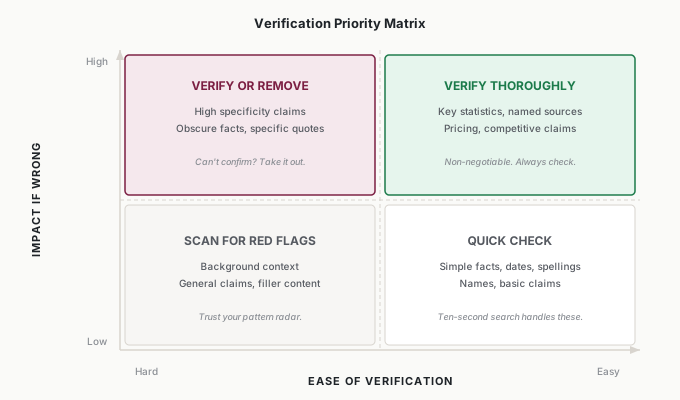
Not everything needs equal verification. I think of it as a two-by-two: how bad is it if this claim is wrong, and how easy is it to check?
- High impact, easy to verify: Verify thoroughly—key statistics, named sources, pricing. These are your non-negotiables.
- High impact, hard to verify: Verify or remove—obscure claims, specific quotes with no clear source. If you can’t confirm it quickly and it matters, take it out.
- Low impact, easy to verify: Quick check—simple facts, dates, spellings. A ten-second search handles these.
- Low impact, hard to verify: Scan for red flags—background context, general claims. If nothing triggers your pattern radar, move on.
This prioritization means you spend your review energy where the consequences are highest. Most output falls into categories three and four—a quick scan handles it. Your deep attention goes to the claims that could actually damage credibility, relationships, or decisions.
Applications
Mariana (Customer Success Director, B2B SaaS)
Mariana’s team used AI to draft quarterly business reviews for 40 enterprise accounts. The biggest error pattern: hallucinated metrics. The AI would cite “a 23% improvement in response time” when the actual CRM data showed 14%. She trained her team on Pattern 1 (Hallucination) specifically—every number in a QBR draft gets verified against the source data before the deck leaves the team. Her shortcut: she built a one-page cheat sheet mapping each error pattern to the specific QBR sections where it shows up most. Hallucinations cluster in the executive summary. Outdated info clusters in competitor comparisons. Her team checks the right sections instead of reading everything twice.
Dex (Data Analyst)
Dex used AI to generate first drafts of weekly analytics reports—audience trends, campaign performance, budget projections. His dominant error pattern was Confident Uncertainty: the AI would state “engagement is trending upward” when the data showed a noisy, flat trend with one outlier week. The AI smoothed ambiguity into false confidence. Dex developed a personal rule: any directional claim (“increasing,” “declining,” “trending”) gets a chart check. If the chart doesn’t obviously support the claim, he rewrites the sentence with appropriate qualification. His review time dropped from 45 minutes to 15 once he stopped reading for grammar and started reading for false confidence.
Lena (Founder/CEO, 22-Employee Marketing Agency)
Lena had no QA team—she was the only reviewer for AI-generated client proposals, competitive analyses, and case study drafts. She couldn’t afford to deep-review everything, so she focused on the two patterns with the highest stakes for her business: Hallucination (a fabricated statistic in a client proposal could end a relationship) and Outdated Information (citing a competitor’s discontinued product makes the agency look careless). Her system: every client-facing document gets a two-minute scan for specific claims and “current” assertions. Internal documents get post-action audit only—she samples three per week. The tiered approach matches her available time to her actual risk.
Ravi (VP of Product, Enterprise Software)
Ravi’s challenge was organizational: twelve product managers across four teams, all using AI for different tasks—user research summaries, competitive briefs, feature specs, customer communications. Error patterns varied by task type. Research summaries had hallucination problems. Competitive briefs had outdated information problems. Feature specs had context misread problems. Ravi created a shared error log across all four teams and reviewed it monthly. After three months, he had enough data to build team-specific review checklists. The research team checks citations. The competitive team checks dates. The feature team checks assumptions. Pattern recognition became part of PM onboarding.
Common Objections
“I don’t have time to learn patterns—I just need to get work done.”
Pattern recognition makes review faster, not slower. I went from 20 minutes per batch to 2 minutes. The upfront investment pays back within the first week.
“My AI is pretty accurate—I rarely find errors.”
Two possibilities: the AI genuinely performs well on your tasks, or errors are escaping your review. The error log will tell you which. Even highly accurate AI makes occasional errors, and the occasional ones tend to be the most damaging because nobody’s expecting them.
“Isn’t this just careful reading?”
Careful reading catches errors through attention. Pattern recognition catches them through prediction—knowing where errors are likely before you find them. Attention burns out by 2 PM. Patterns don’t.
“What if I’m wrong about which pattern it is?”
Doesn’t matter. The goal is directing attention, not taxonomy. If you misclassify an error but still catch it, you win. Your classifications improve naturally through the log.
Your Monday Morning Action Item
Create an error pattern log this week. A spreadsheet with five columns: Date, Error, Pattern Type, Signature, Impact.
For every AI error you catch, spend 30 seconds categorizing it. Which of the five patterns does it fit? What tipped you off? What would have happened if you’d missed it?
Friday, scan your log. You’ll likely find that two or three patterns account for most of your errors. Those are where your review attention should concentrate next week. Update your scan checklist accordingly—your review should evolve with your data, not stay static.
Most people discover the same thing I did: a small number of patterns account for the vast majority of errors. Once you know your patterns, review stops feeling like an exhausting line-by-line slog and starts feeling like a targeted search. You know what you’re looking for. You know where to look. And you catch more while spending less time doing it.
Start the log. The patterns will find you.