Vibe Coding Introduction
The Tool I Built Without Writing It
The pattern-detection tool I told you about earlier—the one that read 12,000 customer messages and found out the client’s biggest objection wasn’t the one anybody guessed—I built that in a weekend. And I’m not a software engineer.
Friday night, I described what I wanted to an AI coding assistant: read the message exports, group messages into conversations, tag each conversation with the objection categories I gave it, count the results. The AI wrote the code. I ran it. It crashed on the second file.
I told it what happened. It fixed the file handling. Then the counts came out absurdly high, and it took me an hour of staring to figure out why: it was counting every reply as a new conversation. I described the threading logic I actually wanted. It rewrote that part. By Sunday evening I had a tool that did in four minutes what had taken me most of a day by hand—and I trusted its numbers, because I’d spent Saturday checking them against samples I counted myself.
That’s vibe coding: you describe what you want, the AI writes the code, you test it, and you iterate until it works. You’re not writing code. You’re managing an intern who does.
The term comes from AI researcher Andrej Karpathy, who coined it in February 2025: a kind of coding where you “fully give in to the vibes” and “forget that the code even exists.” He meant it half-jokingly, for throwaway weekend experiments—and the meme version took off from there. Let me be clear that the meme version is not what this chapter teaches. Forgetting the code exists is how plausible-looking garbage ships. What I practice is stricter: the meme says don’t read the code; the intern model says never ship what you haven’t reviewed.
Because that’s all vibe coding is—the intern model applied to code. Everything you’ve built in this book transfers. You’ve spent six parts scoping tasks, reviewing drafts, promoting trust one rung at a time. Now the intern writes software.
What Vibe Coding Is
Vibe coding is creating software by describing functionality and iterating on the results. You bring the problem knowledge and the judgment; the AI brings the syntax, the implementation details, and the debugging patience. You know your problem deeply. It writes code fast. Neither of you could build the tool alone.
This is not traditional programming—you don’t write the code, understand every construct, or make the technical decisions. And it’s not drag-and-drop no-code tooling either, because you’re not limited to someone else’s templates. It’s a middle ground with a specific trade: you get custom logic without learning syntax, and you pay for it in verification effort.
The economics are what make the trade interesting. Before I built the pattern-detection tool, my options were an analytics subscription that cost a few hundred dollars a month and did most of what I needed badly, or a feature request into someone else’s roadmap. The weekend build cost me nothing but the weekend—and it did exactly what I needed, because I was both the customer and the product manager.
That trade is the whole game. Vibe coding is not easier than programming—it’s differently hard. The demanding skills are clarity of description, rigor of testing, and judgment about what’s working. Which should sound familiar, because those are the same skills this book has been building since the first SCOPE brief you wrote.
Quality comes from verification, not from how the code was generated.
When to Build
Not every problem should be vibe-coded, and you already own the fit test: FFCC.
Frequent. The problem recurs. A tool you’ll use weekly justifies a weekend; a tool you’ll use once doesn’t beat doing the task by hand.
Forgiving. Failure is recoverable. If the tool breaks, you lose some time—not customer trust, not money, not compliance standing.
Clear. You can describe success precisely. “Reads a CSV of contacts and flags rows that match on email or phone” is buildable. “A customer management system” is a wish, not a description.
Contained. The scope has edges. One input, one transformation, one output beats a platform with ambitions.
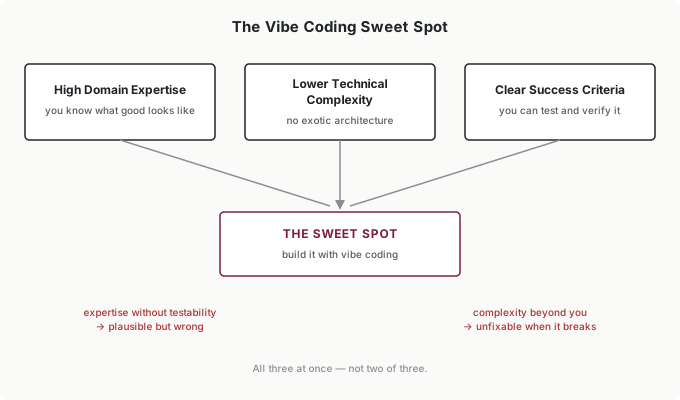
The sweet spot sits where three conditions overlap: you understand the problem deeply, the solution doesn’t need sophisticated architecture, and you can verify the output yourself. All three at once—not two of three. Expertise without testability produces plausible-but-wrong results you can’t catch. Complexity beyond your understanding produces tools you can’t fix when they break.
And some territory is simply off the map. My hard rules, learned by almost breaking them: nothing that touches customer data, payments, or authentication without professional security review—I once got two evenings into a tool that needed my client’s CRM credentials before admitting that “it’s just for me” wasn’t a security model. Nothing mission-critical, where failure costs more than the tool saves. Nothing you intend to sell or deploy to many users—production software needs professional engineering, full stop. AI-generated code can carry vulnerabilities a non-programmer will never spot, and no amount of describing-what-you-want fixes that.
The Vibe Coding Cycle
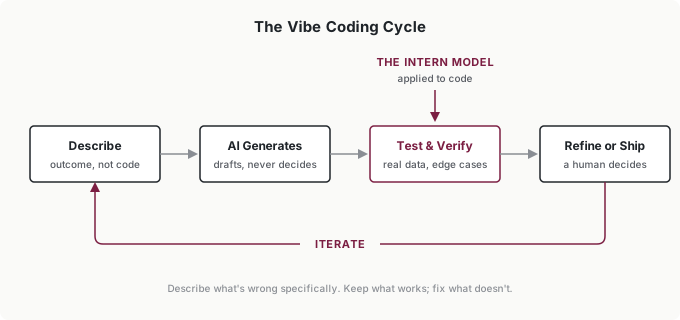
If the shape of that diagram looks familiar, it should—it’s the intern model cycle from the beginning of the book with the labels changed. Same loop, new output format.
Describe is a SCOPE brief where the output format happens to be code. Specific outcome (“reads the message export, groups replies into conversations”), constraints (“skip messages from internal senders”), output format (“a CSV of conversation counts by objection category”), prior context (a sample of the input data—this matters more than anything else you provide), evaluation criteria (“totals must match my hand count on the sample file”). The quality of what you get tracks the quality of what you describe, exactly like every other AI task in this book.
Generate is the AI’s job. Build in small pieces—one capability at a time, tested before the next is added. Ask for the file parser first. Then the grouping. Then the counting. A complete complex tool requested at once produces something that partially works in ways you can’t untangle; increments produce something you understand.
Test and verify is the Review Spectrum applied to code, and here’s the adjustment that catches new builders: code that runs is not code that works. Running without errors is a scan. What code needs is a deep review—real data, edge cases, and outputs checked against results you calculate yourself. Empty files, missing fields, weird formats. My conversation-counting bug produced numbers that looked completely plausible; I only caught it because my evaluation criterion was a hand count, not a gut check.
Refine or ship is where you decide, and iteration is the feedback loop you already know. When something’s wrong, describe it specifically—“the date parsing fails on MM/DD/YYYY formats” gets a fix; “it’s not working” gets a shrug. Keep what works, fix what doesn’t, and log the failure patterns: my log’s greatest hits include silent duplicate-counting, date formats, and off-by-one filtering, and I now test for all three on every build.
Two pitfalls account for most failed builds. Scope creep: the tool that starts as a counter and accretes “one more thing” until nobody can debug it—define the edges early. And insufficient testing: trusting output because it looks right. Looking right is what AI output does. It’s the one thing you can count on.
What You Actually Need to Know
You don’t need to program. You need three skills, and you already have two of them.
Scoping—the SCOPE discipline, unchanged. Testing—the review discipline, escalated, because code fails more quietly than prose. And one genuinely new skill: reading enough code to verify intent. Not writing it—scanning it. When the AI builds a function, you should be able to see roughly what it does: here’s the part that reads the file, here’s the loop that groups the messages, here’s where the count happens. That reading level lets you spot when the AI built something other than what you asked, and it’s learnable in an afternoon of asking the AI to explain its own code line by line—which it does happily and well.
A handful of concepts make that reading easier, and you can pick them all up from your first build. A function is a reusable piece of logic—when my tool needed the same conversation-grouping in two places, the AI wrote it once and called it twice. A variable stores something for later. An API is how your tool talks to another service—when my counts needed to land in Slack, that was an API call. A database is structured storage, which matters only when a plain file stops being enough. You’ll never implement any of these. Recognizing them is plenty, because recognition is what lets you ask the right question when something breaks.
Trust works the same way it always has: every new tool starts at Rung 1. My pattern-detection tool ran for weeks with me checking its output against hand samples before I let a single number reach a client deck unverified. Vibe-coded tools live on the low rungs by design—the promotion criteria are yours to set, and “it hasn’t been wrong in a month” is the only currency that buys a promotion.
Where should you start? The best first builds share a shape: real (an actual problem you have—theoretical exercises won’t sustain you through iteration eleven), personal (you’re the user, so requirements live in your head and testing needs no coordination), and small (one input, one transformation, one output). Data-transformation scripts, file organizers, report formatters, and simple personal dashboards all fit. And expect your first project to take longer than it should—mine did, and the testing took longer than the building. That’s the learning curve, not a verdict. The second build goes faster. By the third, the loop is muscle memory.
Putting It Into Practice
Elena gates a team member’s script
One of Elena’s writers vibe-coded a script that formats content briefs into the team’s template—useful, unrequested, and suddenly part of the team’s workflow without anyone deciding that. Elena didn’t kill it; she gated it. The script got the same treatment as any new AI output: internal use only, an error log, and two weeks of the writer checking every output before anyone else relied on it. It’s now standard kit, and it saves the team about an hour per brief. The precedent mattered more than the script—her team knows building is welcome and review is non-negotiable.
Jordan builds inside the lines
Jordan’s earnings-call workflow needed the same data pulled and reformatted every quarter, so he vibe-coded the pull script. He didn’t ask permission, and he didn’t need to: his own analysis, public data, no customer information, failure costs him an afternoon. That’s the green light zone—inside those lines, build. The script’s outputs still get spot-checked against the source filings, because a wrong number in a client memo costs more than the script ever saved.
Tomás prototypes, then rebuilds
Tomás vibe-coded a cash-flow anomaly dashboard for his own Monday review. It worked well enough that within a quarter, his month-end close depended on it—which is exactly the boundary line. A tool his firm’s financial reporting relied on had outgrown “forgiving.” He hired a developer to rebuild it properly, and the vibe-coded version became the spec: every feature already validated, every edge case already discovered. The prototype wasn’t wasted work. It was the cheapest requirements document he ever produced.
Ingrid writes the policy
Ingrid never opened a coding assistant. Her contribution was the vibe-coding paragraph in the department’s AI policy, and it’s short: internal tools are encouraged inside the fit test—frequent, forgiving, clear, contained; every tool starts at Rung 1 with its builder verifying outputs; nothing customer-facing, revenue-touching, or credential-holding without professional engineering review. One paragraph, and her teams build freely without a single ticket to IT about whether they’re allowed to.
Common Objections
“I’m not technical—I can’t do this.”
Vibe coding exists for domain experts who aren’t programmers. Your knowledge of the problem is the scarce ingredient; syntax is the abundant one. I built my first useful tool with no engineering background and a Friday night. What I did have was six months of practice scoping tasks and reviewing AI output—which is the actual prerequisite, and if you’ve been doing the work in this book, you have it too.
“Isn’t this just a recipe for bad software?”
It’s a recipe for exactly as much quality as your verification enforces. Skip testing and yes—you’ll ship plausible garbage. But the failure mode isn’t how the code was generated; it’s whether anyone checked it. Keep vibe-coded tools on the low trust rungs, verify against results you compute yourself, and stay inside the hard boundaries, and the risk profile is an intern’s first draft: useful, checked, and never shipped blind.
“Should I just hire a developer instead?”
For anything complex, customer-facing, or security-sensitive—yes, and the boundaries above say so. For personal tools and internal utilities, a developer is slower and more expensive than your weekend, and Tomás’s path shows the hybrid: vibe-code the prototype, and if it becomes critical, rebuild professionally with the prototype as your spec.
“Will this get me in trouble with IT or compliance?”
Check before you build anything that touches company systems or data—policies vary, and some organizations have rules you’d be surprised by. For tools that read public data or files you already own, you’re generally fine. If your organization has no policy at all, Ingrid’s paragraph is a good one to propose.
Your Monday Morning Action Item
Identify one vibe coding candidate this week. Don’t build yet—just find and describe it.
List your friction points. What do you do by hand, repeatedly, that follows a pattern? What tool do you keep wishing existed?
Run the fit test. Frequent, Forgiving, Clear, Contained. All four, honestly. If a candidate fails one, note which—that’s your answer for now.
Write the SCOPE brief. The same brief you’ve written all book, with output format = a working tool: what it does, what input it takes, what output it produces, and—most important—how you’ll verify the output is correct. If you can’t write the verification line, you’re not ready to build this one.
The building comes next. For now, find the project where your domain expertise matters more than the technical complexity. When you can describe it clearly and check it yourself, you’re already most of the way to a working tool.