Output Quality
The Perfection Trap
I used to spend 20 minutes reviewing every AI-generated meeting summary. I’d rephrase sentences that were fine, restructure sections that nobody would notice, polish paragraphs that would live in a shared drive nobody checked. After a week, I’d spent more time reviewing than the summaries had saved me. I’d optimized away all the time savings.
A colleague on my team took the opposite approach—he rubber-stamped everything. Five seconds, ship it, next. That worked until he sent a client recap that attributed a commitment to the wrong executive. The client called. It wasn’t fun.
Most people fall into one of these two traps. Over-editing kills time savings. Under-reviewing creates errors. The skill isn’t generating quality output—it’s recognizing when output is good enough.
Defining “Good Enough”
I send a different quality of email to my team than I do to a client’s legal department. So does the AI. An internal status update has different quality requirements than a press release. A first draft has different requirements than a final deliverable.
Good enough means fit for purpose—does it meet the actual requirements of this specific situation? An internal status update needs clarity and accuracy. Perfect prose doesn’t matter. A customer email needs professional tone and brand consistency. A legal document needs precision that’s non-negotiable. The same output could be excellent for an internal summary and inadequate for a customer email. Recognizing which standard applies is half the skill.
The Three Questions
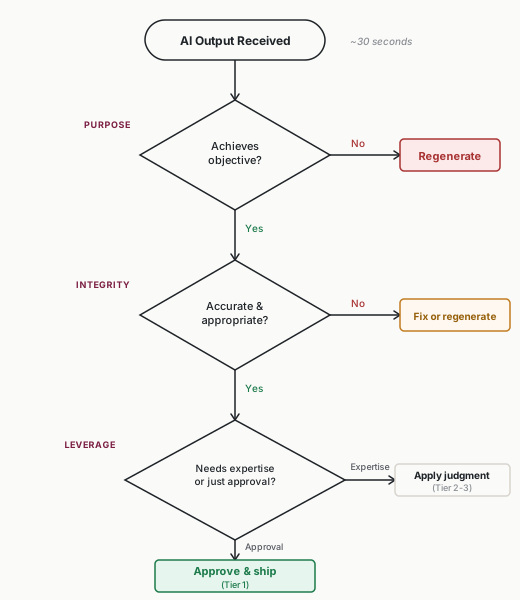
Before evaluating any AI output, establish your criteria with three questions:
1. Does it achieve the objective? (Purpose) Why did you request this output? Does it accomplish that goal? A summary that’s well-written but misses the key points fails this test. A draft that’s rough but captures the essential message passes.
2. Is it accurate and appropriate? (Integrity) Are facts correct? Is tone appropriate? Would sending this create problems? This is your error-checking question—what could go wrong if you use this as-is?
3. Does it need my expertise or just my approval? (Leverage) Is the output asking you to contribute specialized judgment, or just to verify it meets basic standards? If AI produced something you could have delegated to a competent colleague, you’ve achieved leverage. If you’re essentially rewriting it, you haven’t.
These three questions take 30 seconds. They prevent both traps—spending 20 minutes when approval was all that was needed, or missing issues that required your expertise to catch. Run through them before diving into line-by-line review.
Quality Tiers
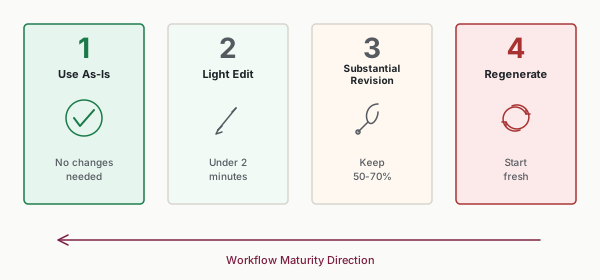
Classify every AI output into one of four tiers:
Tier 1: Use as-is. Output requires no changes. It meets all criteria and you can immediately put it to use.
Tier 2: Light edit. Minor adjustments needed—typos, small word choices, formatting tweaks. Edits take less than 2 minutes.
Tier 3: Substantial revision. The foundation is useful but significant changes are required. You’re keeping 50-70% and revising the rest.
Tier 4: Regenerate. Output misses the mark fundamentally. It’s faster to try again with improved inputs than to salvage this version.
The goal is maximizing Tier 1 and Tier 2 outputs over time. This is how you measure progress—not by how clever your prompts are, but by how often the output is ready to use.
After two weeks with my meeting-summary workflow, I was running about 60% Tier 2, 30% Tier 3, 10% Tier 4. That told me the template was decent but my context section needed work. Track your tiers informally. After a week, you should know roughly what percentage falls into each tier.
If you’re consistently getting Tier 3 or Tier 4 outputs after several iterations, the problem is almost always in the input, not the output.
Evaluation Criteria
Five things to check. Skip what doesn’t apply.
Factual Accuracy
I once shipped a customer email that cited a product feature we’d deprecated six months earlier. The AI stated it with perfect confidence. Now I always verify names, dates, numbers, and any claim that could be checked against sources. The dangerous ones aren’t the obvious errors—it’s the plausible-sounding claim you almost didn’t check.
Relevance and Completeness
AI has a habit of answering the question next to the one you asked, then padding the response to feel substantial. Check that the output addresses what was actually requested and isn’t missing anything critical.
Tone and Voice
I once sent a team Slack update that the AI had written in the tone of a formal press release. Nobody said anything, but I could feel the eye-rolls. Tone mismatches are common AI errors—too formal when casual is needed, too generic when specific voice is expected, too enthusiastic when measured is appropriate. Check: does it match the intended audience? Does it sound like your organization? A customer-facing email written in internal shorthand is as wrong as an internal note written like a press release.
Format and Structure
Format requirements are the easiest check. If you specified bullet points and got paragraphs, or asked for three sections and got seven, the format failed. Check that length is appropriate—AI tends to over-write when unconstrained and under-write when given tight limits.
Actionability
For outputs that drive action, ask: - Can the recipient use this immediately? - Are next steps clear? - Is the output self-contained, or does it require additional context?
An AI-drafted email that requires the recipient to ask follow-up questions hasn’t saved you time—it’s shifted the work.
Diagnosing Problems: Input or Output?
After reviewing hundreds of AI outputs, I started seeing the same five problems over and over:
- Generic language: Corporate-speak and placeholder phrases. “In today’s fast-paced business environment” adds nothing. Generic language signals that context was missing from the input.
- Confident inaccuracy: Wrong information stated with certainty. Dates that don’t exist, statistics that were never published. The confidence makes these harder to catch.
- Missing nuance: Stakeholder relationships, organizational politics, historical context—these subtleties disappear. The output is technically correct but practically naive.
- Tone mismatch: Too formal, too casual, too enthusiastic. This usually means the audience wasn’t adequately specified.
- Padding: Unnecessary words to fill perceived length targets. Introductions that delay getting to the point.
When quality disappoints, diagnose before fixing. An AI summary misses the key decision from a meeting. The temptation is to fix the output—add the decision manually. The better response is to fix the input—ensure meeting transcripts include clear markers for decisions.
I’ve seen this pattern repeatedly: fixing outputs addresses symptoms, while fixing inputs addresses causes. If you’re constantly editing the same types of errors, your input needs work, not your editing skills.
The Feedback Loop
People who document what went wrong get better. People who just re-roll the dice don’t. Every quality issue is an improvement opportunity—but only if you capture it.
Documenting Patterns
Keep brief notes on issues you encounter: - What type of error? - Which workflow? - What was your fix?
You don’t need elaborate tracking. A simple log is enough: “Meeting summaries often miss action items → Added explicit instruction: ‘List all action items with owners and deadlines.’”
Patterns reveal systematic improvements. If you fix the same issue three times, that’s a pattern. Update your input template once instead of fixing outputs repeatedly.
Input Refinement
Most quality improvement comes from refining inputs. Your input inventory is your improvement roadmap:
- Outputs miss nuance: Add context about stakeholders, history, or constraints
- Tone is wrong: Add examples of appropriate voice or explicit tone guidelines
- Format is inconsistent: Add structural requirements
- Key elements missing: Add explicit requirements for what must be included
My first customer-response workflow took 6 weeks to reach mostly Tier 2 outputs. Each week I tracked what I was editing and traced it back to a missing input. Week one: tone was wrong (added voice examples). Week three: missing account history (added CRM context). Week five: format drift (added structural constraints). The feedback loop turned each editing session into an input improvement.
Calibrating Expectations
In my experience, the arc runs roughly like this—treat it as an observed pattern, not a schedule:
New workflow (first 1-4 weeks): Expect mostly Tier 3-4 outputs. You’re learning what inputs this workflow needs.
Developing workflow (weeks 4-8): Should shift toward Tier 2-3. Patterns emerge, inputs improve.
Mature workflow (8+ weeks): Should see mostly Tier 1-2. The workflow is stable and reliable.
If you’re stuck at Tier 3-4 despite multiple iterations, the workflow probably needs redesign—not just input tweaks.
Time Budgets for Review
Without time limits, review expands to consume all saved time. I learned this the hard way—my first month using AI for customer responses, I spent so long perfecting each draft that my total time barely changed. The AI was doing its job. I was undoing mine.
Setting Review Limits
For each output type in your workflow, define: - Maximum review time - Action if you exceed the limit
Review time should be a fraction of manual creation time. If manual creation takes 30 minutes and review takes 25, you’ve saved 5 minutes. That’s not a workflow—it’s a hobby.
Time Budget Examples
| Output Type | Max Review Time | Action if Exceeded |
|---|---|---|
| Email draft | 2-3 minutes | Regenerate with better input |
| Meeting summary | 3-5 minutes | Use partial, flag gaps |
| Status report | 5-7 minutes | Identify pattern for next time |
| Customer response | 3-5 minutes | Escalate or regenerate |
| First draft of document | 7-10 minutes | Accept Tier 3 quality, iterate |
If you regularly exceed time budgets, that’s diagnostic information. Either your review criteria are too expansive, or your inputs need refinement.
When to Invest More Time
Some situations warrant exceeding time budgets:
First iteration of new workflow: You’re learning patterns. Extra review time is investment in future efficiency. I budget double the normal review time for the first two weeks of any new workflow.
High-stakes outputs: Executive communications, legal documents, external publications. Higher stakes justify more scrutiny. A board presentation gets 20 minutes. A team Slack update does not.
Training others: When teaching team members quality standards, you demonstrate thorough review to calibrate expectations. Once calibrated, they should hit the same time targets you do.
But these should be exceptions. If every output requires extended review, the workflow isn’t working.
The Time Budget Discipline
Enforcing time budgets requires discipline. The temptation to “just fix this one thing” leads to scope creep. Before you know it, you’ve spent 15 minutes on what should have been a 3-minute review.
The discipline: when you hit your time limit, stop. Make a decision: - Use it as-is (it’s good enough) - Regenerate (input needs improvement) - Escalate (task may not be suitable for AI)
Don’t split the difference by endlessly tweaking. That’s how you spend 30 minutes to save 30 minutes.
Putting It Into Practice
Mariana, customer success manager (8-person team), built a quality checklist for her AI-drafted account health summaries. Three criteria: factual accuracy (account details match CRM), completeness (all flagged accounts addressed), and actionability (each summary ends with a recommended next step). She set a 2-minute review budget per summary. After tracking 30 outputs, she found 70% were Tier 2—quick edit and send. The 30% that were Tier 3 all had the same problem: missing stakeholder context. One input fix—adding the champion name and last interaction date—eliminated most of her editing time. Her team now reviews 40 account summaries each Monday in under an hour.
Theo, content strategist, kept over-editing AI blog drafts. Every post took 25 minutes to review—barely faster than writing from scratch. He applied the Three Questions and realized he was treating internal drafts with the same scrutiny as published content. The leverage question was the realization that mattered: internal drafts only needed his approval, not his expertise. He created two checklists: a three-item “internal” checklist (accurate, clear, complete) and a seven-item “publication” checklist that added tone, SEO, brand voice, and formatting. Internal drafts dropped to 5-minute reviews. Published content kept the scrutiny it deserved. Total review time across all content types fell by 60%.
Nadia, who runs a 25-person e-commerce company, needed her team to review AI-generated product descriptions consistently—but everyone had different standards. One writer accepted anything readable. Another rewrote every sentence. She defined quality tiers specific to product descriptions: Tier 1 meant accurate specs, correct pricing, and brand-appropriate tone. Tier 2 meant one or two word-choice fixes. Below that, regenerate with better input rather than trying to salvage. Shared definitions eliminated the arguments about “good enough” and cut total review time in half across her catalog of 400 products.
Stefan, VP of Sales, used the feedback loop to transform his team’s weekly forecast summaries. The first month, 80% of outputs were Tier 3—technically correct but missing the narrative leadership wanted. He tracked every edit across four weeks and found three recurring gaps: competitive context, pipeline velocity trends, and rep-level commentary. He added those three inputs to the template. By month two, 60% of outputs were Tier 1. His review time dropped from 15 minutes per summary to 3. His team stopped dreading Monday morning forecast prep—and his CFO stopped asking why the numbers felt incomplete.
Common Objections
“I can’t ship anything that’s not perfect.”
Nobody ever thanked you for the fourth draft of a Slack message. Define “good enough” for each output type. Reserve perfectionism for what actually requires it. Most outputs don’t.
“How do I know if I’m being too lenient?”
Track what surfaces later. If stakeholders complain about quality, tighten criteria. If they never notice your edits, you’re over-editing. The world’s reaction is your feedback loop.
“Every output seems to need substantial editing.”
That’s an input problem, not an editing problem. Something is missing from your input—context, examples, constraints, or clarity.
“Different reviewers have different standards.”
Document your criteria explicitly. Teams need shared standards, not individual judgment calls. Write down the checklist.
“This all seems like a lot of overhead.”
Five minutes defining standards saves hours of inconsistent review. The overhead is front-loaded; the payoff compounds across every future output.
Your Monday Morning Action Item
Create a quality checklist for your most-used workflow:
- List 5-7 specific criteria for evaluating output
- Define your quality tiers—what makes output Tier 1 versus Tier 4?
- Set a review time budget—maximum minutes you’ll spend per output
- Track your next 10 outputs—note which tier each falls into
If most land in Tier 3-4, your inputs need work—go audit what’s missing. If most land in Tier 1-2, your workflow is maturing and you’ve found a reliable pattern. The checklist prevents both over-editing and rubber-stamping. It makes review consistent, efficient, and improvable.