Team Rollout
The Second Attempt
The first time I handed my workflows to the client’s team, I launched: an hour-long walkthrough, everyone at once, good luck. You know how that ended—broken constraints, a burned team member, an error rate climbing toward “the AI thing doesn’t really work.”
The second attempt had a problem the first one didn’t: the team had already watched it fail. I wasn’t rolling out to a neutral audience anymore. I was rolling out to skeptics I had personally created.
So I did the opposite of a launch. I gave the reworked workflow to exactly two people: the ops lead who would eventually own it, and one deliberately average user—not the enthusiast, not the skeptic, the person in the middle. For two weeks, just them. They worked at Rung 1, reviewing everything, while I watched what they caught and what they missed. Then two more people, with documentation the first pair had already improved. Then the rest of the team, who by that point had heard from coworkers—not from me—that the thing actually worked.
Adoption held. Not because the workflow was better the second time (it was, but that wasn’t the difference). Because the first attempt was an event and the second was a process.
Here’s what I understood only afterward: the reason a launch can’t work for AI is that you’re not rolling out a tool. You’re rolling out judgment. Software can be announced. Judgment—when to trust a draft, which outputs need deep review, what the AI reliably gets wrong—only transfers through repetition over time. That’s not a rollout preference. It’s a rollout requirement.
Rolling Out Judgment
Generic tool rollout asks: will people use it? AI rollout asks a harder question: will people use it well? Because with AI, a person can be a heavy user and a dangerous one at the same time—shipping unreviewed drafts faster than anyone can catch the errors.
What actually has to transfer in an AI rollout is the judgment layer you built in the earlier parts of this book:
- The trust calibration. Every new user starts at Rung 1 on the Trust Ladder, no matter how proven the workflow is. The rollout plan is, at its core, a schedule of earned promotions.
- The review discipline. Which outputs get a scan and which get a deep review—and the habit of actually doing it after the novelty wears off.
- The error patterns. Everything your log taught you about what this workflow gets wrong. New users inherit the list or they re-learn it the expensive way, in front of customers.
This reframe changes what success means. 80% adoption with good usage beats 95% adoption with poor usage—and for AI, “good usage” has a precise definition: calibrated review. Track that, not just logins.
The Pilot
The readiness gates from the last chapter asked whether the workflow was ready. The pilot asks whether the pairing works: this workflow, this team, this documentation. Different question, and the only way to answer it is with a small number of real users doing real work.
Choosing pilot users is where I went wrong the first time—or rather, I skipped choosing entirely and got everyone, which meant I learned nothing until things were already on fire. What I look for now:
- Willing but not champions. Enthusiasts succeed regardless and reveal nothing; their workarounds hide your documentation gaps. You want the average user.
- Real work to apply it to. Test cases don’t surface real-world failure modes.
- Available for feedback. A pilot user too busy to tell you what confused them is just an early adopter with extra steps.
- Visible to their peers. When the pilot succeeds, the team should notice without you announcing it.
Run the pilot with high-touch support you don’t intend to sustain—the point is to hear every question while questions are cheap. Collect feedback in scheduled sessions, not hallway comments: what worked, what confused you, what would make you recommend this to the person next to you?
And define what passing looks like before you start. My bar, from the second attempt: the pilot users work independently by the end, output quality holds at the stated review level, and—the real test—they’d recommend it to a peer. One more that’s specific to AI: they catch the errors I would have caught. I seeded the pilot review queue with a few drafts containing the known failure patterns from my error log. When the ops lead flagged the fabricated-policy draft without prompting, I knew the judgment was transferring, not just the tool.
If the pilot fails, that’s the system working. Better to learn your documentation has holes with two users than with twenty. Fix it, run it again.
The Waves
After the pilot holds, expand in waves—not because gradualism is a virtue, but because waves are how the Trust Ladder scales. Each wave starts at Rung 1 while the previous wave stabilizes at Rung 2 or 3. Your support capacity only has to absorb one rung-climbing cohort at a time, and every wave inherits better documentation than the one before it.
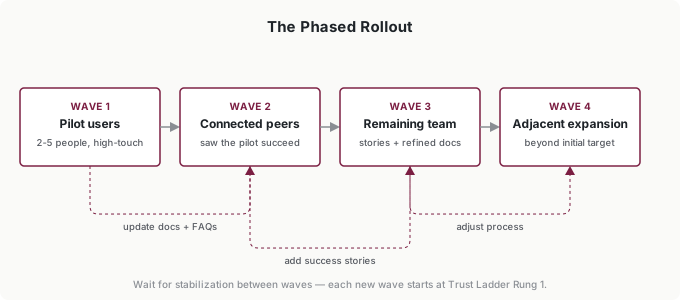
Wave 1 is your pilot—already done. Wave 2 is the people who work closest to the pilot users and have watched it succeed; they’re primed because the proof came from a peer, not from you. Wave 3 is the rest of the target team, arriving to refined documentation and multiple success stories. Wave 4, if it exists, is adjacent teams who want in—which is the best adoption signal there is.
Between waves, do the maintenance that makes the next wave cheaper: fold the questions you heard into the documentation, turn repeated questions into FAQ entries, and let the wave’s best catch become a success story the next wave hears about. In my rollout, the ops lead’s fabricated-policy catch did more for Wave 2 adoption than anything I said.
Don’t rush the gaps. I hold 2 to 3 weeks per wave—long enough for usage to stabilize without heavy support and for question volume to drop. Moving faster spreads problems ahead of your capacity to fix them. (Note this is a different clock than the readiness gate’s 4-week stability bar: that one measured the workflow before any of this started. The wave clock measures the team.)
One note on training, because I spent almost nothing on it the second time and that was the right call: the infrastructure from the last chapter is the training. The recorded walkthrough, the one-page guide, the error log—they were built for exactly this. What rollout adds is sequencing: each wave gets trained just-in-time, when they’re about to start, not in one all-hands session weeks before anyone touches the tool.
The Fear Nobody Names
Midway through the second attempt, one of the client’s team members asked the ops lead a question that never made it into any feedback session: “If this thing drafts the responses, what do they need me for?”
Every AI rollout runs into this question, spoken or not. Most resistance that looks like something else—skepticism about accuracy, attachment to the current process, being “too busy” for training—is this fear wearing a disguise. The team member from my first attempt who modified the prompts wasn’t being careless. Slowing down a system that threatened her job was, from where she stood, rational self-protection.
You can usually spot fear wearing its disguises. Skill objections that survive three rounds of training. Accuracy skepticism that no amount of evidence satisfies. A person who’s “too busy” for a tool that would save them five hours a week. When the stated objection doesn’t respond to its stated remedy, you’re not looking at the real objection.
The dishonest answer is a reassurance poster: “AI won’t replace you!” People smell it, and it costs you the credibility the rollout runs on. The honest answer is structural, and it’s the argument of this whole book: a workflow built on the intern model requires human judgment at every rung. The AI drafts; a human decides. Review isn’t a temporary training-wheels phase—it’s the permanent architecture. What the workflow actually changes is the ratio of judgment to typing in a person’s day, and judgment is the part that was always the job.
Say that plainly, then prove it with the design: show them where their review decisions go, how their catches become constraints, why the error log makes the humans who maintain it more valuable, not less. In my rollout, the person who asked the question is now the one who runs the error log. Her judgment is more visible to her employer than it ever was when she typed every response by hand.
And accept that some people won’t adopt regardless. Don’t let one loud holdout set the tone for the persuadable middle—keep the enthusiasm and the resistance in separate conversations. Don’t force adoption; forced compliance produces exactly the unreviewed, low-quality usage that gets AI initiatives killed. Invite, demonstrate, and let results recruit.
Surviving the Drop
Here’s what I watched happen after each wave’s training: engagement peaked immediately, then sagged around week three. Novelty fades, old habits reassert, and the workflow’s real complexity shows up right as the initial support attention moves to the next wave. Left alone, the sag becomes a slide, and the slide becomes quiet abandonment.
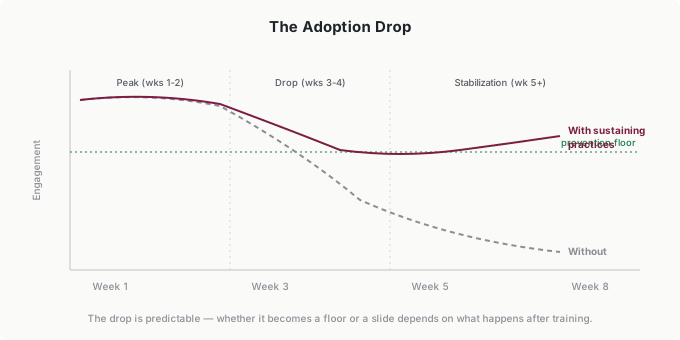
The sag is preventable, but only with practices that continue after training ends:
Stay visible. Brief weekly check-ins through week six—not status meetings, just “what’s the workflow getting wrong?” That question keeps the error log alive and tells the team the system is maintained, not abandoned.
Make wins loud. When someone’s review catches something expensive, or a task drops from hours to minutes, make sure the team hears it. Success stories do the sustaining work your enthusiasm can’t.
Fold it into the standard. The workflow has to become “how we do this,” not an optional extra. For my client, that meant the workflow became part of onboarding—new hires learn it as the normal way, not as an initiative.
You’ve reached sustainable adoption when the workflow is the default rather than the exception, questions are about edge cases rather than basics, and improvement suggestions come from the team instead of from you. At that point you’re not running a rollout anymore. You’re running operations.
Measure the whole way, but measure the right things: frequency and consistency of use, review quality (are the catches still happening?), time saved against the pre-workflow baseline, and whether users would recommend it. A weekly look at those four during rollout tells you what’s actually happening instead of what you hope is happening.
Putting It Into Practice
Elena rolls out in waves
After the observation fix got Elena’s brief templates to ten of twelve adopters, the interesting question is how the middle seven got there. Not through her original team-meeting announcement—through waves. Her two strongest early users became the pilot; the next wave was the writers who sat closest to them and had watched the briefs work. Elena never ran a second training session. She let each wave’s output do the recruiting, and she spent her own time on the between-wave documentation updates instead.
Tomás learns what a mandate can’t do
Tomás had total authority over his fifteen-person firm, so his first instinct after the Path C transfer was to mandate: everyone uses the anomaly-check workflow, starting Monday. Everyone did—and his ops lead noticed within two weeks that half the team was rubber-stamping the AI’s flags without investigating them. Compliance without judgment: the most dangerous adoption pattern there is. He restarted with a two-person pilot and let the waves run. It cost him six weeks against the mandate’s zero, and it produced reviewers who actually review.
Ingrid sequences her portfolio
Ingrid’s two gated workflows could have rolled out simultaneously—different teams, no resource conflict. She sequenced them anyway. The first rollout, in her strongest team, generated the success stories and the refined playbook; the second team’s rollout opened with proof from inside the same department, not a pitch from a VP. Her rule of thumb for the portfolio: never spend credibility you haven’t banked. Each successful rollout funds the next one’s Wave 2.
Common Objections
“We don’t have time for a phased rollout—we need to move fast.”
Fast rollout usually means slow adoption. The weeks you save launching to everyone at once come back as support overflow, quality problems, and abandonment—my first attempt saved two weeks of rollout time and cost six weeks of recovery plus a credibility debt. Phased is usually faster to full adoption than big-bang.
“Our team is too small for phases.”
My second attempt’s pilot was two people on a team of six. The principle scales down; only the wave sizes change.
“People should just adopt good tools without all this hand-holding.”
Should doesn’t equal will. Adoption is habit change plus trust building, and for AI it’s also judgment transfer—which no one does alone. Your job is to make adoption achievable, not to grade people on how they handle change.
“What if the pilot fails?”
Then it worked. A pilot’s job is to find the gaps while they’re cheap—better with 2 users than 20. Fix what it found and run it again.
Your Monday Morning Action Item
Take the workflow that passed your readiness assessment and write the rollout plan—one page:
Success definition. What adoption rate by when, and what does good usage mean—which review level, what error-catch expectations?
Pilot. Which 2 to 5 people fit the pilot profile? What are they testing, for how long, and what does passing look like? Include one seeded test: an output containing your workflow’s most common known error. If the pilot catches it, judgment is transferring.
Waves. Who’s in Wave 2, what triggers the expansion, and what gets updated between waves?
Sustain. What’s your week-three check-in, and when does the workflow become part of standard onboarding?
Write it down before you announce anything. The announcement is the smallest part of the rollout—that’s the whole point.