Role-Specific Applications
The Workflow That Worked for Me and Failed for Everyone Else
My first social media triage workflow was a personal masterpiece. Trigger: new message batch arrives. Input: messages, sender history, product context. AI processing: classify intent, draft responses. Human review: verify and edit. Action: send or escalate. It cut my processing time by 70%.
Then I tried handing it to the team lead who managed our customer success reps.
Total failure. She didn’t need to classify and respond to individual messages—she needed to know which reps were drowning, which escalations were stacking up, and what themes were emerging across thousands of conversations. My workflow was built for an individual contributor doing hands-on work. She needed a coordination workflow. Same five components, completely different implementation.
That experience taught me something I should have seen earlier: the framework is universal, but what you put inside each component depends entirely on how you spend your days. A manager’s workflow that aggregates information across a team would be useless for a solo consultant prepping for client calls. An IC’s research workflow would miss the point for a CEO who needs a daily priority briefing.
Once I understood this, I rebuilt workflows for different modes of my own work. When I was triaging messages as an IC, I used a classification workflow. When I was managing the team that handled those messages, I needed a coordination workflow that showed me queue depths, response times, and escalation patterns. When I was reporting to leadership on the whole operation, I needed a synthesis workflow that turned raw metrics into narrative. Three different workflows, three different roles—all mine, all running from the same five-component framework.
Workflow Patterns by Role
Department Heads: Coordination and Visibility
If you manage a team, your core challenge is knowing what’s happening without micromanaging. You’re reporting up, coordinating across, making decisions that affect others, and scaling knowledge beyond yourself.
The highest-value workflow patterns for department heads:
- Status aggregation—Collecting updates from team members and synthesizing them into coherent summaries
- Performance summarization—Turning raw metrics into a plain read on what’s improving, what’s slipping, and what needs attention
- Communication standardization—Creating consistent messaging across stakeholders
- Decision documentation—Capturing the reasoning behind choices for future reference
Example workflow: Weekly Status Synthesis
- Trigger: Friday at 2 PM
- Input: Project tool updates, standup notes, 1:1 highlights, escalations
- Processing: Summarize progress by project, flag blockers, identify patterns, draft leadership talking points
- Review: Verify accuracy, add strategic context, protect 1:1 confidentiality
- Action: Post to team wiki, share highlights in Slack, save leadership prep
A department head doesn’t need help doing tasks—they need help knowing what’s happening across their team. I’ve seen managers build beautiful draft-generation workflows that saved them 30 minutes a week—while they were spending 5 hours manually compiling status updates. The personal productivity workflow was fine. It was just solving the wrong problem.
Individual Contributors: Personal Leverage
If you produce work directly, your value comes from output quality and volume. You’re juggling multiple projects, building reputation through what you deliver, and constantly learning.
The highest-value workflow patterns for ICs:
- Task preparation—Gathering context and research before starting work
- Draft generation—Creating first passes on deliverables
- Quality checking—Self-review assistance before submission
- Learning synthesis—Capturing knowledge for future use
Example workflow: Design Research Prep
- Trigger: New design task assigned
- Input: Requirements document, user research, competitive examples, design system components
- Processing: Summarize requirements, extract user pain points, identify relevant patterns, generate initial design directions
- Review: Verify interpretation accuracy, add creative judgment, validate feasibility
- Action: Save to project folder, add starting points to design file, block focused work time
An IC needs to prepare for their own work, not aggregate information across people. The best IC workflows remove the friction that sits between “I know what I need to do” and “I’m actually doing it.” Research gathering, context assembly, first-draft generation—these are the tasks that eat hours before the real work starts.
Small Company CEOs: Decision Support and Time Efficiency
If you run a small company, you’re the decision bottleneck. CEO today, sales rep tomorrow, HR in between. No army of analysts. High-stakes choices with minimal data.
The highest-value workflow patterns for CEOs:
- Research synthesis—Consolidating competitive intelligence, market data, and business information
- Communication drafting—Stakeholder updates, investor communications, company announcements
- Decision preparation—Pros/cons analysis, option evaluation, risk assessment
- Meeting efficiency—Agenda preparation, meeting summaries, follow-up tracking
Example workflow: Daily Priority Briefing
- Trigger: Every morning at 7 AM
- Input: Yesterday’s emails, today’s calendar, project tool updates, key metrics
- Processing: Identify urgent items, summarize important messages, suggest priority order
- Review: Adjust priorities based on judgment, add context AI couldn’t know
- Action: Set day’s focus, respond to urgent items, update task list
CEOs don’t get deep focus on one project. The workflow is decision support, not task support. I’ve worked with founders who tried to use IC-style draft generation workflows and got frustrated. The problem wasn’t the AI output—it was that they needed prioritization more than production. When they switched to a daily briefing format, the same 15-minute investment produced dramatically more value.
Senior Leaders: Strategic and Organizational
If you’re a VP or C-suite leader, you’re drowning in signal and noise from multiple sources. You can’t wait for perfect data. Your messages reach hundreds or thousands. You need to connect high-level strategy to concrete action.
The highest-value workflow patterns for senior leaders:
- Intelligence synthesis—Market trends, competitive moves, internal signals
- Meeting preparation—Board meetings, leadership offsites, all-hands events
- Policy and strategy documentation—Capturing and communicating strategic decisions
- Communication at scale—Consistent messaging across channels and audiences
Example workflow: Board Meeting Preparation
- Trigger: One week before scheduled board meeting
- Input: Department reports, financial summaries, strategic initiative updates, market intelligence, investor questions from previous meetings
- Processing: Synthesize key themes, identify strategic highlights and concerns, draft talking points per agenda item, flag items needing board decisions
- Review: Verify financial claims, add political context, ensure messaging consistency, protect sensitive personnel matters
- Action: Finalize board deck sections, prepare Q&A talking points, schedule pre-meetings with key board members
A misstatement at this level cascades. A missed signal becomes a strategic blind spot. Senior leader workflows need broad vision and precise communication.
The key distinction between senior leader workflows and CEO workflows is scope and audience. A CEO of a 30-person company is making hands-on decisions about specific projects. A VP at a 2,000-person company is setting direction that gets interpreted and executed by layers of management. The review step matters more here than in any other role—because the cost of a wrong output reaching the wrong audience is organizational, not personal.
How Each Component Shifts by Role
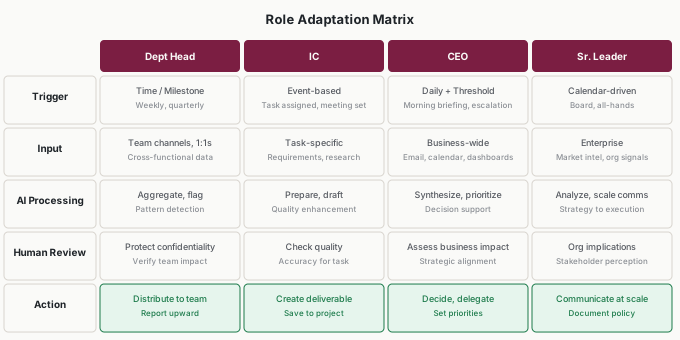
The matrix captures the core difference: same five components, different content in each one depending on how you actually work.
| Component | Dept Head | IC | CEO | Senior Leader |
|---|---|---|---|---|
| Trigger | Time/milestone (weekly, quarterly) | Event-based (task assigned, meeting set) | Daily rhythm + escalation threshold | Calendar-driven (board, all-hands) |
| Input | Team channels, 1:1 notes, cross-functional data | Task-specific: requirements, research, client context | Business-wide: email, calendar, dashboards, metrics | Enterprise: market intel, org signals, strategic reports |
| Processing | Aggregate, flag exceptions, detect patterns | Prepare, draft, quality-check | Synthesize, prioritize, support decisions | Analyze strategically, scale communication |
| Review | Protect 1:1 confidentiality, verify team impact | Check output quality and accuracy | Assess business impact, alignment with strategy | Evaluate org implications, stakeholder perception |
| Action | Distribute to team, report upward | Save to project, create deliverable | Decide, delegate, set priorities | Communicate at scale, document policy |
If your actions don’t match your role column, your workflow might be misaligned. A manager whose actions are all personal (saving to their own folders) has an IC workflow in disguise. An IC whose actions are all about distributing to others might be doing coordination work that warrants a separate workflow.
Applications
Sofia (Engineering Manager, 9 Direct Reports)
Sofia’s first workflow—meeting summaries—was fine but generic. It would have helped anyone in any role. When she redesigned for her actual job, the workflow shifted to Friday team status synthesis. Inputs: Jira updates, standup notes, 1:1 highlights. Processing: aggregate progress, flag blockers, draft leadership talking points. Review: verify accuracy, protect confidentiality.
Friday compilation dropped from 60 minutes to 20 minutes. She arrived at Monday leadership syncs better prepared. Her director noticed. Sofia’s first version didn’t include leadership talking points—she added that after realizing Monday prep was a separate pain point. Her second version didn’t filter out 1:1 confidential items during processing, and she caught herself almost sharing a sensitive personnel issue in the team-wide summary. She added a confidentiality review step. The workflow evolved as she discovered what her role actually needed—and each iteration caught a risk she hadn’t anticipated.
Ty (UX Designer, Healthcare App Team)
Ty designs patient-facing mobile apps. His challenge: juggling multiple projects while maintaining quality. He built a design research prep workflow—triggered by task assignment, drawing from PRDs and user research, generating design direction options.
Time to first draft dropped from 4-6 hours to 2-3 hours. He handled more concurrent projects without quality dropping. An unexpected benefit: the workflow forced him to check for existing user research before starting. He used to discover relevant research halfway through a design—too late to incorporate easily. Now research synthesis happened automatically at the start of every project. His first version generated too many design directions—he refined the processing to return three options max, each grounded in a specific user research finding. Constraints made the output more useful, not less.
Marta (Founder/CEO, 14-Employee Consulting Firm)
Marta wore every hat. She was the rainmaker, the project manager, and the final quality reviewer. Her decision inventory revealed she was making 80+ decisions per day—most of them invisible triage calls about which client needed attention first.
She built a daily priority briefing: 7 AM trigger, pulling yesterday’s email threads, today’s calendar, and project status from Asana. Processing surfaced the three most urgent items and drafted talking points for each. Review took 4 minutes—she adjusted priorities based on context AI couldn’t know (like which client was considering a renewal).
Within a week, Marta stopped starting her mornings by staring at an overflowing inbox. The briefing gave her a focused starting point. She estimated it saved 30 minutes daily, but the real value was cognitive: she made better decisions because she wasn’t already drained by the time the hard choices arrived. Her next step was building a separate workflow for proposal writing—an IC-style draft generation workflow she ran when she switched from CEO mode to rainmaker mode. Same person, different workflows for different hats.
Raymond (VP of Customer Operations, Insurance Company)
Raymond managed four regional directors and 200+ frontline agents. His challenge wasn’t personal productivity—it was organizational visibility. He needed to spot emerging problems before they became crises.
He built a weekly intelligence synthesis workflow. Trigger: Monday morning. Input: escalation logs, NPS scores, call volume trends, agent satisfaction surveys, competitive intelligence feeds. AI processing: identify week-over-week changes above threshold, flag emerging patterns, draft executive summary. Human review: verify the data told the right story (AI once flagged a spike in call volume as a problem; Raymond recognized it was a planned marketing campaign driving expected inbound).
The workflow didn’t replace Raymond’s judgment—it gave him a running start. Before, Monday mornings meant 2 hours of pulling reports from four different systems. Now he spent 20 minutes reviewing a synthesized brief and making decisions about where to focus his team’s attention. The review step was critical: AI was good at spotting patterns in the data but terrible at understanding organizational context. Raymond’s experience—knowing which trends were intentional versus accidental, which regional directors needed support versus space—was the human review that made the workflow reliable.
Common Objections
“I wear multiple hats—which role should I use?”
Build different workflows for different modes. When you’re coordinating your team, use manager patterns. When you’re producing deliverables, use IC patterns. I run at least three workflows that serve different parts of my work—they don’t need to be consistent with each other. The key is recognizing which hat you’re wearing when the trigger fires.
“These examples don’t match my exact role.”
They’re patterns, not prescriptions. A consultant combines IC and CEO patterns. A project manager blends department head and IC patterns. A technical lead might need IC workflows for coding and department head workflows for sprint planning. Identify which challenges match yours and adapt. The role categories exist to help you think about your workflow’s purpose, not to box you in.
“My first workflow was generic—should I rebuild it?”
Try adapting before rebuilding. Small adjustments—changing triggers, adding role-relevant inputs—often fix a generic workflow without starting over. Sofia didn’t scrap her meeting summary workflow; she expanded its inputs and redirected its action step from personal notes to team distribution.
“The role patterns overlap.”
That’s common. Many department heads also do IC work. Many ICs have coordination responsibilities. Build multiple workflows if needed—one for each mode of work. The overhead of maintaining two simple workflows is lower than the frustration of one workflow that fits neither role well.
“Can I use someone else’s workflow template for my role?”
Starting from a template is fine, but expect to customize heavily. Someone else’s manager workflow uses their team’s tools, their reporting rhythm, their leadership expectations. The pattern transfers; the specifics don’t.
“How do I know if my workflow is role-appropriate?”
Check the action step. If you’re a manager and all your actions are personal (saving to your own folders), your workflow is IC-shaped. If you’re an IC and all your actions involve distributing to others, you’re doing coordination work that warrants a separate workflow.
Your Monday Morning Action Item
Review your existing workflow through your role lens:
- Which role pattern best matches your context?
- Does your trigger match your work rhythm?
- Are your inputs capturing role-relevant information?
- Does your processing address your characteristic challenges?
- Does your action connect to how you actually work?
Make one adaptation based on this review. Run the workflow again.
Most people discover their first workflow was built for a different role than the one they actually play. That’s not failure—it’s the first real learning. Adapting the five components to match how you actually spend your days is what turns a generic AI experiment into a workflow that sticks. The structure is universal. The implementation is personal.