Build vs. Buy
Two Expensive Mistakes
I’ve gotten this decision wrong in both directions.
The build mistake: I once spent two evenings building a message-tagging report—a tool that grouped my client’s conversations by topic and counted them by week. It worked. It was also, I discovered a month later, a feature the messaging platform already had. The export sat two menus deep in a settings page I’d never opened. Nobody was using it, including me, while I built my own.
The buy mistake ran longer and cost more. I subscribed to a project-management platform because every agency I respected seemed to use it. Fourteen months later, an honest accounting: I used the task list. That’s it. The Gantt charts, the resource views, the client portals, the automations—untouched. I was paying for a hundred features to use three, and spending real time working around the tool’s opinions about how projects should run.
Both mistakes came from skipping the same question. Not “can I build this?” or “can I afford this?”—with AI assistance and SaaS pricing, the answer to both is almost always yes. The question is should I.
And that question got harder recently, in a way most build-vs.-buy advice hasn’t caught up with. AI didn’t make building cheap. It made building feel cheap—maintenance still costs what it always did. Before vibe coding, the risk was building badly. Now the risk is building everything: a junk drawer of weekend tools nobody maintains, each one a small unfunded liability. The boundary between build and buy moved. Both sides of it still have ditches.
The Real Question
The default should still be buy. Commercial software represents years of development and testing by teams who’ve hit the edge cases you haven’t imagined yet. They handle security, updates, and support. For common needs—CRM, project management, email marketing—someone has already built a good solution, and a $50-a-month subscription beats 20 hours of your weekend almost every time.
The default is still buy. The exception just got bigger. A whole class of tools that used to be “obviously buy” or “live without it”—the specific report, the odd data transformation, the glue between two systems—moved into the buildable zone. The pattern-detection tool that opens this part of the book is one of them: the subscription that “did most of what I needed badly” lost to a weekend build, and that trade wasn’t available to me three years ago.
One more honesty check before the framework, because the framework assumes something not everyone has: purchasing authority. If you can’t approve a subscription, “buy” really means “convince someone,” and the cost of convincing—the business case, the wait, the political capital—belongs in your comparison. For a lot of individual contributors, that asymmetry quietly decides the question: building needs no approval at all. It’s worth noticing when that’s what’s actually driving your choice.
The Decision Matrix
You already own the build-side test—FFCC and the sweet spot answer “is this buildable?” This matrix answers the harder question: even if buildable, should you? Two factors do most of the work.
Requirement specificity. If your needs sound like what most people need, commercial tools have been optimized for exactly your case—buy. If you keep saying “I only need this one part” or “I need it to work differently,” you’re paying for someone else’s requirements. My rough test: if I’d ignore three-quarters of a tool’s features, I consider building. If I’d use half of it, I buy even when the fit isn’t perfect.
Scale and criticality. The more people who depend on a tool and the more expensive its failure, the stronger the case for professional software—bought or professionally built. A tool only you use can have rough edges; you built it, you know where they are. A tool your whole team runs on cannot.
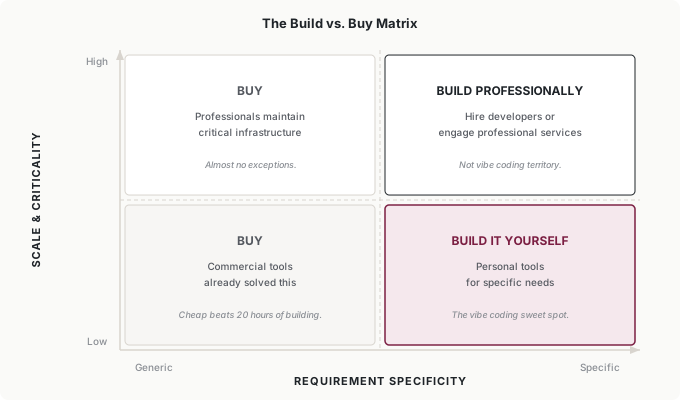
The quadrants sort cleanly. Generic plus high scale: buy—almost no exceptions. Let professionals build and maintain critical infrastructure. Generic plus low scale: buy, unless there’s genuinely no cheap option. Specific plus high scale: build professionally—this is not vibe coding territory; it’s the hire-a-developer boundary you already know. Specific plus low scale: build it yourself. That’s the sweet spot, and it’s the same one from two chapters ago.
A third factor tilts close calls: maintenance burden. Stable requirements favor building—what you need today is what you’ll need in two years, so build it once and use it. Evolving requirements favor buying—commercial vendors absorb the cost of chasing new regulations and changing standards. And external integrations favor buying most of all, because APIs change, and when they do, a vendor fixes their product while you rediscover how your own tool works. My message workflows call one external API, and every one of its updates has cost me an evening.
One factor deliberately missing from the matrix: learning value. Sometimes the point of building is the capability it grows, not the tool it produces. My first few builds were worth doing even where buying was objectively cheaper, because they taught me what’s possible—and that knowledge now improves every technology decision I make, including the buy decisions. Weight it honestly, but don’t let it justify everything; “I’m learning” is also what the junk drawer says.
Evaluating the Buy Side
Building has a fit test; buying deserves one too, and almost nobody runs it. Before committing to a tool, spend one hour on four questions. Does it meet your five most important requirements without workarounds—fit to your actual workflow, not feature count? Is the pricing sustainable if it rises? Does it actually connect to your other tools—tested, not promised, because sales-page integrations and working integrations are different things? And can you leave—if you switch later, does your data come with you?
That hour would have saved me fourteen months of task-list rent. I now run it on every subscription over $20 a month, and the most common outcome isn’t “don’t buy”—it’s “buy the smaller plan,” because the evaluation exposes how few of the features my actual workflow touches.
Hybrid Approaches
The best answer is often both, split along the right seam.
Buy the platform, build the customization. I do this with my client’s CRM: the platform handles contact management and deal tracking—complex, critical, absolutely not something to rebuild—and I built the weekly report that pulls its data and formats it the way the client actually reads it. Professional reliability where it matters, custom fit where it’s cheap.
Build the prototype, then buy—or commission—the production. Vibe-code the tool, use it for a few months, and let real usage tell you what you actually need. Then either buy the commercial product that now demonstrably fits, or, when your needs are specific and the tool has become critical, hire a developer and hand them the prototype as the spec. That second path is exactly what Tomás did with his anomaly dashboard—the prototype was the cheapest requirements document he ever produced. Either way, you’re buying or building against validated requirements instead of guesses.
Build the glue. Buy the specialized tools; build only the connections between them. Most of my client’s infrastructure is exactly this—commercial messaging, commercial scheduling, commercial CRM, and thin custom scripts that move data between them. Glue is the ideal vibe-coding workload: small, specific, testable, and nobody sells it, because your combination of tools is yours alone.
Decision Triggers
Build vs. buy isn’t a permanent decision, and both kinds of choices calcify if you let them.
Reconsider a built tool when maintenance starts eating hours every week, when reliability or security concerns outgrow your ability to address them, when the tool needs to serve more than you and a small team, or when the requirements have drifted far from the original design. Don’t let sunk cost trap you in a build that no longer makes sense.
Reconsider a bought tool when you’re using a small fraction of what you pay for, when time fighting the tool rivals time using it, when workarounds outnumber straightforward uses, or when the price has climbed without the value following. Don’t let familiarity trap you in a buy decision that no longer serves you.
And schedule the check, because it won’t happen on its own. Before vibe coding, your tool inventory grew as fast as your budget. Now it grows as fast as your weekends. Once a year, walk the inventory—built and bought—and ask each item the same question: is this still the right approach, and is it still earning what it costs me in money or maintenance? My last audit is where the project-management subscription finally died, fourteen months late.
Putting It Into Practice
Elena splits the seam
Elena’s content operation runs on a bought platform—publishing, calendars, approvals—and she has no intention of replacing it. What her team built is the fringe the platform doesn’t cover: the brief formatter, the status-report generator, small glue scripts that all live under her review gates. At renewal time she ran the usage test on the platform itself: her team uses well over half its features. It stays. The tool audit isn’t anti-buy; it’s anti-default.
Tomás unbuys a tool
Tomás’s annual audit caught a buy mistake this year: a client-portal subscription his firm had outgrown—paying for 20 seats, using 6, working around its document handling with email anyway. Nobody had decided to keep it; it had simply kept renewing, which is how most bad buy decisions survive. Cancelling it funded the professional maintenance contract on the anomaly dashboard—the tool that started as his weekend prototype and became month-end infrastructure. One audit, one unbuy, one build professionally maintained. The portfolio got smaller and better at the same time.
Ingrid adds the buy clause
Ingrid’s one-paragraph build policy gained a second paragraph: default to buying for anything generic or shared; building is for the specific and the small, inside the existing gates; and every internal tool—built or bought—goes on a department inventory reviewed annually. The inventory requirement sounds bureaucratic and takes her teams about an hour a year. What it actually does is make the junk drawer visible before it becomes archaeology—because the tools people build on weekends don’t show up in any procurement system, and until the inventory existed, nobody could say how many of them her department actually ran on.
Common Objections
“But I already built it—switching would waste that investment.”
Sunk cost. The build time is spent no matter what you do next; the only question is the best path forward from here. My tagging report taught me that lesson for the price of two evenings—cheap tuition.
“The commercial tool is too expensive.”
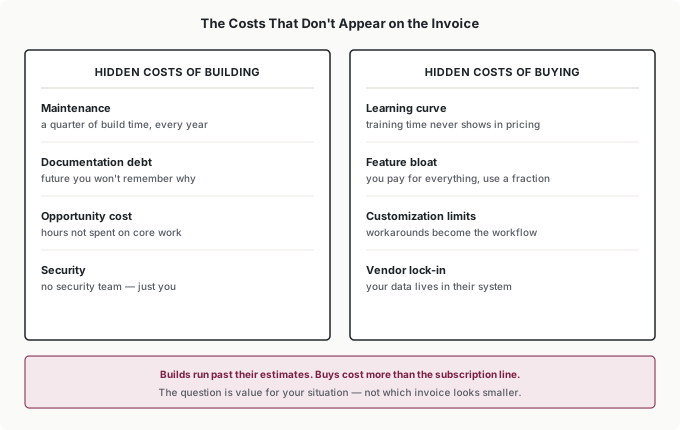
Price your own time honestly—even at half what you think your hour is worth, a 20-hour build plus a quarter of that every year in maintenance is real money. Sometimes the subscription is the cheap option wearing an expensive-looking price tag.
“My needs are unique—no commercial tool does what I need.”
Sometimes true, often an assumption. Spend one hour searching before you build. My message-tagging report existed the whole time, two menus deep. An hour of looking beats two evenings of duplicating.
“I want full control over my data and tools.”
Then take the full responsibility that comes with it—security, backups, updates, and the maintenance calendar. That trade is genuinely worth it for some tools. Make it a decision, not a preference.
Your Monday Morning Action Item
Audit one tool this week—built or bought, your choice.
Calculate its true cost: for a built tool, the honest maintenance hours; for a bought one, the subscription plus learning time plus workaround time. Check the fit: what fraction of it do you actually use, or how sustainable is its upkeep? Spend 15 minutes searching for alternatives you might not know exist—that search is how I found the report button that made my two-evening build redundant. Then decide—keep, switch, or kill—on purpose.
Repeat it yearly and the junk drawer never forms. The goal isn’t the perfect portfolio. It’s conscious choice rather than default continuation.
Every tool should earn its place in your workflow.