Data Access Decisions
The Customer Complaint That Went Sideways
When I built our AI-powered customer response system, I did what most people do first: I gave it everything.
Every message, every customer note, every deal value, every internal comment my team had ever written. Every month, 72,000 messages flowed through our system, and I wanted the AI to understand all of it. More context meant better responses, right?
It worked beautifully—for about three weeks.
Then one of my team members flagged something. The AI had drafted a response to a routine billing question, but the draft referenced details from the customer’s previous conversation—one where they’d mentioned a personal health issue as the reason for a late payment. That detail had been in our internal notes. The AI wove it into a “personalized” response that would have been deeply inappropriate to send.
We caught it in review—that’s Rule 2 of the intern model doing its job. But the incident forced a question I’d been avoiding: just because the AI can see this data, should it?
Nobody had asked for that health information. No workflow required it. The AI used it because it was there, because I’d given it access to everything, and because it was trying to be helpful. That’s what AI does—it uses whatever context you give it. The problem wasn’t the AI. The problem was me, treating data access as a binary switch—on or off—when the real decision was more like a dimmer.
My near-miss stayed internal. Samsung’s didn’t. In March 2023, Samsung’s semiconductor division lifted its ban on ChatGPT—and within about three weeks, according to reporting in The Economist Korea, employees had pasted confidential material into it three separate times: buggy source code from a semiconductor database program, code for identifying defective equipment, and the transcript of an internal meeting someone wanted summarized into minutes. Samsung reportedly responded first by capping prompts at 1,024 bytes, then by May had temporarily banned generative AI on company devices altogether—telling staff it couldn’t retrieve or delete data once it reached external servers. Three well-meaning employees, three ordinary tasks, one common factor: the data was available, so it got used.
The last chapter introduced the Permission Framework for assessing AI applications broadly. This chapter zooms in on the granular decisions about what information your AI workflows should actually see—and the practical system I built after that near-miss to stop guessing and start deciding.
The Dimmer, Not the Switch
Here’s the tension: every piece of data you feed AI makes it more capable, and every piece also increases your exposure. You can’t escape this tradeoff—but you can manage it.
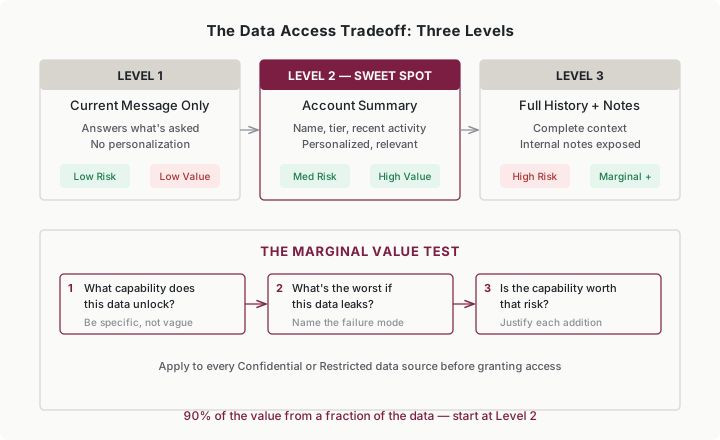
I learned this the hard way with our customer response system. Let me show you what different levels of access actually looked like:
Level one—current message only. The AI could answer what was asked, but every response sounded like it came from someone who’d never talked to this customer before. Technically accurate. Personally cold.
Level two—account summary. Customer name, account tier, recent activity, open issues. Now the AI could say “I see you’ve been with us for three years” and reference their last interaction. This covered 90% of what we needed.
Level three—everything. Complete history, internal notes, deal values, personal details. The AI sounded like it had known the customer for years. It also had access to information that never should have appeared in a customer-facing response.
We settled on level two. The jump from level one to two was enormous—dramatically better responses. The jump from two to three? Marginal improvement in personalization, massive increase in risk. That health-note incident happened at level three.
The Marginal Value Test
This is the question that cuts through most data access debates: Does this data improve the output enough to justify what happens if it leaks?
For every data source, I ask three things:
What specific capability does this data unlock? Not “the AI will be better”—that’s too vague. I mean: “The AI can reference the customer’s last three support tickets, which reduces repeat explanations.”
What’s the worst that happens if this data shows up where it shouldn’t? Internal notes in a customer email. Salary data in a team summary. Deal values in a competitor’s hands. Name the actual failure mode.
Is the capability worth that risk? Sometimes the answer is obvious. Customer names and account tiers? The risk of those leaking is low and the utility is high—easy yes. HR performance reviews? The utility for most workflows is minimal and the exposure is enormous—easy no.
Most decisions fall somewhere in between. That’s where a classification system helps.
Four Levels of Data Sensitivity
After the health-note incident, I built a simple classification system. Nothing fancy—just four buckets that made access decisions feel less like gambling.
Public. Marketing materials, published docs, product information. If it’s on your website, the AI can have it. No additional exposure because the information is already out there.
Internal. Meeting notes, project updates, general procedures. Should stay inside the company but wouldn’t cause real damage if it leaked. Standard logging is enough.
Confidential. Financial forecasts, pricing strategies, competitive intelligence, unpublished roadmaps. Exposure here damages the business or violates agreements. AI access requires documented justification.
Restricted. Customer PII, employee HR records, legal matters, credentials, health information, financial account details. Exposure creates legal liability, regulatory violations, or genuine harm to people. AI access only by exception, with strong controls and explicit approval.
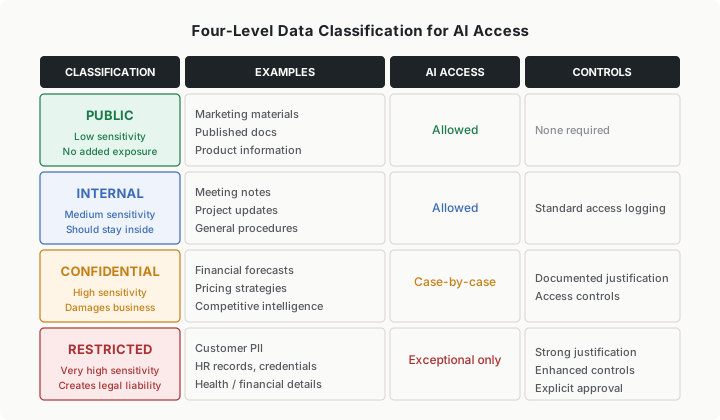
The power of classification is that it turns every data access decision into a lookup instead of a debate. When someone on my team asked, “Can the AI see customer payment history?” I didn’t have to reason from scratch. Payment history is Confidential—so the answer was: yes, if you can document why and what controls you’ll apply.
Classifying Ambiguous Data
Some data doesn’t fit neatly. When that happens, err toward more restrictive. You can always loosen access later. You can’t un-leak data.
Three questions to classify the gray areas:
If this leaked, who gets hurt? Individuals harmed → Restricted. Business harmed → Confidential. Embarrassment only → Internal. No concern → Public.
Are there regulatory implications? Anything touching PII, health data, or financial records is at minimum Confidential, usually Restricted. GDPR, CCPA, HIPAA, and SOX all have opinions about this, and none of them are flexible.
What would the people involved expect? Customers shared their data in a specific context. Employees submitted HR information with privacy expectations. Those implicit expectations matter—violating them destroys trust even when it’s technically legal.
Minimum Viable Access
After classifying our data, I adopted a principle that saved us from several near-misses: start with the least data that makes the workflow useful, and add more only when you can justify each addition.
I think of it as the intern model applied to data. You wouldn’t hand a new intern the keys to every filing cabinet on their first day. You’d give them what they need for their current task and expand access as they demonstrate they can handle it.
Here’s how this plays out across four categories that trip people up:
Customer data. We started with account-level summaries—name, tier, recent activity, open issues. That handled most of our customer response workflows. Full interaction history only came into play for escalation workflows where the extra context genuinely changed the quality of the AI’s output, and even then we stripped out internal-only notes.
Communication data. This one’s deceptive. Email threads and chat logs are rich with context—and also rich with things people said assuming no one else would read them. We never gave AI ambient access to communication archives. Instead, users paste specific messages into the workflow. They choose what to share. That single design choice eliminated an entire category of “the AI surfaced something awkward” problems.
Financial data. Read-only access to aggregated summaries and dashboards, never transaction-level detail. Our AI could analyze trends—“revenue is up 12% this quarter”—without seeing individual invoices or customer payment amounts. SOX compliance alone justified this boundary, but the practical benefit was just as strong: fewer things that could go wrong.
HR data. We mostly avoided this entirely. Performance reviews, compensation data, personal details—the legal exposure is too high and the utility for most workflows is too low. The one exception was a scheduling tool that accessed role and department information (Internal classification), never performance or compensation data.
The pattern across all four: start narrow, prove value, expand with justification. Not the other way around.
Building Controls Into the Workflow
Access classification only matters if you enforce it when building the workflow—not after something goes wrong.
At design: List every data source the workflow will touch. Classify each one. Document why Confidential or Restricted sources are needed. If you can’t articulate the reason, the access isn’t justified.
At implementation: Configure access to match what you documented—nothing broader. I’ve seen teams give AI “full database access for flexibility” when the workflow only needed three fields. That flexibility is a liability.
At launch: Enable access logging from day one. You want to know what data the AI actually touches, not just what it could touch. When we turned on logging for our customer response system, we discovered the AI was pulling fields we’d never intended it to use—fields that happened to be in the same database table.
At review: Check quarterly whether actual access still matches intended access. Workflows drift. Features get added. Data sources accumulate. A quarterly audit takes 30 minutes and prevents the slow creep toward “the AI sees everything again.”
When Access Decisions Change
Data access decisions aren’t permanent, and they shouldn’t be. Revisit them when:
The workflow scope expands. A customer response tool that starts handling refund requests now needs access to transaction data it didn’t need before. That’s a new access decision, not an extension of the old one.
Regulations change. The EU AI Act entered into force in August 2024, with substantive obligations phasing in from February 2025. If you made data access decisions before that, they need review.
Your controls prove inadequate. If monitoring reveals the AI accessing data you didn’t expect, that’s a signal to tighten scope—not to turn off monitoring.
The business need evaporates. That pilot project from six months ago? If it’s dead, revoke the access. Zombie permissions are how breaches happen—nobody’s watching because nobody remembers the access exists.
Putting It Into Practice
Angela runs a twenty-person customer support team
Angela’s team handles 400 tickets a day. She wants AI to draft initial responses and route tickets to the right specialists.
She classifies her data: customer names and account tiers (Internal), ticket history (Internal), product documentation (Public), internal escalation notes (Confidential), customer payment records (Restricted).
Her AI ticket router gets access to the first three—enough to draft solid responses and route accurately. The escalation notes stay out because they often contain candid assessments (“this customer is difficult”) that shouldn’t influence AI tone. Payment records stay out because they’re irrelevant to support responses.
Three months in, she finds that adding the last 60 days of ticket history (previously excluded to keep scope narrow) improves routing accuracy noticeably. She documents the justification, adds access logging, and expands. Incremental, justified, controlled.
Micah is a marketing analyst working solo
Micah uses AI to build competitive analysis reports. He’s tempted to paste entire competitor earnings transcripts, internal sales call notes, and pricing spreadsheets into his prompts.
He pauses and asks the marginal value question. The earnings transcripts are public—no risk. Internal sales call notes are Confidential and contain unfiltered opinions about competitors and clients. The pricing spreadsheets are Confidential and competitively sensitive.
Micah realizes he can get 80% of what he needs from public sources—earnings calls, press releases, published product pages. He supplements with specific, sanitized data points from internal sources rather than pasting raw documents. His competitive analysis is strong, and he hasn’t accidentally fed proprietary pricing into a third-party AI system.
Rena is CEO of a thirty-person e-commerce company
Rena found out about her data problem the wrong way. During a product demo, a marketing coordinator mentioned—cheerfully, as a productivity win—that she’d been pasting the weekly order export into a free AI tool to draft customer win-back emails. Customer names, addresses, order values: all of it, into a consumer chatbot, for weeks. Nobody had done anything wrong by any rule Rena had written, because Rena hadn’t written any rules. She doesn’t have a data governance team. She has herself, a CTO, and twenty-eight employees who are all experimenting with AI tools on their own.
She spends the next Monday morning mapping her company’s data into the four classification levels. Customer order data and PII go into Restricted. Supplier pricing and margins go into Confidential. Internal processes and product catalog go into Internal and Public.
Then she writes a one-page policy: Public and Internal data can be used with any AI tool. Confidential data requires manager approval. Restricted data is off-limits for external AI tools entirely—no customer PII in ChatGPT, period.
It takes her two hours. It’s not perfect, but it prevents the most dangerous mistakes while her team figures out what AI workflows actually work for them.
Tariq is VP of Operations across five departments
Tariq’s challenge isn’t deciding what data AI can access—it’s getting five department heads to apply the same standards. Marketing is pasting customer lists into AI tools. Finance won’t let AI touch anything. Operations is somewhere in between.
He adopts the four-level classification as a company standard, then runs a two-hour workshop where each department classifies their top twenty data sources. The exercise surfaces three immediate problems: Marketing had been using Restricted customer data in an external AI tool. Finance had classified everything as Restricted, blocking genuinely useful applications. Operations had no classification at all.
Within a month, all five departments are using the same framework. Data access decisions that used to escalate to Tariq now get resolved at the team level because everyone shares a common language.
Common Objections
“We need AI to access everything to be useful.”
We thought so too. Then we found that our level-two access—account summaries without full history—handled 90% of use cases. Start with minimum viable access. You’ll often find that most of the value comes from a fraction of the data.
“Our data isn’t that sensitive.”
It probably is. Customer email addresses carry legal obligations. Internal chats contain things people said off the cuff that would be mortifying in a formal summary. I’ve seen “not sensitive” data include salary discussions, health mentions, and candid client assessments—all in routine communication threads.
“We trust our AI vendor.”
Trust doesn’t eliminate exposure. Data you share with a vendor is still your responsibility. If they get breached, it’s your customers calling you. If your data ends up in their training set, you can’t untrain it. Trust is a factor in vendor selection, not a substitute for access controls.
“This slows us down.”
Quick access decisions create slow problems. One breach, one compliance finding, one customer who discovers their private information in an AI-generated email—any of these takes months to resolve. A 30-minute classification exercise on the front end prevents that. I’d rather be slow and careful than fast and in front of a regulator.
Your Monday Morning Action Item
Pick one AI workflow you’re currently using—or planning to use—and audit its data access:
- List every data source it touches. Be specific: “customer name and account tier” not just “customer data.”
- Classify each source: Public, Internal, Confidential, or Restricted.
- For anything Confidential or Restricted, ask: does the workflow actually need this? What capability would I lose without it?
- Remove any data source where the exposure outweighs the utility.
- Document what access remains and why.
If you discover access that can’t be justified, fix it now. If access is appropriate but undocumented, write it down. Either outcome makes you safer than you were this morning.