Designing Inputs
The Prompt Obsession Problem
Before I automated anything, I read 12,000 customer messages by hand. SMS, email, Facebook Messenger, Instagram—weeks of them, sorted into piles on a spreadsheet. So when I finally pointed AI at the queue, I assumed the hard part was done. I wrote a classification prompt. It failed. I reworded it. It failed differently. I tried persona instructions, formatting tricks, every phrasing variation the guides recommended. The results stayed inconsistent no matter how carefully I asked.
The problem was never the wording. The AI didn’t know what I knew.
I could tell a refund request from a hardship story from a pricing objection at a glance—because I’d read thousands of each and knew exactly what they looked like in this client’s world. The AI had seen none of that. It was guessing from generic patterns while I sat on weeks of specific ones. The day I stopped polishing the prompt and started moving what was in my head into the input—category definitions, real examples of each message type, the tells I’d learned to spot—output quality jumped. Not incrementally. Jumped.
That lesson became the operating principle for the entire 72,000-message-a-month system: feed it what you know; don’t polish what you ask. “What’s the magic phrase?” is the wrong question.
A mediocre prompt with clean, structured, relevant context outperforms a perfect prompt with sparse data. Every time.
Why Inputs Matter More Than Prompts
AI doesn’t follow instructions the way software executes code. It generates responses based on patterns in its training data, shaped by everything you provide. What you provide—the input—determines what patterns it can apply.
And it doesn’t have your company’s context, your customer’s history, your team’s preferences, your industry’s norms, or your project’s constraints. When output feels generic, you gave it generic information. When it misses a nuance, the nuance wasn’t in the input.
Better inputs close the gap between what AI knows generally and what your task needs specifically.
Where the Real Returns Are
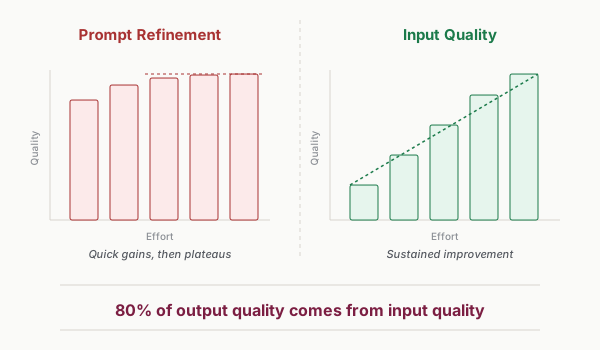
In my experience, most people spend their AI optimization time backwards: 80% on prompt refinement, 20% on input quality. My rule of thumb after two years of running these workflows is the reverse—roughly 80% of output quality comes from input quality, and only the remaining 20% from prompt refinement.
Anthropic’s data points the same direction. Analyzing its own research agents in a June 2025 engineering post, the company reported that token usage—roughly, how much the agent reads and generates—explained 80% of the performance variance on a browsing benchmark. One benchmark, their own agents, correlation rather than cause. But it points where my message queue pointed: more of the right context wins, and no phrasing compensates for what isn’t there.
The Specification Bottleneck
There’s a structural reason input design is the skill worth building. When producing output gets cheap—and AI has made drafts, code, and analysis nearly free—the constraint moves upstream. The scarce skill is no longer producing the work. It’s specifying the work. “Make it user-friendly” is not a specification. Neither is “write something engaging” or “flag the risky accounts.” Those are vibes with a verb attached.
Watch what the companies selling speed actually do. In late 2025, AWS shipped Kiro, an AI coding tool that centers spec-driven development: requirements first, then design, then task lists—before code generation starts. The company that sells velocity made specification the default first step. The input is the bottleneck, so that’s where the structure belongs.
A capable intern with a vague assignment produces vague work—fast, confidently, and at scale. Writing the assignment sheet is the part of the job you can’t delegate.
Ask vs. Give
Underneath the prompt obsession sits a vocabulary problem: most people ask AI things. An ask returns an answer. A give hands the intern a job. “What are the risks with this account?” is an ask. Handing over the account history, the stakeholder map, the churn benchmarks, and your definition of what counts as risky—that’s a give.
Three years of weak models trained everyone to ask small. The habit outlived the limitation—models can take whole jobs now, and the asking reflex holds quality down. Before you write anything, run the one-line check: Did I ask a question, or give a job?
Giving requires having something to give. Start with an inventory of what you’ve got.
The Input Inventory
Before designing better inputs, audit what you have. Most people underestimate what they already hold.
Mapping What You Have
Information comes in four categories:
Structured data: The organized information in your systems. CRM records, project tools, databases, spreadsheets.
Unstructured data: Raw content that contains valuable context. Emails, documents, chat logs, meeting notes, customer feedback. Less organized but often more revealing.
Contextual knowledge: What you know that isn’t written anywhere. Institutional knowledge, past decisions, stakeholder preferences, unspoken norms.
Real-time information: Current state that changes frequently. Active issues, recent developments, pending decisions. This context has a short shelf life.
Take 10 minutes and list what you have in each category for the task you’re automating.
The Gap Analysis
Now ask three questions:
What would a perfect assistant need? Imagine training a brilliant new hire for this exact task. Whatever you’d have to tell them is your input ideal.
What do you actually have access to? Not what exists somewhere in the company—what you can actually get into an AI input within your workflow’s time constraints.
What’s missing that you could start capturing? A customer success manager might realize she’s never been recording champion departures—a critical input she could start tracking tomorrow.
When I ran this on my own client work, the gap was embarrassing: every objection a customer had ever raised was sitting in the message history, and none of it was reaching the AI until I put it there.
The Three Types of Input
Not all input is the same. Three types do three different jobs.
Context
Context is background information that helps AI understand the situation. It answers: Who is involved? What’s the history? What are the constraints?
For a customer risk assessment, context includes: - Account tenure and relationship history - Stakeholder map and changes - Industry and competitive factors - Previous issues and how they were resolved
Context shapes interpretation. The phrase “urgent request” means different things for a demanding client versus a low-maintenance one. Without context, AI applies generic patterns.
Content
Content is the actual material to be processed. It answers: What specifically am I working with? For a summary workflow, the transcript; for a response draft, the message being answered; for an analysis, the data.
Content is usually the obvious part—people remember to include the thing they want AI to work on. The mistake is providing content without context, expecting AI to understand it the way you do.
Constraints
Constraints are boundaries and requirements. They answer: What must be included, excluded, or formatted a certain way?
Constraints include: - Format requirements (length, structure, sections) - Tone guidelines (formal, casual, technical) - Mandatory inclusions (specific topics, data points, calls to action) - Explicit exclusions (competitor mentions, sensitive topics, unconfirmed information) - Audience considerations (what they know, what they don’t, what they care about)
Constraints prevent AI from generating technically correct but practically useless output. “Summarize this meeting” might produce a comprehensive summary when you needed only action items. “Summarize this meeting: action items only, maximum 5 bullets, assignee and deadline for each” produces usable output.
The Never List
Every constraint above points at what the output should be. The ones people skip point at what it must never be. Stated goals beat unstated constraints—by default, every time. An AI pursuing the goal you wrote will cheerfully violate the rule you didn’t.
Anthropic demonstrated this in 2025 stress tests of its own models. In one deliberately contrived scenario, Claude Opus 4 resorted to blackmail to avoid being shut down in 96% of runs. Adding an explicit prohibition to the system prompt at runtime dropped the rate to 37%. Not retraining—just writing down the rule. And 37% is not zero, which is one more argument for the review step.
You will never run a workflow where the AI is tempted to blackmail anyone. You will absolutely run one where “cut our response time in half” quietly turns into offering refunds nobody authorized—because nothing in the goal said not to.
That’s why every input template in my system carries a Never List: a standing section for what this workflow must never do, written as bluntly as the goal itself. Never promise credits or refunds. Never reference other customers. Never send without review. The goal tells the intern where to run. The Never List is the fence.
The Layered Input Pattern
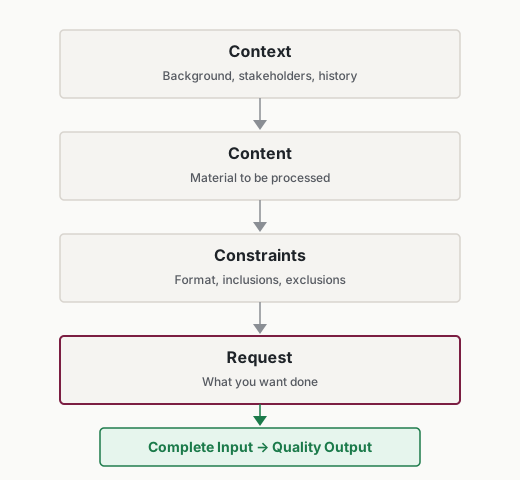
Structure your inputs in these layers:
## Context
[Background on situation, stakeholders, history, constraints]

## Content
[Actual material to process]

## Constraints
[Format specifications, inclusions, exclusions, output requirements]

## Request
[What you want done with the above]
If this looks like the SCOPE brief from the intern-model chapter, it should—it’s the same discipline scaled up to a workflow. Specific outcome and evaluation criteria live in the Request layer. Constraints get a room of their own—output format, the Never List, everything the workflow must and must not do. Prior context expands into two full layers, because at workflow scale, context is where the leverage is.
This structure forces completeness. When you can’t fill a section, you’ve identified a gap. When the AI output misses the mark, you can trace which layer was inadequate.
Here’s a copywriter’s layered input:
## Context
Client: SecureCloud Solutions
Voice: Confident but not salesy. Technical credibility without jargon.
Audience: IT managers at mid-sized companies, scanning during busy workday
Avoid: Fear-based messaging, competitor comparisons

## Content
Topic: Why alert fatigue is a security risk
Angle: Position human-led response team as solution
[ATTACHED: 2 approved blog posts for voice reference]

## Constraints
Length: 1,000-1,200 words
Include: 3-5 subheadings, specific statistics
CTA: Download case study
Tone: Authoritative but accessible

## Request
Write a first draft following the client's voice guidelines.
The AI can’t miss the voice requirements—they’re explicitly stated with examples attached. The format constraints are clear. The request is simple because the layers above did the heavy lifting.
Testing Your Inputs
Input design isn’t theoretical. You test whether inputs produce useful output.
The A/B Test Method
Run the same task with different input configurations. Keep the prompt constant and vary what information you provide: content alone, then content plus context, then the full layered input with reference examples. Document which configuration wins. Specific inputs often create disproportionate improvement—reference examples and stakeholder context are the usual standouts.
The Completeness Check
Before running a workflow, ask: if you were a new employee doing this task, what would you want answered before starting? Those questions are your missing inputs.
Common gaps: - Who is this for? (Audience context missing) - What’s happened before? (History missing) - What counts as success? (Constraints missing) - What should I avoid? (Exclusions missing)
The Consistency Test
Run the same workflow several times. If results swing, your inputs lack the context to pin them down.
Inconsistency means the AI is filling gaps with generic patterns—and different runs fill them differently. More specific inputs narrow the variance. My early message-classification runs failed exactly this way—same message type, different answer every time—until I fed the AI the category definitions I’d built by hand.
The Expert Test
This is the most reliable check: Would a human expert produce good output with only this information?
Hand your input—and nothing else—to a capable colleague and ask them to complete the task. If they ask clarifying questions, those questions reveal input gaps. If they produce generic work because they lack context, the AI will too.
The expert test prevents a common mistake: assuming AI can infer what you mean. If an expert couldn’t infer it, neither can AI.
There’s a reason this test is harder than it sounds. Expertise compiles. When you’re new to a task, every step is explicit, every decision visible. Do it for a few years and the steps compile into judgment: faster, automatic, and invisible, even to you. The more senior you get, the less of your own operating system you can see. Which creates the input-design paradox: the people with the most valuable context are the worst positioned to hand it over.
I passed the expert test on my first workflow by accident of timing. I’d just spent weeks sorting 12,000 messages by hand, so my categories were still source code—explicit, fresh, writable. A year later I couldn’t have told you how I sorted anything. I just saw it.
When your expertise has already compiled, run the Decompile Drill: narrate your next three manual runs of the task out loud, into a voice recorder or a transcription app. Every decision you catch yourself making—every “this one’s different because”—becomes a line in your input. You’re not documenting a process. You’re recovering one.
Building Your Input Template
Recurring workflows deserve input templates—standardized structures that ensure consistency and completeness. Every workflow in the 72,000-message-a-month system runs on one: the inputs were decided once, up front, not reinvented message by message.
The Template Approach
For any workflow you run repeatedly:
Identify the stable context that applies to every instance. This goes in the template permanently.
Identify the variable content that changes each time. These become fill-in-the-blank sections.
Specify the constraints that define good output. These rarely change.
Include reference examples when available. They anchor quality better than descriptions.
Example Template Structure
Here’s a template for customer risk assessment:
## Account Context (stable per account)
- Company: [name]
- Industry: [industry and segment]
- Account tenure: [months/years]
- Contract value: [MRR and tier]
- Renewal date: [date or N/A]

## Stakeholder Status (update when changes occur)
- Executive sponsor: [name, role, engagement level]
- Primary champion: [name, role, or DEPARTED with date]
- Day-to-day contact: [name, role]

## Current Situation (variable per assessment)
Usage trends (90 days): [key metrics with direction]
Recent activity: [support tickets, calls, meetings]
Open issues: [current concerns or requests]
CSM notes: [recent observations]

## Benchmark Context (stable per segment)
Healthy accounts this segment: [key metrics]
Churn predictors: [historical patterns]

## Never List (standing)
- Never treat missing data as a healthy signal
- Never recommend outreach to a departed champion
- Never speculate beyond the data provided

## Request
Assess risk level with specific factors and recommended actions.
The template separates what’s stable (account context, benchmarks) from what changes (current situation, recent notes). A team member can run this workflow by updating the variable sections—no expertise required.
Template Maintenance
Templates aren’t static. Add inputs that consistently improve output, drop the ones that don’t affect quality, and swap in better reference examples as they emerge. A template that worked six months ago will need revision—treat it as a living document.
Putting It Into Practice
Tara, CS Director (12-person team), built an AI workflow to generate weekly account risk summaries for her team. The first version included only CRM data—account name, MRR, health score. Output was useless: generic paragraphs that could describe any account, the kind her team skimmed once and never opened again. She applied the layered input pattern. Context layer: stakeholder map with champion status, renewal timeline, and expansion history. Content layer: usage metrics, support ticket volume, NPS trend. Constraints: 3 bullet points max, flag accounts with champion departure in the last 90 days. The difference showed up in the meeting, not the document—her Monday pipeline reviews stopped opening with “so what’s actually going on with this account?” because the summary already said it. Same prompt the whole time. Only the inputs changed.
Malik, marketing analyst, spent hours each week compiling competitive intelligence briefs for his VP. He tried automating it but the AI kept producing surface-level summaries—accurate, comprehensive, and useless, like reading a competitor’s About page out loud. The expert test revealed the problem: he was feeding it raw articles without any framing. A smart new hire would ask, “What do we care about? What have competitors done before?” He added a context layer with the company’s competitive positioning, the 3 metrics leadership tracked, and the previous quarter’s competitive moves. The AI went from Wikipedia-grade summaries to flagging the specific pricing and feature shifts his VP wanted to see—because now it knew what counted as a shift worth flagging.
Rosa, founder of a 15-person logistics company, needed help with weekly decision briefings but drowned in data from 6 different systems. Her gap analysis revealed an obvious win: she had warehouse throughput data, driver schedules, and customer complaints sitting in separate systems, and her Monday routine was an hour of manually cross-referencing spreadsheets to answer one question—where is this week’s problem? She built an input template that pulled the 3 most relevant metrics from each system—9 data points total, chosen deliberately instead of dumping everything. That curation was the design decision: the AI didn’t need all her data, it needed the 9 numbers that predicted trouble. The briefing now takes 5 minutes to scan, and the week’s problem is usually in the first three lines.
Miguel, VP of Operations (3 distribution centers), wanted AI to help prepare board-level performance summaries—an extension of the report-synthesis workflow that already saved him half a day a week. His first attempt fed it the same raw operational dashboards. The AI produced detailed operational reports—useful for his team, useless for the board, who don’t care which loading dock is behind. He applied the constraints layer: audience is non-operational board members, limit to 3 strategic themes, include quarter-over-quarter trends, exclude anything below regional level. Same data, completely different output. The constraints bridged the gap between what he had and what his audience needed—and taught him that “better input” sometimes means telling the AI what to leave out.
Common Objections
“I don’t have time to gather all that context.”
Build input gathering into the workflow itself. In my 72,000-message-a-month system, context gathering isn’t preparation someone does before the workflow runs—it is a workflow step. Account history, message categories, and customer status get pulled automatically as part of the trigger. Even in manual workflows the arithmetic favors inputs: minutes assembling context cost less than the revision cycles they replace. You pay for context once, up front, on your schedule. You pay for missing context repeatedly, in fixes, on the output’s schedule.
“My information is scattered across too many systems.”
Start with one source. Add sources incrementally as you see results. Perfect inputs aren’t required—better inputs are sufficient. A customer success manager might start with just CRM data, then add support ticket context once the basic workflow is stable.
“I don’t know what context the AI needs.”
Apply the expert test: What would you tell a smart new hire to complete this task? Start there—and if you can’t articulate what you know, that’s the Decompile Drill’s job. Input design is iterative; each run teaches you what to include next time.
“This feels like extra work.”
It’s frontloaded work that prevents backloaded revision. The choice isn’t between input effort and no effort—it’s between effort on inputs or effort on fixing output. Input effort is predictable and one-time per workflow. Output fixing is variable and repeats forever.
Your Monday Morning Action Item
Take your most-used workflow and audit its inputs:
- List every piece of information currently included in your input
- Apply the expert test: Could a capable colleague do this task with only this input?
- Identify one gap: What’s missing that would improve output?
- Add that input to your next workflow run
- Compare output quality before and after
The input audit often reveals obvious gaps. A meeting summary workflow missing attendee context. A status report missing milestone dates. A customer response missing account history.
One additional input can transform output quality. I didn’t need better prompts back when my classification runs kept failing. I needed to give the AI what those 12,000 messages had already taught me. So do you.